3CX V20 Disable Do not disturb

Status
Not open for further replies.

Alle CTEC

Silver Partner
Advanced Certified
Joined
Sep 11, 2023
Messages
360
Reaction score
45
A customer asks me to disable the ability to put a group of users in do not disturb mode on 3CX V20 latest build central?

Thanks
 
AFAIK, there is no way to disable DND in 3CX.
 
  • Like
Reactions: Guillaume Bourgeois
A customer asks me to disable the ability to put a group of users in do not disturb mode on 3CX V20 latest build central?

Thanks

It's not possible to prevent the use of Do Not Disturb mode, but with a Call Processing Script, it would be quite simple to identify the department to monitor and, for example, every 5 minutes, change the status of the department's extensions to available if they aren't already.

If you give me a little time, I can even do it for you, if it would help. In return, you'll need to help someone else on the forum :-P, as the saying goes: "Pay it forward" :-)
 
  • Like
Reactions: Evolute IT
It's not possible to prevent the use of Do Not Disturb mode, but with a Call Processing Script, it would be quite simple to identify the department to monitor and, for example, every 5 minutes, change the status of the department's extensions to available if they aren't already.

If you give me a little time, I can even do it for you, if it would help. In return, you'll need to help someone else on the forum :p, as the saying goes: "Pay it forward" :)
Call Processing Scripts can't run in the background. They handle a call, always.

However, a dumb CFD dialer could work.
 
The api c# solution was contemplated, I have a list of users, I check if we are in office hours if yes and they are in do not disturb I make them available.

https://www.3cx.com/docs/call-api-linux/
Should I find documentation here for creating and deploying the right script?
 
The api c# solution was contemplated, I have a list of users, I check if we are in office hours if yes and they are in do not disturb I make them available.

https://www.3cx.com/docs/call-api-linux/
Should I find documentation here for creating and deploying the right script?

Yes, Implemented in a CallFlow Dialer,
Yes, would you like me to provide you with a quick code example?
Just tell me the name of the department where the users are, and I'll give you a code example that you can use as a starting point.
 
  • Like
Reactions: Evolute IT
Ok I'll gladly take the example, call them agents too, thanks
 
ok "agents" department

I'll be back with you in a few minutes.

Please stay on the line; your call is important to us :p. Thank you for being a loyal customer.
[Hold music plays] :cool: LOL
 
  • Like
Reactions: Evolute IT
Well, here it is,
I've been busy with clients, but I finally got around to doing it.

So here's an example of a script (Dialer) to achieve this.


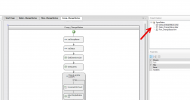
To the right, if you double-click on Comp_ChangeStatus.comp,
you can modify the first two variables (string).

1722893634908.png


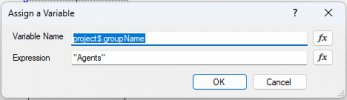
The first is the department name.
We will ignore any extensions that are not at least part of the department configured in this variable.
1722888218355.png


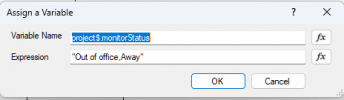
The second is the name of the statuses that are forbidden to use. If any of the extensions has one of the statuses written in this variable (separated by a comma), it will be considered in the wrong status and will be added to the list of extensions where an intervention will be made.
If the extension has a status that is not on the list, which you can customize in the variable, we ignore it; no intervention will be made (In my example, Available, Custom 1 and Custom 2 are statuses that we ignore; an extension having one of these statuses will be ignored).
1722888200833.png


You need to use the status names as seen by the system, not those displayed in the graphical interface.

Available
Away
Out of office
Custom 1
Custom 2

If there are several, please separate them with commas.


GetExtensionsList aims to retrieve all extensions based on the conditions described;
The extensions that are part of the "Agents" group name and have one of the statuses written in the varStatus variable.

It returns one extension per line.
The first line (Line 0) contains the number of extensions, and then the following line (second line) contains the first extension that meets the conditions, the next line contains the second extension that meets the conditions, and so on.

The loop is designed to process each extension in the list (one at a time) until all have been handled, as we cannot request the CallFlow component to change the status of a list of extensions. Therefore, the loop will send one extension at a time.

So, the variable named VarCount will increment each time the process goes through the loop. Initially, it is set to 0.
Therefore, it will increment before even modifying the status of the first extension.

The 'returnSingleExtension' script aims to return the extension number written at the requested line number (The line number is equal to the incremented value (VarCount)).

Thus, we provide it with the list of extensions, and also the desired line number.
The first line is actually line 0, which contains the number of extensions in the list. It is not part of the extension list.
Therefore, the extensions start on the second line (which is line #1).
And when the incremented value exceeds the total number of extensions, we exit the loop.


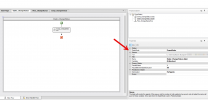
Next, double-click on Dialer_ChangeStatus.dialer. On the right, you will see the settings of the Dialer.
1722892098064.png

ParallelDialers = 1, we do not want the script to run multiple times in parallel with the same list.

PauseBetweenDialerExecution = 30, is the number of seconds to pause between two executions. Adjust this according to frequency. Be careful not to set the value too low; you need to give it time to process the list before starting a new instance. The new instance overrides the previous one. Therefore, do not reduce it below 15 seconds, ideally. Optimization: For Agents, this is not used in our context.


In the Dialer, you could implement a date and time condition logic, into which you insert the 'comp_ChangeStatus'.


Note, if you are using 'Date and Time conditions' based on a department schedule, you should read the following:
https://www.3cx.com/community/threa...ay-from-call-flow-designer.126381/post-606796

You need to call it once to trigger it. After that, it will run in an infinite loop ( Until you restart the CallFlow service. )
 

Attachments

For those interested, here is the content of my C# scripts ;


Method Name : GetExtensions
Input Parameters : groupName , profileNames
Objective: Retrieve a list of extensions that are part of the department named in the parameter and are on one of the profiles also specified in the parameter.

The possible profile names are:

Available
Away
Out of office
Custom 1
Custom 2
The script is not case-sensitive.

C#:
{
    // Initialisation de PhoneSystem
    PhoneSystem ps = PhoneSystem.Root;

    // Normalize the group name to make the comparison case-insensitive and ignore spaces
    string normalizedGroupName = groupName.Replace(" ", "").ToLowerInvariant();

    // Get the tenant and then the group
    Tenant tenant = ps.GetTenant();
    Group group = tenant.Groups.FirstOrDefault(g => g.Name.Replace(" ", "").Equals(normalizedGroupName, StringComparison.OrdinalIgnoreCase));

    if (group == null)
    {
        return null; // Group not found
    }

    // Split and normalize the profile names
    var profileNamesArray = profileNames.Split(',')
                                        .Select(p => p.Trim().ToLowerInvariant())
                                        .ToArray();

    // Get all extensions in the group and filter based on the current profile name
    var matchingExtensions = group.GroupMembers
        .Select(gm => gm.DN as Extension)
        .Where(ext => ext != null && profileNamesArray.Contains(ext.CurrentProfile.Name.ToLowerInvariant()))
        .Select(ext => ext.Number)
        .ToList();

    // Prepare the result
    if (matchingExtensions.Count == 0)
    {
        return null; // No matching extensions found
    }

    // First line is the count, followed by the extension numbers
    string result = $"{matchingExtensions.Count}\n{string.Join("\n", matchingExtensions)}";
    return result;
}


Method Name : GetFirstLine
Input Parameters : content
Objective: Retrieve the information from the first line in a text containing multiple lines.
Returns 0 if there are no lines.

C#:
    {
        // Check if the content is null or empty
        if (string.IsNullOrEmpty(content))
        {
            return 0;  // Return 0 if there's no content
        }

        // Split the content by line breaks and return the first line
        string[] lines = content.Split(new[] { "\r\n", "\n" }, StringSplitOptions.None);
        return lines.Length > 0 ? lines[0] : string.Empty;  // Return the first line if available
    }


Method Name : FetchSpecificLine
Input Parameters : textContent , targetLine
Here’s the rephrased text in English:

Similar to the previous script, but this time, I provide the line number from which I wish to retrieve the information.
Note, the first line is line 0 (The script uses zero-based indexing to interpret lines.).

C#:
    {
        // Split the content into individual lines, ignoring any empty lines
        string[] allLines = textContent.Split(new[] { "\r\n", "\n" }, StringSplitOptions.RemoveEmptyEntries);

        // Check if the specified line number is within the valid range
        if (targetLine > 0 && targetLine < allLines.Length)
        {
            // Return the line at the specified position (ignoring the first line)
            return allLines[targetLine];
        }
        else
        {
            // Return an empty string if the specified line number is out of range
            return string.Empty;
        }
    }
 
Dear, can I take advantage of it?

I should create a report for a customer where I show the times of intense call traffic and the possible filling of the trunk.

As I wrote in this previous post.
Post Report

Can I create something with the api that generates the report for me?

Thank you very much
 
It's not very simple because the API does not keep a history of the number of simultaneous calls.
Therefore, your API will need to check at repeated intervals and continuously track the number of active simultaneous calls in the phone system.

This requires significant configuration.

However, if I were in your position, I would wait to see what 3CX will release in the coming months.
With the planned integration of Grafana...
I am convinced that 3CX will simplify the monitoring work, and I wouldn't be surprised if they include what you're looking to achieve.

Another alternative, if it's urgent, is to opt for a ready-to-use service. The PBXMONITOR solution ( @BrenttG ) already integrates monitoring of the number of simultaneous calls... ( Stats Chart by PBXMONITOR ) and if features are missing,
Brentt is generally open to adding functionalities for free if they can be useful to other clients.
All this without needing to install an software in 3CX.

The costs are negligible... The time and resources you'll need to develop a similar service will show you that, in the end, it’s not expensive at all. There’s no contract, so you can cancel whenever you want.

If you're still not convinced... Subscribe for one month, I believe they still offer the possibility of getting a trial version... This will give you time to explore everything that can be done.


You’ll come back later to thank me for referring you!
 
  • Like
Reactions: Evolute IT
Status
Not open for further replies.

Forum statistics

Threads
111,953
Messages
589,910
Members
164,845
Latest member
tdzski5