3CX with Teams integration

stefkraaijeveld

Bronze Partner
Basic Certified
Joined
Feb 7, 2023
Messages
3
Reaction score
0
Hello everyone. I am getting Teams integrated within 3CX. I already made an FQDN in the exact domain of the MS365 tenant. A record that points to the IP address of the PBX. I am now trying to get an SSL certificate from a Microsoft-approved vendor.

The only thing that is bothering me, is that I need to open port 5062. We are hosting the PBX at KeenSystems in The Netherlands, and the SBC locally at our Office. Where do I need to open port 5062?

Because all I know is. When the SSL cert and port 5062 are done, everything from there on should work. Of course, when using the right M365 licenses.

Thanks in advance for helping out.
 
Open TCP 5062 on the 3CX PBX. The SBC has nothing to do with this.

Also, make sure to get a regular SSL and not a wildcard as it won't work.
 
  • Like
Reactions: stefkraaijeveld
Open TCP 5062 on the 3CX PBX. The SBC has nothing to do with this.

Also, make sure to get a regular SSL and not a wildcard as it won't work.
Okay, thanks! So it is correct that the FQDN is pointing to the PBX right?
 
  • Like
Reactions: stefkraaijeveld
Okay, that's one step further in the process. Is it sufficient to have the M365 Business Premium + M365 Business Voice licenses to be able to use the functions within Teams?
 
Okay, that's one step further in the process. Is it sufficient to have the M365 Business Premium + M365 Business Voice licenses to be able to use the functions within Teams?
Business Voice doesn't exist anymore. It's now "Teams Phone System Standard". Be careful as one is with a calling plan and one is without, make sure to use the one without.
 
  • Like
Reactions: stefkraaijeveld
Okay, that's one step further in the process. Is it sufficient to have the M365 Business Premium + M365 Business Voice licenses to be able to use the functions within Teams?
Within the guide, the requirement mentioned here, states that to have a 365 license the team's licenses are both required

If you have a user licensed with an M365 Business Premium and the Microsoft Teams Phone standard license add-on, this will suffice.
 
  • Like
Reactions: stefkraaijeveld
Hello everyone. I am getting Teams integrated within 3CX. I already made an FQDN in the exact domain of the MS365 tenant. A record that points to the IP address of the PBX. I am now trying to get an SSL certificate from a Microsoft-approved vendor.

The only thing that is bothering me, is that I need to open port 5062. We are hosting the PBX at KeenSystems in The Netherlands, and the SBC locally at our Office. Where do I need to open port 5062?

Because all I know is. When the SSL cert and port 5062 are done, everything from there on should work. Of course, when using the right M365 licenses.

Thanks in advance for helping out.
Hi @stefkraaijeveld,

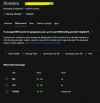
I'm making the same think for a our customer but I dont' undestand how to add on M365 Domain the FQDN for teams.

1695293944859.png

Could you help me? thanks a lot in advance.
 
  • Like
Reactions: Evolute IT
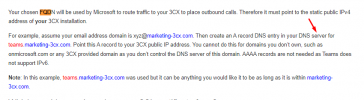
The domain you have in 365 is your email domain, so yes, you create an A record under this domain's DNS for a hostname for this domain, so something like teams.yourdomain.com (where 'teams' is the hostname for the A record, and yourdmain.com equates to the email domain in 365), the A record for teams.yourdomain.com will then point to your 3CX systems public IP.
 
  • Like
Reactions: Riccardo M.
The domain you have in 365 is your email domain, so yes, you create an A record under this domain's DNS for a hostname for this domain, so something like teams.yourdomain.com (where 'teams' is the hostname for the A record, and yourdmain.com equates to the email domain in 365), the A record for teams.yourdomain.com will then point to your 3CX systems public IP.

Hi,
I've continued with the integration but after to run the dial plan script via powershell (using the admin account of our M365 tenant ) and set the Set-ExecutionPolicy in Bypass:

$: Get-ExecutionPolicy -List
Scope ExecutionPolicy
MachinePolicy Undefined
UserPolicy Undefined
Process Undefined
CurrentUser Bypass

LocalMachine RemoteSigned

during this task I get a lot of string like that:
1696596659835.png

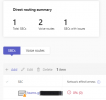
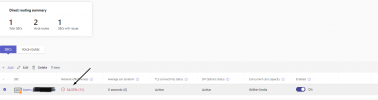
while on our teams console->Direct Routing I see that:
1696596710047.png
1696596728316.png

Our PBX is on hosted by 3CX
thanks
 
Last edited:
This indicates that the dial plan already exists.

You can try running the command.

Get-CsTenantDialPlan
Code:
Get-CsTenantDialPlan

To check if it has already created

In any case, run through the configuration and check the following guide for any troubleshooting requirements.

https://www.3cx.com/docs/microsoft-teams-integration-faqs/
 
Hi @Charles_3CX,

the result of that is:

Get-CsTenantDialPlan

Identity : Global
Description :
NormalizationRules : {}
ExternalAccessPrefix :
SimpleName : DefaultTenantDialPlan
OptimizeDeviceDialing : False

Identity : Tag:3CX Dial Plan
Description : 3CX via Direct Routing
NormalizationRules : {Description=Emergency Numbers;Pattern=^(112|113|115|118)$;Translation=$1;Name=3CX Emergency;IsInternalExtension=False,
Description=Internal Calls;Pattern=^(\d{3})$;Translation=$1;Name=3CX Internal;IsInternalExtension=False, Description=National
Calls;Pattern=^(0[1-9]{1}\d+)$;Translation=+39$1;Name=3CX National;IsInternalExtension=False, Description=Mobile
Calls;Pattern=^(3[1-9]{1}\d+)$;Translation=+39$1;Name=3CX National Mobiles;IsInternalExtension=False...}
ExternalAccessPrefix :
SimpleName : 3CX-Dial-Plan
OptimizeDeviceDialing : False
I'm seeing the guide but I don't find any about tha.

thanks and have a nice day
 
I continued with the guide an run the last script, on 3CX console my EXT is now sync
1696864851132.png

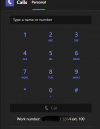
on teams the keyboard is now available. Making some inbound/outbound calls the system seems to be OK.

1696865291817.png

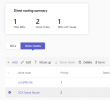
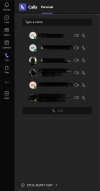
while on teams something is changed

1696867699381.png
 

Attachments

  • 1696864776618.png
    1696864776618.png
    12.5 KB · Views: 12
  • 1696865071774.png
    1696865071774.png
    46.6 KB · Views: 6
  • Like
Reactions: Charles_3CX

Members Online Now

Forum statistics

Threads
111,831
Messages
589,277
Members
164,660
Latest member
RJenkinsROCK