Solved Attended transfer with Fanvil X4G

Status
Not open for further replies.

jpluimmm

Forum User
Advanced Certified
Joined
May 29, 2020
Messages
5
Reaction score
0
Hello,

we bought about 30 new Fanvil x4g phones, autoprovisioned them and placed them by the users.
Now we have problems with not replacing original CID after attended transfer to a Fanvil X4G.

I have found the exactly same problem, but i does not solve my problems.
This one :
https://www.3cx.com/community/threads/attended-transfer-issues-fanvil-x3s-x4.62316/
And this one :
https://www.3cx.com/community/threads/attended-transfer-issues-fanvil-x5s.56866/

We have to firmware versions active, both have the same problem.
2.10.1.6836 (The newest supported firmware from 3cx)
2.10.2.6887 (Firmware when the phones came out of the box)

The 3cx server is up-to-date at Professional 16.0.1.1078
Can anyone help me?
 
Hi @jpluimmm

Can you tell us the entire call flow that leads to this? (from trunk to final destination extension)

Give a description of the steps taken to perform the attended transfer

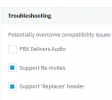
Confirm your extensions have the option for re-invites and replaces enabled under Options > Troubleshooting
1611922940633.png
 
Hi,

when a customer calls to an extension (so external to internal) and colleague A answers the call. On display of colleague A is the CID from the customer. The customer is searching for colleague B and colleague A uses the attended transfer to transfer the call. Colleague A talks to colleague B en then transfers the call. On the display of colleague B stays the name of colleague A and not the CID of the customer.

Support Re-invites and Replaces are enabled on al extensions in our configuration.

In the old situation we where using Aastra phones and there are no problems with this.
 
Hi,

I have tested this using 3CX V16.0.7.1078, and Fanvil firmware V2.10.1.6836, with phones provisioned as per the 3CX guide, but I did not come across the issue when doing an attended transfer of an external call.

I suggest you ensure all the Fanvils are on the supported 3CX firmware first, and test your scenario using two phones that share the correct firmware.

Reset and reprovision the phones exactly as per the 3CX guide, because it appears that there is possibly something that doesn't match the expected setup https://www.3cx.com/sip-phones/fanvil-x3-x5/
 
Hi,

we updatet al extensions to firmware 2.10.1.6836. After that we reset two phones en provisioned them using the guide. The other ones where added the same way, but first with the newer firmware and then downgraded to latest supported firmware, wich should be oke too.

We have a new problem now, i cannot use XFER button for attended transfer even while we selected that for the users extension. So I cannot test again and I don't want to reset the other phones.
 
Hi @jpluimmm

So is the original issue is now resolved? Please confirm.


As for the 2nd issue you mentioned, do you mean when you set this option in the extension provisioning tab?
1611932066111.png

- This option only applies to using BLF buttons (known also as a DSS Key). It means that if I am on an active call, and press one of my BLFs, the phone will attempt an attended transfer

- The phones must be reprovisioned after changing this option in order to take effect, and it should not affect your manual attended transfers, those should still work
 
Hi,

both issues are resolved after reprovioning again and rebooting the phone. I think the issue is caused because we provisioned the phones with newer firmware then supported firmware. I quess the phone have to be at the right firmware before provisioning them.
 
I'm very glad to hear that :)

Yes, as per our guide the correct order is to first upgrade the firmware, then factory reset, then provision.

This makes sure that no "garbage" is left in the phone's configuration memory.
 
Status
Not open for further replies.

Members Online Now

Forum statistics

Threads
111,834
Messages
589,287
Members
164,663
Latest member
svdDGS