Auto Provision not working on v20

Rajan638

Silver Partner
Basic Certified
Joined
Jul 16, 2025
Messages
14
Reaction score
2
Hi All,


I’m experiencing an issue with auto provisioning on version 20 — it was working without any problems on v18.


I’ve tested this using multiple devices, including Yealink T43U, T46U, T53W, and Fanvil V65 (both as a router phone and via SBC using a Raspberry Pi), but unfortunately, none of them are provisioning successfully.


Could you please advise if there are any new settings or requirements in v20 that need to be reviewed to enable auto provisioning?

Thank You for your help in advance,
Best regards,
Rajan
 
Hello,

The phones need to be supported, on the latest v20 firmware, and able to reach the internet to get the provisioning files. Beyond that there should not be any issue.
 
  • Like
Reactions: JohnS_3CX
Hi Kyriacoss,

Phone is on latest version, we have more than 30 PBX, we tested same phones work on other v20 pbx. If thats helps?

Thanks
Rajan
 
Then it must be a network/firewall issue at the location or with the PBX if it's on the cloud.
 
  • Like
Reactions: JohnS_3CX
Hello Rajan638,

Can you please explain what does happen, and what is not working?

-Can you add the MAC to an User, an get no Error, all fine?
-Factory reset of phone works good?
-Phone does reboot normally, does it ask for 5 digits of Serial number, or does it ask you to change the admin password?
-What is the firmware version you have on the phone at the moment?

Paulo
 
Hi Kyriacoss and Paul,

Forgot to add – If I configure manually it works.

Only issue on auto provision.

Paul,

There is no error while adding MAC address. All fine.

We did several time factory reset, no joy

Yes, it reboot normally, and stuck on change the password page.

Firmware version 108.87.0.16 – Yealink T43U


Thanks

Rajan
 
I do think that for some reason you might not be able to reach the Yealing RPS server. Check if phone LAN can freely reach the internet on ports 80/443.
 
Hello Rajan638,

Okay, thank you for the answers.
It seems you 'also' have the same problem with phone stop at password change, and not moving forward.

At the moment the phone stops at this point with the password request, please do not do anything to the phone.
Login in the 3CX, check the Phone PNP list, the phone MAC should be there in the list.

If yes, please goto the user, en delete the phone from the user.
Then goto the phones, PNP phones, and assign the phone MAC to the user.

At this point the phone will move forward, give it 1 minute, it will come up.
Not sure why Yealink has done this and still not sure at what Firmware this did happen.... but its here now.

Paulo
 
Last edited:
@Rajan638 a few things to check when moving to V20

1. The default HTTPS port in no longer 5001, so if you used default V20 install options you need to update your firewall port forwards. Check the 3CX dashboard to confirm your ports first.

2. If you use a custom FQDN, this means you also use custom certificates. If the certificate chain is not correctly implemented the phone will fail to make a TLS connection to 3CX, and cannot provision. Check using this tool here after you've taken care of step 1 above.

3. V20 requires Split DNS (for local installs with local phones on same LAN as PBX). You can ignore this if your phones are remote via SBC only and the PBX is cloud hosted.
 
  • Like
Reactions: Rajan638 and ivank
Following up on John, if you upgraded and kept the old ports, the phones need to be able to reach the PBX on port 5001 to fetch their provisioning file, so do make sure they can do that.
 
Hi All,

The below is showing on dashboard.

1753967920037.png

Thanks
Raj
 
Yes those are your ports, but are they open on the firewall? They seem to be closed.
 
Hi John,

Yes those port allowed on Firewall, but i can't see any traffic from phone. I have live traffic open.

Thanks
Raj
 
Hello ajan638,

Do you use a SBC ?
Can you use your laptop/pc as temp. SBC until you setup the first router phone?

If you have a SBC, can you see the PNP phone in the Phone list on the 3CX?

Paulo
 
Hi Paul,

Yes, customer have Raspberry PI onsite already and since you suggest, I have setup windows SBC on laptop at lab, Still no traffic from phone.

while setting up SBC on laptop i can see traffic from laptop for port 5001 and 5090, If that help

Feel like Yealink RPS server not sending to our pbx.

Thanks
Rajan
 
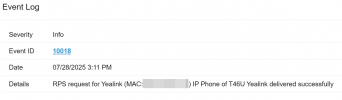
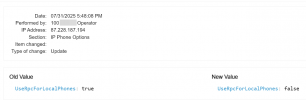
Is this option on or did you maybe turn it off by mistake?
1753971519728.png
See the Event Log to confirm if delivered
 
Hi @JohnS_3CX

Ahh, I see that is off, Its working now.

Strange, I can see pbx which we move from v18 to v20 was RPS off, very odd we never touch this option.

Anyway Thank you so much for all your help.

Appreciate for your help John, Paul, KyriacosS

Regards,
Rajan
 
Glad to hear!

Someone turned it off probably.. If the change was done in V20 it will appear in the Audit Log.
1753973338220.png
 
Will do,

Thank you,
Rajan
 

Forum statistics

Threads
112,285
Messages
591,711
Members
165,409
Latest member
T2T