


- Joined
- Dec 1, 2020
- Messages
- 33
- Reaction score
- 20
Morning folks,
Whilst I've been able to configure customers' V18 systems to backup to SharePoint previously, we're getting errors when trying to use SharePoint as a destination on our v20 PBX. 365 integration has been done, redone and redone again - no errors, all looks OK.
The destination list is empty, and then we get thrown an error:
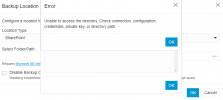
I suspect this is caused by some kind of permission oddity on our default SP site, but can't see anything obvious.
Anyone else experienced this?
Whilst I've been able to configure customers' V18 systems to backup to SharePoint previously, we're getting errors when trying to use SharePoint as a destination on our v20 PBX. 365 integration has been done, redone and redone again - no errors, all looks OK.
The destination list is empty, and then we get thrown an error:
I suspect this is caused by some kind of permission oddity on our default SP site, but can't see anything obvious.
Anyone else experienced this?


