Solved Calls hanging up after 32 seconds

Status
Not open for further replies.

Piotr_INS

Customer
Intermediate Cert.
Joined
Sep 1, 2021
Messages
17
Reaction score
2
Hi,
all inbound calls hanging up after 32 seconds and all outbound calls not working. 3cx firewall checker is all green. Local firewall and configuration of FortiGate looks ok because everything worked good. Where to look for the cause of the problem? Is it on the provider's side?
fw_check.PNG
 
Hi @Piotr_INS,

Is this for IP phones or Web Client (etc)? If IP Phones, how have they been provisioned (STUN perhaps)?
 
SIP Provider is not supported and it's for every incoming calls for IP phones and aslo for Web Client. Outcoming calls not working also.
 
Every external incoming calls are hanging up
 
Hi @Piotr_INS,

To confirm, this is only happening with external calls? If yes, the calls ending at exactly 32 seconds may be connected to the SIP flow between 3CX and your provider.

You may want to consider using a supported 3CX SIP Trunk provider, as they have been extensively tested with 3CX and you should not run into any issues.

I would also suggest having a look at the link @kieferschild provided as it does describe the flow and the issue with 32 second cut offs.
 
I would temporarily remove the firewall (anything between the 3CX server and your router), then test. My guess, is that signalling is being blocked, or misdirected (misconfigured?), from 3CX to your provider. I suspect that when they send you a call, they do not receive an ACK, wait 32 seconds, then drop the call. A call drop at about 32 seconds is almost always as a result of no ACK.

If you have Wireshark, you could also check on the LAN side of the Firewall.
 
  • Like
Reactions: VasilisV_3CX
Hi @Piotr_INS,

Feel free to let us know what you find regarding @leejor's post with some good tips on investigating the issue.
 
Hi @VasilisV_3CX

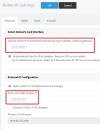
Changing this setting and put IP manually solved problem with incoming calls:

1633351502117.png

but still is a problem with outbound calls. PBX send INVITE to provider from internal ip adress not from public. Configuration looks good, where to look for solution? Problem is in PBX configuration or FortiGate configuration?
 
  • Like
Reactions: VasilisV_3CX
Hi @VasilisV_3CX

Changing this setting and put IP manually solved problem with incoming calls:

View attachment 24858

but still is a problem with outbound calls. PBX send INVITE to provider from internal ip adress not from public. Configuration looks good, where to look for solution? Problem is in PBX configuration or FortiGate configuration?

Shot in the dark here. but check your DMTF settings. we had issues with this originally as we had our set to one that conflicted with our provider (who is also "unsupported")
 
Hi @FridayIT, thank you for tip but still doesn't work. I'll keep looking.
 
Hi @VasilisV_3CX

Changing this setting and put IP manually solved problem with incoming calls:

View attachment 24858

but still is a problem with outbound calls. PBX send INVITE to provider from internal ip adress not from public. Configuration looks good, where to look for solution? Problem is in PBX configuration or FortiGate configuration?

Hello,

If you had to do this, then you probably have the wrong IP configuration on your 3CX System, so it is not sending the correct info to the provider.
1633610889398.png


But you also have an unsupported provider so we have no clue what they expect and from where.

Is this an internet trunk or do they provide you with a local gateway box?

The PBX follows RFC1918 rules to decide what IPs to put so if you do not know what the setup/requirements are, then the PBX will not know what to do either.
 
Hi @JohnS_3CX thank you for answer. I put default internet facing IP adress and static public IP corretly. This is internet trunk.
 
Ok and does your PBX have a LAN IP that is contained within RFC1918?

10.0.0.0 to 10.255.255.255
172.16.0.0 to 172.31.255.255
192.168.0.0 to 192.168.255.255

Or is it outside of this range?
 
Yes, LAN IP is in this range.
 
1633614451488.png

Which IP did you put here, the PBX LAN IP or the public IP of your internet connection?
 
1633615454700.png

Do not use this setting above - remove it for not.

Then do the following captures from your 3CX Management console, under Activity Log page:
1633615576826.png
1. Start a capture and make an incoming call, when the problem occurs end and download the capture

2. Start a capture and make an outgoing call, when the problem occurs end and download the capture

Upload the captures somewhere and send me a private message with the link. I can take a quick look.
 
Status
Not open for further replies.

Forum statistics

Threads
111,974
Messages
590,081
Members
164,899
Latest member
mazet