CFD Predictive dialer only calls the first number on the text file

Status
Not open for further replies.

Int Erra

Bronze Partner
Joined
Dec 8, 2022
Messages
3
Reaction score
0
i'm new to CFD and i just tried setting up PD with CFD on my 3cx installation but it seems to be calling only the first number on the .txt file, it doesn't go down the list as it is supposed to, it doesn't seem to be incrementing, i've checked a similar post on this issue but all my config seems to be correct. Can anyone assist with this.
 
If you're using a TXT file, you should increment the line index in every iteration. You should confirm with the logs that this is the case. In order to investigate the issue, please enable verbose logs from the 3CX Console > Dashboard > Activity Log > Settings. The 3CXCallFlow.log file that you can download from the 3CX Console > Dashboard > Activity Log > Logs button > Instance folder will give you some pointers.
 
  • Like
Reactions: Evolute IT
Hi Ernesto, thanks for responding, as i said i'm a bit of a newbie with this so i just followed a mix of the outbound dialer and predictive dialer example files to do this, yes i'm using a .txt file and yes i set the getindex and setindex variables as shown in the examples but it still hasn't worked. i have attached my build and the logs here for you to see, maybe you could suggest what the problem could be
 
see the files
 

Attachments

I can see that this has been also reported through a support ticket. I answered there, but just for completeness, you need to pass the actual index when you read the text file.
 
Hello,
I tried configure the 3CX Predictive Dialer with 3CX CFD.
I don't understand this argument :
The dialer is ready to start making calls as soon as the Call Flow app receives a call
If I did configurated file of Predictive Dialer to 3CX pbx as Call flow application with date schedule of every day from 00:00 - 23:59 periode, after this process of automaticly initate call to ANI agent/ DNIS PSTN user must be immediately.
But what is mean when dialer is ready for initate as soon as Call Flow app receives a call ?
What is call ?
I know the outbound campaign call only as automated process without need recieve some call.
Thank for explain.

Petr Halberstat
 
Hello,
I tried configure the 3CX Predictive Dialer with 3CX CFD.
I don't understand this argument :
The dialer is ready to start making calls as soon as the Call Flow app receives a call
If I did configurated file of Predictive Dialer to 3CX pbx as Call flow application with date schedule of every day from 00:00 - 23:59 periode, after this process of automaticly initate call to ANI agent/ DNIS PSTN user must be immediately.
But what is mean when dialer is ready for initate as soon as Call Flow app receives a call ?
What is call ?
I know the outbound campaign call only as automated process without need recieve some call.
Thank for explain.

Petr Halberstat
Hello Petr,

The CFD app can't start automatically once deployed to the 3CX console. You will need to assign an extension to it (when you build the app, you will see a dialog in which you can do this), and then from your extension call this number, so the app gets activated. Once it receives a single call from you, the dialer will start iterating and executing the sequence of components defined in the app.
 
Thank for fast reaction, it mean than first must be one inbouind call to Call queue groupe, aned after the dialer will activate ?
 
Or the first call must be to Builded number of Predictive dialer application ?
 
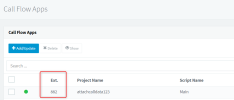
Not to a call queue. You need to call the extension assigned to the CFD app. For example, in this CFD app, the extension number is 882, so you would need to dial "882" to activate the callflow:
1671175891373.png

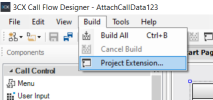
You need to ensure that you assign an extension number when you build the app. This can be done from the dialog automatically shown when you build the CFD app, or also manually from the CFD menu > Build > Project Extension:
1671176020127.png

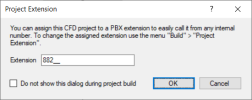
You will see the following dialog there:
1671176051576.png

Just enter an extension number that you're not using in your 3CX server. Then deploy the app, and call that number.
 
Ok, my case is 3CX with length numbering plane 00-99, I did build the number 82 for Call flow application.
After I can make for initate CFD application as call from another 3CX user to 82 for initate process of dialer.
After call to 82, the 3CX pbx will inform me by some guide about activate dialer ?
The database with DNIS called party can be also internal users from 3CX pbx, only for test ?
 
After call to 82, the 3CX pbx will inform me by some guide about activate dialer ?
No, you will not see anything. You can see the dialer activity in the 3CXCallFlow.log file.

The database with DNIS called party can be also internal users from 3CX pbx, only for test ?
You can specify any number.
 
Ok I understand and one last task, the definition in script of CFD dialer application for Make call must be defined only the Call queue number and the choice of agents will by predictive process, ok ?
 
If you configure the CFD dialer as a predictive dialer, you need to specify the extension number of the queue to monitor. The CFD app will check the queue, and make calls only when there are agents available to take those calls. Then, you should also configure your Make Call component to make calls between the external number (customer), and the queue extension. This way the call will be sent to the queue. The agent that will receive the call will depend on the queue configuration, the CFD app can't do anything about this.
 
Yes, it is all right, in the queue must be available agents for recieve of call.
The specifiy number of queue to monitor, it mean on the agent numbers valid some parameters ex. by Skill management
and need Enterprise license ?
 
The specifiy number of queue to monitor, it mean on the agent numbers valid some parameters ex. by Skill management
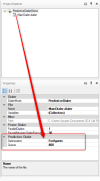
When you select the project node in the Project Explorer, the Properties window will show the dialer properties. That's where you need to specify the extension number of the queue to monitor:
1671180141876.png

and need Enterprise license ?
A Pro license is enough to use CFD apps and queues.
 
Thank you for explain, I did find this parameters and modify right.
1. the end of the campaign call is depend only from schedule or after complete dialed the PSTN users ?
2. the column in database for PSTN DNIS can be in format varchar as begin +international code and national number
or only numeric as : 00420 ( intrenational code ) and 724xxxxxx ( national number ) ?
3. get each a new application requesting always first call to him ?
4. how is possible stop of campaign during she processing ?
 
1. the end of the campaign call is depend only from schedule or after complete dialed the PSTN users ?
Please note that using the CFD you can build a dialer tailored to your needs. There is not a solution ready to use out of the box. What I mean with this is that you need to define the business logic by yourself. You will decide when to make calls, and when not.

2. the column in database for PSTN DNIS can be in format varchar as begin +international code and national number
or only numeric as : 00420 ( intrenational code ) and 724xxxxxx ( national number ) ?
The format is what your PBX needs, according to your outbound rules.

3. get each a new application requesting always first call to him ?
Sorry, I don't understand what you mean, can you please elaborate?

4. how is possible stop of campaign during she processing ?
You define this logic. For example, you can use a parameter in the database. The dialer can query this and decide if it needs to make calls or not. You define this logic.
 
I undrstand of point 1,2 and 4, is is ok for us.
Point 3 I mean, ex. when I make remove current Call flow application 85 from 3CX pbx and I will get a new application with a new number or the same number, after is necessary make one call to this new application for her activate ?
 
I undrstand of point 1,2 and 4, is is ok for us.
Point 3 I mean, ex. when I make remove current Call flow application 85 from 3CX pbx and I will get a new application with a new number or the same number, after is necessary make one call to this new application for her activate ?
Yes, every time you upload a new version of the CFD app, you will need to make a call to activate it. Also, if the 3CX Call Flow Server service is restarted, you will need to make this call, otherwise the CFD app will not start automatically. Finally, please note that even if you remove a CFD App from the 3CX console, the dialer will continue running in background. The only way to stop it is restarting the 3CX Call Flow Server service. If you will upload a new version to replace a previous one, you should also restart this service to stop the old version.
 
Status
Not open for further replies.

Forum statistics

Threads
112,274
Messages
591,617
Members
165,387
Latest member
Jeff_MKC