CLI Selection

Alphabetic

3CX MVP
Silver Partner
Advanced Certified
Joined
Jul 1, 2016
Messages
6,557
Reaction score
2,570
Hi all

We're using the DDI selection no problem.

However, I dont want the DDI's to ring the extension.. basically, any inbound calls to these numbers need to go to an auto message.

How can I allow extensions to change their CLI but not receive calls to it?

Also, just noticed I cant select a DDI when im using softphone and browser - how come?
 
Hello Alphabetic,

With the new version 10 (still in Alpha), it does provide you with the option to select an DDI for dialing out:
https://www.3cx.com/blog/releases/native-model-context-protocol/
Meanwile also the Windows APP does support this now.

If the DDI's need to go to an message, then you could just setup an Digital Receptionist and attach all the required DDI to it.
Or will it also need to go to a phone in other cases ?

Paulo
 
Hello Alphabetic,

With the new version 10 (still in Alpha), it does provide you with the option to select an DDI for dialing out:
https://www.3cx.com/blog/releases/native-model-context-protocol/
Meanwile also the Windows APP does support this now.

If the DDI's need to go to an message, then you could just setup an Digital Receptionist and attach all the required DDI to it.
Or will it also need to go to a phone in other cases ?

Paulo
Hi Paulo

How do I assign the ddi to two destinations?
 
Hello Alphabetic,

Would you like to have the caller A (calling back the number) to go to a message, and a unknow caller B dialing the same DDI to go to the extention??

Paulo
 
Hello Alphabetic,

Would you like to have the caller A (calling back the number) to go to a message, and a unknow caller B dialing the same DDI to go to the extention??

Paulo
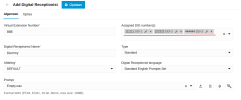
I need the calls to the DIDs so always go to an IVR not the extension making a call from it
 
1787919927573.png

Assign DDI to Digital Receptionnist, and call will go there and not to any extension.
 
Hello Alphabetic,

Okay got your question.... ;)
So you want to keep the DDI at the user level, so the user can select the DDI to dial out, great!

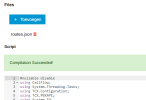
For the inbound, you can use a call script -> Integrations -> Call Script -> Get from Store -> inbounddidrouting.cs
More information here: https://www.3cx.com/blog/call-flow-scripts/call-routing-did/

Use it as type 'call from trunk':

1787921289868.png

Paulo
 

Latest Posts

Forum statistics

Threads
111,930
Messages
589,795
Members
164,802
Latest member
SpacetelSupport