CRM: Contact Creation Error MySQL DB

Status
Not open for further replies.

CISCOX

SMB User
Basic Certified
Joined
May 26, 2023
Messages
41
Reaction score
3
Hello,

I'm having an issue with 3CX CRM and my external SQL database. I can perform queries using the "Test" button and receive a result when manually inserting it into my MySQL database. Call journaling is working fine.

Now, onto my problem: Unfortunately, I'm unable to add contacts to my external MySQL database using the 3CX web client. I receive the following error message in the event log:

Exception during contact creation. FirstName=Test, LastName=Test, Company=, Number=01234567, Email=. Exception: System.InvalidOperationException: CommandText must be specified at MySqlConnector.MySqlCommand.ExecuteReaderAsync(CommandBehavior behavior, IOBehavior ioBehavior, CancellationToken cancellationToken) in /_/src/MySqlConnector/MySqlCommand.cs:line 345 at MySqlConnector.MySqlCommand.ExecuteDbDataReaderAsync(CommandBehavior behavior, CancellationToken cancellationToken) in /_/src/MySqlConnector/MySqlCommand.cs:line 337 at Integration.Crm.Engine.SqlDatabaseClient.Execute(String statement, CancellationToken token) at Integration.Crm.Engine.ScenarioProcessorBase.ProcessSQLDatabaseQuery(ISQLClientFactory sqlClientFactory, ScenarioQuery query, IValueManager customManager, CancellationToken token) at Integration.Crm.Engine.ScenarioProcessorBase.ProcessScenario(ProtocolScenario scenario, IValueManager customManager, CancellationToken token) at Integration.Crm.Engine.ScenarioProcessorBase.Execute(ProtocolScenario scenario, CancellationToken token) at Integration.Crm.Engine.CrmProcessor.CreateContactRecord(IValueManager customManager, String scenarioId, Func`2 filterResultsFunctor, CancellationToken token) at Integration.Crm.Engine.CrmProcessor.CreateContactFromClient(String firstName, String lastName, String company, String contactNumber, String email, CancellationToken token) at MyPhoneServer.Common.ClientManager.ServerMessageProcessor.ProcessUpdateContact(RequestUpdateContact request, IClient client, CancellationToken token, ICrmProcessorFactory crmProcessorFactory, IGraphServiceClientFactory graphServiceClientFactory, IPhoneSystem ps, IMicrosoft365ConfigurationRepository configurationRepository)

The Error Message in web client:

Contact Creation Error
Problems occurred while adding the contact
Contact state:
CRM
Unable to create the contact due to an error. Please contact Administrator.

I use the Contact Creation SQL Statement as follows:

INSERT INTO contacts (first_name, last_name, phone) VALUES ('New', '3CX Contact', '[Number]');SELECT id as contactid, first_name as firstname, last_name as lastname, phone as phonebusiness FROM contacts WHERE phone = '[Number]'

I know this docu (does not work for me): https://www.3cx.com/docs/server-side-crm-template-xml-description/
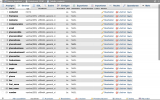
 
That's the XML Template I use:

<?xml version="1.0" encoding="utf-8"?>
<Crm xmlns:xsi="http://www.w3.org/2001/XMLSchema-instance" xmlns:xsd="http://www.w3.org/2001/XMLSchema" Country="US" Name="Database MySQL" Version="5" SupportsEmojis="true" ListPageSize="0">
<Number Prefix="AsIs" MaxLength="[MaxLength]" />
<Connection MaxConcurrentRequests="2" />
<Parameters>
<Parameter Name="Server" Type="String" Parent="General Configuration" Editor="String" Title="Server:" />
<Parameter Name="Port" Type="String" Parent="General Configuration" Editor="String" Title="Port:" />
<Parameter Name="Database" Type="String" Parent="General Configuration" Editor="String" Title="Database:" />
<Parameter Name="Username" Type="String" Parent="General Configuration" Editor="String" Title="Username:" />
<Parameter Name="Password" Type="Password" Parent="General Configuration" Editor="String" Title="Password:" />
<Parameter Name="LookupSQLStatement" Type="String" Parent="General Configuration" Editor="Sql" Title="Lookup By Number SQL Statement:" />
<Parameter Name="LookupByEmailSQLStatement" Type="String" Parent="General Configuration" Editor="Sql" Title="Lookup By Email SQL Statement:" />
<Parameter Name="ContactUrlPrefix" Type="String" Parent="General Configuration" Editor="Sql" Title="Contact URL Prefix:" Default="https://mycrmurl/contacts/" />
<Parameter Name="ContactUrlSuffix" Type="String" Parent="General Configuration" Editor="Sql" Title="Contact URL Suffix:" Default="/show" />
<Parameter Name="ReportCallEnabled" Type="Boolean" Editor="String" Title="Enable Call Journaling" Default="False" />
<Parameter Name="ReportCallSQLStatement" Type="String" Parent="ReportCallEnabled" Editor="Sql" Title="Call Journaling SQL Statement:" />
<Parameter Name="ReportChatEnabled" Type="Boolean" Editor="String" Title="Enable Chat Journaling" Default="False" />
<Parameter Name="ReportChatSQLStatement" Type="String" Parent="ReportChatEnabled" Editor="Sql" Title="Chat Journaling SQL Statement:" />
<Parameter Name="CreateContactEnabled" Type="Boolean" Editor="String" Title="Enable Contact Creation" Default="False" />
<Parameter Name="CreateOnCallDirection" Type="List" Parent="CreateContactEnabled" Editor="String" Title="Create Contacts on Call Direction:" Default="Inbound" ListValues="Inbound,Inbound/Outbound" />
<Parameter Name="CreateContactSQLStatement" Type="String" Parent="CreateContactEnabled" Editor="Sql" Title="Contact Creation SQL Statement:" />
</Parameters>
<Authentication Type="No" />
<Scenarios>
<Scenario Type="SQLDatabase">
<Query DatabaseType="MySQL" ConnectionString="Server=[Server];Port=[Port];Database=[Database];User Id=[Username];Password=[Password]" StatementPasses="2" Statement="[LookupSQLStatement]" />
<Rules>
<Rule Type="Any" Ethalon="">contactid</Rule>
</Rules>
<Variables>
<Variable Name="ContactID">contactid<Filter /></Variable>
<Variable Name="FirstName">firstname<Filter /></Variable>
<Variable Name="LastName">lastname<Filter /></Variable>
<Variable Name="CompanyName">companyname<Filter /></Variable>
<Variable Name="Email">email<Filter /></Variable>
<Variable Name="PhoneMobile">phonemobile<Filter /></Variable>
<Variable Name="PhoneMobile2">phonemobile2<Filter /></Variable>
<Variable Name="PhoneHome">phonehome<Filter /></Variable>
<Variable Name="PhoneHome2">phonehome2<Filter /></Variable>
<Variable Name="PhoneBusiness">phonebusiness<Filter /></Variable>
<Variable Name="PhoneBusiness2">phonebusiness2<Filter /></Variable>
<Variable Name="PhoneOther">phoneother<Filter /></Variable>
<Variable Name="FaxBusiness">faxbusiness<Filter /></Variable>
<Variable Name="FaxHome">faxhome<Filter /></Variable>
<Variable Name="Pager">pager<Filter /></Variable>
<Variable Name="PhotoUrl">photourl<Filter /></Variable>
</Variables>
<Outputs AllowEmpty="false">
<Output Type="ContactUrl" Passes="0" Value="[ContactUrlPrefix][ContactID][ContactUrlSuffix]" />
<Output Type="FirstName" Passes="0" Value="[FirstName]" />
<Output Type="LastName" Passes="0" Value="[LastName]" />
<Output Type="CompanyName" Passes="0" Value="[CompanyName]" />
<Output Type="Email" Passes="0" Value="" />
<Output Type="PhoneMobile" Passes="0" Value="[PhoneMobile]" />
<Output Type="PhoneMobile2" Passes="0" Value="[PhoneMobile2]" />
<Output Type="PhoneHome" Passes="0" Value="[PhoneHome]" />
<Output Type="PhoneHome2" Passes="0" Value="[PhoneHome2]" />
<Output Type="PhoneBusiness" Passes="0" Value="[PhoneBusiness]" />
<Output Type="PhoneBusiness2" Passes="0" Value="[PhoneBusiness2]" />
<Output Type="PhoneOther" Passes="0" Value="[PhoneOther]" />
<Output Type="FaxBusiness" Passes="0" Value="[FaxBusiness]" />
<Output Type="FaxHome" Passes="0" Value="[FaxHome]" />
<Output Type="Pager" Passes="0" Value="[Pager]" />
<Output Type="PhotoUrl" Passes="0" Value="[PhotoUrl]" />
<Output Type="EntityType" Passes="0" Value="Contacts" />
<Output Type="EntityId" Passes="0" Value="[ContactID]" />
</Outputs>
</Scenario>
 
<Scenario Id="LookupByEmail" Type="SQLDatabase">
<Query DatabaseType="MySQL" ConnectionString="Server=[Server];Port=[Port];Database=[Database];User Id=[Username];Password=[Password]" StatementPasses="2" Statement="[LookupByEmailSQLStatement]" />
<Rules>
<Rule Type="Any" Ethalon="">contactid</Rule>
</Rules>
<Variables>
<Variable Name="ContactID">contactid<Filter /></Variable>
<Variable Name="FirstName">firstname<Filter /></Variable>
<Variable Name="LastName">lastname<Filter /></Variable>
<Variable Name="CompanyName">companyname<Filter /></Variable>
<Variable Name="Email">email<Filter /></Variable>
<Variable Name="PhoneMobile">phonemobile<Filter /></Variable>
<Variable Name="PhoneMobile2">phonemobile2<Filter /></Variable>
<Variable Name="PhoneHome">phonehome<Filter /></Variable>
<Variable Name="PhoneHome2">phonehome2<Filter /></Variable>
<Variable Name="PhoneBusiness">phonebusiness<Filter /></Variable>
<Variable Name="PhoneBusiness2">phonebusiness2<Filter /></Variable>
<Variable Name="PhoneOther">phoneother<Filter /></Variable>
<Variable Name="FaxBusiness">faxbusiness<Filter /></Variable>
<Variable Name="FaxHome">faxhome<Filter /></Variable>
<Variable Name="Pager">pager<Filter /></Variable>
<Variable Name="PhotoUrl">photourl<Filter /></Variable>
</Variables>
<Outputs AllowEmpty="false">
<Output Type="ContactUrl" Passes="0" Value="[ContactUrlPrefix][ContactID][ContactUrlSuffix]" />
<Output Type="FirstName" Passes="0" Value="[FirstName]" />
<Output Type="LastName" Passes="0" Value="[LastName]" />
<Output Type="CompanyName" Passes="0" Value="[CompanyName]" />
<Output Type="Email" Passes="0" Value="" />
<Output Type="PhoneMobile" Passes="0" Value="[PhoneMobile]" />
<Output Type="PhoneMobile2" Passes="0" Value="[PhoneMobile2]" />
<Output Type="PhoneHome" Passes="0" Value="[PhoneHome]" />
<Output Type="PhoneHome2" Passes="0" Value="[PhoneHome2]" />
<Output Type="PhoneBusiness" Passes="0" Value="[PhoneBusiness]" />
<Output Type="PhoneBusiness2" Passes="0" Value="[PhoneBusiness2]" />
<Output Type="PhoneOther" Passes="0" Value="[PhoneOther]" />
<Output Type="FaxBusiness" Passes="0" Value="[FaxBusiness]" />
<Output Type="FaxHome" Passes="0" Value="[FaxHome]" />
<Output Type="Pager" Passes="0" Value="[Pager]" />
<Output Type="PhotoUrl" Passes="0" Value="[PhotoUrl]" />
<Output Type="EntityType" Passes="0" Value="Contacts" />
<Output Type="EntityId" Passes="0" Value="[ContactID]" />
</Outputs>
</Scenario>
<Scenario Id="ReportCall" Type="SQLDatabase">
<Query SkipIf="[ReportCallEnabled]!=True" DatabaseType="MySQL" ConnectionString="Server=[Server];Port=[Port];Database=[Database];User Id=[Username];Password=[Password]" StatementPasses="2" Statement="[ReportCallSQLStatement]" />
<Variables />
<Outputs AllowEmpty="false" />
</Scenario>
<Scenario Id="ReportChat" Type="SQLDatabase">
<Query SkipIf="[ReportChatEnabled]!=True" DatabaseType="MySQL" ConnectionString="Server=[Server];Port=[Port];Database=[Database];User Id=[Username];Password=[Password]" StatementPasses="2" Statement="[ReportChatSQLStatement]" />
<Variables />
<Outputs AllowEmpty="false" />
</Scenario>
<Scenario Id="CreateContactRecord" Type="SQLDatabase">
<Query SkipIf="[CreateContactEnabled]!=True||[IIf([CreateOnCallDirection]==Inbound,[CallDirection]!=Inbound,False)]==True" DatabaseType="MySQL" ConnectionString="Server=[Server];Port=[Port];Database=[Database];User Id=[Username];Password=[Password]" StatementPasses="2" Statement="[CreateContactSQLStatement]" />
<Rules>
<Rule Type="Any" Ethalon="">contactid</Rule>
</Rules>
<Variables>
<Variable Name="ContactID">contactid<Filter /></Variable>
<Variable Name="FirstName">firstname<Filter /></Variable>
<Variable Name="LastName">lastname<Filter /></Variable>
<Variable Name="CompanyName">companyname<Filter /></Variable>
<Variable Name="Email">email<Filter /></Variable>
<Variable Name="PhoneMobile">phonemobile<Filter /></Variable>
<Variable Name="PhoneMobile2">phonemobile2<Filter /></Variable>
<Variable Name="PhoneHome">phonehome<Filter /></Variable>
<Variable Name="PhoneHome2">phonehome2<Filter /></Variable>
<Variable Name="PhoneBusiness">phonebusiness<Filter /></Variable>
<Variable Name="PhoneBusiness2">phonebusiness2<Filter /></Variable>
<Variable Name="PhoneOther">phoneother<Filter /></Variable>
<Variable Name="FaxBusiness">faxbusiness<Filter /></Variable>
<Variable Name="FaxHome">faxhome<Filter /></Variable>
<Variable Name="Pager">pager<Filter /></Variable>
<Variable Name="PhotoUrl">photourl<Filter /></Variable>
</Variables>
<Outputs AllowEmpty="false">
<Output Type="ContactUrl" Passes="0" Value="[ContactUrlPrefix][ContactID][ContactUrlSuffix]" />
<Output Type="FirstName" Passes="0" Value="[FirstName]" />
<Output Type="LastName" Passes="0" Value="[LastName]" />
<Output Type="CompanyName" Passes="0" Value="[CompanyName]" />
<Output Type="Email" Passes="0" Value="" />
<Output Type="PhoneMobile" Passes="0" Value="[PhoneMobile]" />
<Output Type="PhoneMobile2" Passes="0" Value="[PhoneMobile2]" />
<Output Type="PhoneHome" Passes="0" Value="[PhoneHome]" />
<Output Type="PhoneHome2" Passes="0" Value="[PhoneHome2]" />
<Output Type="PhoneBusiness" Passes="0" Value="[PhoneBusiness]" />
<Output Type="PhoneBusiness2" Passes="0" Value="[PhoneBusiness2]" />
<Output Type="PhoneOther" Passes="0" Value="[PhoneOther]" />
<Output Type="FaxBusiness" Passes="0" Value="[FaxBusiness]" />
<Output Type="FaxHome" Passes="0" Value="[FaxHome]" />
<Output Type="Pager" Passes="0" Value="[Pager]" />
<Output Type="PhotoUrl" Passes="0" Value="[PhotoUrl]" />
<Output Type="EntityType" Passes="0" Value="Contacts" />
<Output Type="EntityId" Passes="0" Value="[ContactID]" />
</Outputs>
</Scenario>
<Scenario Id="CreateContactRecordFromClient" Type="SQLDatabase">
<Query SkipIf="[CreateContactEnabled]!=True" DatabaseType="MySQL" ConnectionString="Server=[Server];Port=[Port];Database=[Database];User Id=[Username];Password=[Password]" StatementPasses="2" Statement="[CreateContactFromClientSQLStatement]" />
<Rules>
<Rule Type="Any" Ethalon="">contactid</Rule>
</Rules>
<Variables>
<Variable Name="ContactID">contactid<Filter /></Variable>
<Variable Name="FirstName">firstname<Filter /></Variable>
<Variable Name="LastName">lastname<Filter /></Variable>
<Variable Name="CompanyName">companyname<Filter /></Variable>
<Variable Name="Email">email<Filter /></Variable>
<Variable Name="PhoneMobile">phonemobile<Filter /></Variable>
<Variable Name="PhoneMobile2">phonemobile2<Filter /></Variable>
<Variable Name="PhoneHome">phonehome<Filter /></Variable>
<Variable Name="PhoneHome2">phonehome2<Filter /></Variable>
<Variable Name="PhoneBusiness">phonebusiness<Filter /></Variable>
<Variable Name="PhoneBusiness2">phonebusiness2<Filter /></Variable>
<Variable Name="PhoneOther">phoneother<Filter /></Variable>
<Variable Name="FaxBusiness">faxbusiness<Filter /></Variable>
<Variable Name="FaxHome">faxhome<Filter /></Variable>
<Variable Name="Pager">pager<Filter /></Variable>
<Variable Name="PhotoUrl">photourl<Filter /></Variable>
</Variables>
<Outputs AllowEmpty="false">
<Output Type="ContactUrl" Passes="0" Value="[ContactUrlPrefix][ContactID][ContactUrlSuffix]" />
<Output Type="FirstName" Passes="0" Value="[FirstName]" />
<Output Type="LastName" Passes="0" Value="[LastName]" />
<Output Type="CompanyName" Passes="0" Value="[CompanyName]" />
<Output Type="Email" Passes="0" Value="" />
<Output Type="PhoneMobile" Passes="0" Value="[PhoneMobile]" />
<Output Type="PhoneMobile2" Passes="0" Value="[PhoneMobile2]" />
<Output Type="PhoneHome" Passes="0" Value="[PhoneHome]" />
<Output Type="PhoneHome2" Passes="0" Value="[PhoneHome2]" />
<Output Type="PhoneBusiness" Passes="0" Value="[PhoneBusiness]" />
<Output Type="PhoneBusiness2" Passes="0" Value="[PhoneBusiness2]" />
<Output Type="PhoneOther" Passes="0" Value="[PhoneOther]" />
<Output Type="FaxBusiness" Passes="0" Value="[FaxBusiness]" />
<Output Type="FaxHome" Passes="0" Value="[FaxHome]" />
<Output Type="Pager" Passes="0" Value="[Pager]" />
<Output Type="PhotoUrl" Passes="0" Value="[PhotoUrl]" />
<Output Type="EntityType" Passes="0" Value="Contacts" />
<Output Type="EntityId" Passes="0" Value="[ContactID]" />
</Outputs>
</Scenario>
</Scenarios>
</Crm>[/B]

3CX Version: 18.0 Update 8 (Build 749)Version (Self hosted)

Thanks in advance for your help.

Kind regards
 

Attachments

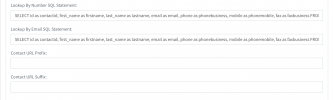
  • Bildschirmfoto 2023-07-07 um 08.22.44.png
    Bildschirmfoto 2023-07-07 um 08.22.44.png
    735.9 KB · Views: 17
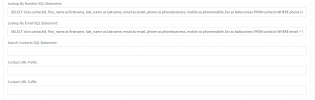
  • Bildschirmfoto 2023-07-07 um 08.23.59.png
    Bildschirmfoto 2023-07-07 um 08.23.59.png
    91.2 KB · Views: 15
Last edited:
From the error:
CommandText must be specified

I guess you're not filling the SQL statement in the contact creation section. Can you check that?

I see that you're using the Contact Creation from Web Client feature introduced in Update 8, so ensure that you have the latest template supporting this. The template version should be 6.
 
  • Like
Reactions: CISCOX
Hi,

Thank you for the prompt response.I only have Template Version 5 available to me.

I have provided the SQL statement for Contact Creation:

INSERT INTO contacts (first_name, last_name, phone) VALUES ('New', '3CX Contact', '[Number]');SELECT id as contactid, first_name as firstname, last_name as lastname, phone as phonebusiness FROM contacts WHERE phone = '[Number]'

EDIT:

Ok, I have resolved the issue. I created a second instance to obtain CRM MySQL Template Version 6.

I found that if I delete this template and reinstall it, I only get Version 5 again.

Anyway, it is now working with Version 6. Thank you for your suggestion! However, I noticed that contacts are not being created in the address book when I make a call and that contact is not saved. How can I solve this?

Do I need an SQL statement for Contact Search? If so, where can I find it?

If someone needs the CRM MySQL Template Version 6 for Update 8 because of Contact Creation issues here it is:

https://fastupload.io/figG6uAkHEI4Klj/file
 

Attachments

  • Bildschirmfoto 2023-07-07 um 20.57.34.png
    Bildschirmfoto 2023-07-07 um 20.57.34.png
    113.9 KB · Views: 14
  • Bildschirmfoto 2023-07-07 um 20.57.10.png
    Bildschirmfoto 2023-07-07 um 20.57.10.png
    60.9 KB · Views: 14
Last edited:
OK, regarding the template version, this will be solved when we release the final version of 3CX v18 Update 8. Then, we will also publish the updates in our server.

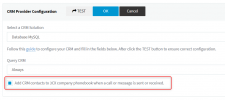
In order to add contacts to the 3CX phonebook, you need to check the option "Add CRM contacts to 3CX company phonebook when a call or message is sent or received.":
1688766288149.png

This is not mandatory anymore. You can see the contact details in the Web Client when you make or receive the call, even if the contact is not added to the phonebook.
 
Thank you for your response.

I have enabled this option, but contacts are still not being created when I call a number that is not saved to my phonebook.

Furthermore, I noticed that the "phone" field in Contact Creation is being populated with the same number I entered in the "mobile" field, even though they are different.

Here is my Contact Creation SQL statement:

INSERT INTO contacts (first_name, last_name, phone, mobile , companyname, email) VALUES ('[FirstName]', '[LastName]', '[Number]', '[Number]', '[Company]', ''); SELECT id as contactid, first_name as firstname, last_name as lastname, email as email, phone as phonehome, mobile as phonemobile, fax as faxbusiness FROM contacts WHERE phone LIKE '%[Number]%' or mobile like '%[Number]%' or fax LIKE '%[Number]%'

And what should I enter in the Search Contacts SQL Statement?

SELECT id as contactid, first_name as firstname, last_name as lastname, email as email, phone as phonehome, mobile as phonemobile, fax as faxbusiness FROM contacts WHERE contactid = '[ContactID]'

(I'm not sure if that is correct.)


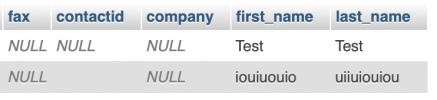
Unfortunately, the contactid is not being inserted into the MySQL database. The value remains null.

I have tried including the contactid in the INSERT INTO SQL statement, but it doesn't work. In my database, I have a column called contactid (INT) set to allow nulls, and I also have the id column set as auto-increment. Do I need to set the contactid column as auto-increment as well?

The documentation is not up to date. It should be updated as soon as possible for customers using Template Version 6.
 
I'm no MySQL expert but the statement you are using is 2 commands. The first "INSERT INTO contacts (first_name, last_name, phone, mobile , companyname, email) VALUES ('[FirstName]', '[LastName]', '[Number]', '[Number]', '[Company]', '');" inserts data but there is no where you are specifying the contact ID or where to store it.
 
  • Like
Reactions: CISCOX
I have tried this SQL statement, but it doesn't work.

INSERT INTO contacts (contactid, first_name, last_name, phone, mobile , companyname, email) VALUES ('[ContactID]', '[FirstName]', '[LastName]', '[Number]', '[Number]', '[Company]', '');

I'm not getting an error message, but still, no record is being inserted into the "contactid" column.
 
ConactID - Typo?
 
ConactID - Typo?
INT

EDIT: VARCHAR because INT is not possible. But there is no entry:

In the first line without the "contactid" statement, and in the second example with it.
 

Attachments

  • Bildschirmfoto 2023-07-09 um 08.39.39.png
    Bildschirmfoto 2023-07-09 um 08.39.39.png
    33.4 KB · Views: 11
  • Bildschirmfoto 2023-07-09 um 08.48.02.png
    Bildschirmfoto 2023-07-09 um 08.48.02.png
    581.4 KB · Views: 10
Last edited:
Can you send me the sql statement to create the table and the statement you use to create the contact, I'll install here
 
  • Like
Reactions: CISCOX
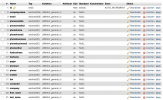
Unfortunately, I cannot post text messages.

You can see the SQL prompt below in the photo.


Bildschirmfoto 2023-07-10 um 08.59.34.png
 
INSERT INTO contacts (first_name, last_name, phone, mobile , companyname, email) VALUES ('[FirstName]', '[LastName]', '[Number]', '[Number]', '[Company]', '');

Your field names for phone and mobile should be PhoneHome and PhoneMobile
 
For me that does not work. Does that work for you?

The field names were "phonehome" and "phonemobile" so I changed them to "PhoneHome" and "PhoneMobile"
However, there is no difference, as you can see below.
 

Attachments

  • 1.png
    1.png
    97.3 KB · Views: 8
  • 2.png
    2.png
    94.5 KB · Views: 8
  • 3.png
    3.png
    92.3 KB · Views: 6
Check the 3cxSystemService.log also if the test number is linked to an extension it doesn't do the look up
 
It is not linked because that number does not exist. It's a random number.
I think it is not possible to use the placeholder [Number] twice in one insert into prompt.
 
I have enabled this option, but contacts are still not being created when I call a number that is not saved to my phonebook.

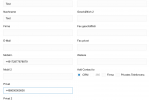
When you are adding a contact from the Web Client, you will see the following form:
SC5zvPHttIw2MVg0Zw9TO0LfvSW3fBhZW6RinBh6vbj0jZiDqfnLk6X3T80Dn9h0G3zorfrSAn70CM-csvF7X_cY7qI_Bb0yU1CEu8voyb9A9p5CQhJmlkyry9oJaLTw2vo-VytQ2LbTkAzIlDZjWLA


If you check the "CRM" option, the contact is added to the CRM. If you also want to add it to the 3CX phonebook, you must also check the "Company" option. This way the contact will be added to both, the CRM and the 3CX phonebook.

Furthermore, I noticed that the "phone" field in Contact Creation is being populated with the same number I entered in the "mobile" field, even though they are different.

Here is my Contact Creation SQL statement:

INSERT INTO contacts (first_name, last_name, phone, mobile , companyname, email) VALUES ('[FirstName]', '[LastName]', '[Number]', '[Number]', '[Company]', ''); SELECT id as contactid, first_name as firstname, last_name as lastname, email as email, phone as phonehome, mobile as phonemobile, fax as faxbusiness FROM contacts WHERE phone LIKE '%[Number]%' or mobile like '%[Number]%' or fax LIKE '%[Number]%'
You're setting the [Number] variable in both fields in your SQL statement, so that's what the database will do, set the same number as phone and mobile. If you need something else, adjust your SQL statement.

And what should I enter in the Search Contacts SQL Statement?

SELECT id as contactid, first_name as firstname, last_name as lastname, email as email, phone as phonehome, mobile as phonemobile, fax as faxbusiness FROM contacts WHERE contactid = '[ContactID]'

(I'm not sure if that is correct.)
The Search Contacts SQL Statement is to search by any field. This is what we use when the Web Client searches for free text. You can search by name, by email, by company name, by phone number, etc. So you need to create an SQL statement that performs the query in all fields, for example:
SQL:
SELECT id AS contactid, firstname AS firstname, lastname AS lastname, companyname AS companyname, email AS email, phonemobile AS phonemobile, phonemobile2 AS phonemobile2, phonehome AS phonehome, phonehome2 AS phonehome2, phonebusiness AS phonebusiness, phonebusiness2 AS phonebusiness2, phoneother AS phoneother, faxbusiness AS faxbusiness, faxhome AS faxhome,pager AS pager, photourl AS photourl FROM contacts WHERE phonemobile LIKE '%[SearchText]%' or phonebusiness like '%[SearchText]%' or faxbusiness LIKE '%[SearchText]%' or firstname LIKE '%[SearchText]%' or lastname LIKE '%[SearchText]%' or companyname LIKE '%[SearchText]%' or email LIKE '%[SearchText]%'
 
  • Like
Reactions: CISCOX
Hi Sir,

thanks for your reply. Can you please help me adjust the SQL statement so that "Phone" and "Mobile" are different?

Without "Insert Into Contacts" in call journaling, it's not possible to automatically create contacts when a call is received or made. I agree that this is not an ideal solution as the contact is only recorded on the second call.
 
thanks for your reply. Can you please help me adjust the SQL statement so that "Phone" and "Mobile" are different?
You're specifying the variable for both fields, just remove one to leave it empty. You will only be providing 1 number, which will be available in the [Number] variable. So you should use:
SQL:
INSERT INTO contacts (first_name, last_name, phone, mobile , companyname, email) VALUES ('[FirstName]', '[LastName]', '', '[Number]', '[Company]', ''); SELECT id as contactid, first_name as firstname, last_name as lastname, email as email, phone as phonehome, mobile as phonemobile, fax as faxbusiness FROM contacts WHERE phone LIKE '%[Number]%' or mobile like '%[Number]%' or fax LIKE '%[Number]%'

Without "Insert Into Contacts" in call journaling, it's not possible to automatically create contacts when a call is received or made. I agree that this is not an ideal solution as the contact is only recorded on the second call.
You should manually create the contact from the Web Client. Then the first call will be logged.
 
Status
Not open for further replies.

Forum statistics

Threads
111,973
Messages
590,077
Members
164,896
Latest member
sameage