DECT base station Yealink W60B will not register

KraGwort

Customer
Joined
Sep 21, 2026
Messages
2
Reaction score
0
We had a working W60B base station with 2 W53H phones. One of the phones dropped and became unregistered. Worked on it for a while with no luck. Then the base station itself dropped to unregistered. Worked on that for a while with no luck. Deleted the base station from the system, reset the base to factory and re-added as a new device/added the provision address given by the system etc.. Confirmed the firmware for both the base and the phones is the latest offered at Yealink. I just cannot get the base to do something it needs to do. This base and phones are still listed as active by 3cx. They are EOL at Yealink. Any suggestions?
 
  • Like
Reactions: DAndersonn@bis. itk
Hi,

The device is indeed EOL but seems to work fine for the time being at least.
1790069065003.png

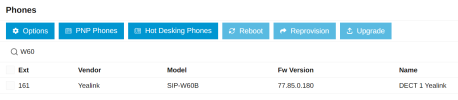
I got it working using firmware 77.85.0.180 on 3CX V20 Update 9. Since your system is Hosted by 3CX, you must configure the remote device behind an SBC for it to work (this is mandatory).

Ensure of course that the SBC is indeed online and working, and it's on the same LAN as the W60B.
 
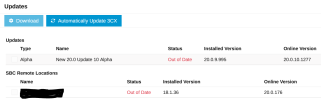
I updated the firmware in the original round of repair attempts. Currently at 77.85.0.160. That is the highest version I can find on Yealink's website. 3cx system version is Version 20.0 Update 9 (Build 995 Release - AI 1.4.48). The SBC is currently version 18.1.36. Both are calling for updates that I have not done yet. Didn't want to confuse the issue with the DECT with updates.

Updates.PNG


When you specify the DECT needs to be behind the SBC, should the provision link point at the SBC? It is currently, and was before the problem, pointed at the 3cx server for this company.

Again, the DECT was working, then it wasn't with no known system or network changes.

Thanks for the help.
 
I updated the firmware in the original round of repair attempts. Currently at 77.85.0.160. That is the highest version I can find on Yealink's website. 3cx system version is Version 20.0 Update 9 (Build 995 Release - AI 1.4.48). The SBC is currently version 18.1.36. Both are calling for updates that I have not done yet. Didn't want to confuse the issue with the DECT with updates.

View attachment 52496


When you specify the DECT needs to be behind the SBC, should the provision link point at the SBC? It is currently, and was before the problem, pointed at the 3cx server for this company.

Again, the DECT was working, then it wasn't with no known system or network changes.

Thanks for the help.
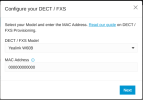
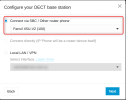
When adding a DECT phone from the PBX, after selecting the model and adding the MAC, you are prompted to choose the provisioning method, either local or via an SBC, as shown below. You should choose the SBC/Router Phone

1790178120051.png
1790178124047.png
 

Forum statistics

Threads
112,106
Messages
590,801
Members
165,099
Latest member
Mahmoud Atef