Desktop App cutting calls when taking off hold

Status
Not open for further replies.

Matt_AIT

Silver Partner
Advanced Certified
Joined
Oct 29, 2019
Messages
76
Reaction score
17
Since our PBX updated to 18.0.6 build 908 last night and the desktop app updated when calls are taken off hold the call is cut. Desk phones, web clients, and mobile apps are all fine. We have tried reinstalling the desktop app but to no avail.

Has anyone else experienced this?
 
  • Sad
Reactions: DiegoF
Hi Matt,

  1. Do you mean that the call ends or that there is no audio?
  2. When this happens, can you check your management console for Active Calls and see that the call is indeed ended or is it running in the background?
  3. Can you replicate this with extension to extension calls or is it only with external callers?
  4. Can you right click the .exe file and confirm the version of the app for me?
Thanks
 
Hi Matt,

  1. Do you mean that the call ends or that there is no audio?
  2. When this happens, can you check your management console for Active Calls and see that the call is indeed ended or is it running in the background?
  3. Can you replicate this with extension to extension calls or is it only with external callers?
  4. Can you right click the .exe file and confirm the version of the app for me?
Thanks
Hi John,

When we press resume the call ends and does so in the management console too.

We can replicate this with internal calls too.

The app is on version 18.11.1213

Thanks.
 
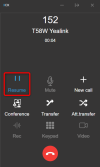
1. How do you take a call off hold, by clicking this directly with the mouse or do you do it using a different way?

1675427546452.png


2. And when you take it off of hold, did you have a second call going, or was it simply a single call with "answer, hold, unhold"?

 
1. How do you take a call off hold, by clicking this directly with the mouse or do you do it using a different way?

View attachment 33957


2. And when you take it off of hold, did you have a second call going, or was it simply a single call with "answer, hold, unhold"?
We press the resume button you have highlighted with the mouse. Simple one call, answer, hold, unhold.
 
Try to enable PBX Delivers Audio on your extension, and let us know if this makes a difference for you please.

Also:

- let me know if you have any headset integration enabled on the app (and what headset)

- make sure Desktop App is selected in the dialler:
1675429843244.png

- try to make your call towards an extension that is only registered on the Android/iOS app just so we can bypass any devices in the middle
 
Try to enable PBX Delivers Audio on your extension, and let us know if this makes a difference for you please.

Also:

- let me know if you have any headset integration enabled on the app (and what headset)

- make sure Desktop App is selected in the dialler:
View attachment 33958

- try to make your call towards an extension that is only registered on the Android/iOS app just so we can bypass any devices in the middle

PBX delivers audio is set on all extensions.

I think I may have found the culprit...Under headset integration, it was set to 'Universal Headset Driver (WebHD - 3rd party supported). I have a Jabra PRO 930. If I set this integration option to 'none', the call does not cut off.
 
Last edited:
Hi,

We are experiencing the same problems with the latest 3CX update (running 3CX 18.0 (Build 908)) and 3CX Desktop App 18.11.1213) and Jabra headsets (Jabra PRO 930 USB).

Accept calls and hang-up works fine by headset button, but as soon as we put a call on hold and try to take it back, the call is dropped immediately.
Uninstalling Jabra Direct has no effect.
Disable the headset integration option in 3CX Audio/Video seems to solve the problem, but takes away the integration ofcourse.

I hope 3CX can solve this problem soon.
If 3CX need any more technical information, please contact me and I will help to collect information.
 
  • Like
Reactions: Matt_AIT
I have just tested with a Plantronics Blackwire 3210 and headset integration enabled 'Universal Headset Driver (WebHD - 3rd party supported)' and this issue does not occur.

These are the only two headsets we have to test with, unfortunately.
 
Ah it looks like the device is instructing the client to close the line as soon as we inform the device of the unhold event.

The closest model we checked was Jabra PRO 935 on its latest firmware and it did not have this issue.

I'm not sure what is different about the 930 that would cause this, but check to see whether it has any firmware updates just in case.

Try to long-press (the answer button on the headset) to put the call on hold, and then long-press again to take it off of hold without touching the client. Let's see if this does anything different.
 
Last edited:
Ah it looks like the device is instructing the client to close the line as soon as we inform the device of the unhold event.

The closest model we checked was Jabra PRO 935 on its latest firmware and it did not have this issue.

I'm not sure what is different about the 930 that would cause this, but check to see whether it has any firmware updates just in case.
There are no firmware updates available, unfortunately, I have just checked.
 
Ah it looks like the device is instructing the client to close the line as soon as we inform the device of the unhold event.

The closest model we checked was Jabra PRO 935 on its latest firmware and it did not have this issue.

I'm not sure what is different about the 930 that would cause this, but check to see whether it has any firmware updates just in case.

Try to longpress to put the call on hold, and then longpress again to take it off of hold without touching the client. Let's see if this does anything different.
Hi,
The Jabra PRO 930 headsets that we have are on the following firmware:
Base firmware version: 2.31.0
Headset firmware version: 2.28.0
The Jabra Direct is showing me that this is the lastest firmware.

I have found an old Plantronics Savi 700 USB headset and tried it.
With the Plantronics Savi 700, the Hold button and Resume button works fine.

When the Jabra 930 USB is connected, the Hold button and Resume buttons does not work correct.
The call gets dropped right after you press on the resume button.

I don't know exactly what you mean with longpress, but I tried to hold the Resume button for about 5 seconds and the same calldrop happens.
 
We are experiencing the same issue it is not limited to Jabra as it is affecting TPOS headsets too.

IT disconnects teams too (if you have teams active in a call, and you answer a 3cx call, when you hang up it ends both).

100% related to headset integration as does not drop calls when using the cell app.
 
IT disconnects teams too (if you have teams active in a call, and you answer a 3cx call, when you hang up it ends both).

We're also seeing this behavior with teams and 3CX.
And the same when resuming an on hold call it ends the call.
We are also using Jabra Pro 930 running the latest firmware.
 
I'm Having the same issue as well using the Jabra pro 9460 I have also tried the long press with the Headset button. and it still ends the call for the user I have spoken one customer that had had the call dropped on them and they say they are still on hold (As When I called them it was on a second number we have for them)
 
We experience the same problem with a Jabra PRO 9470 after updating to 18.0 (Build 908). Updating the headset firmware to the most recent version didn't fix the problem. To be sure that's the headset is the culprit I switched to another to a simple gaming headset and everything worked fine. It seems that there is an real issue with Jabra headsets.
 
hi all, same issue here after updating to Update 6 (Build 908). We use Desktop App (18.11.1213) and Jabra Evolve 40 and if we are on 3cx call and receive a Teams call the 3cx call crash, and viceversa if we are on teams call and receive 3cx call the teams call crash.

Disabling the headset integration resolve the problem but until Update 5 we haven't problems
 
Can confirm it's headset integration within the application triggering the call to drop. Have tested with and without Jabra Direct installed and the web client works fine.

Am currently checking a packet capture to isolate the termination command.

UPDATE: Located the BYE command being triggered with the SIP for both parties.

1675822787608.png
 

Attachments

  • 1675822539361.png
    1675822539361.png
    10.4 KB · Views: 8
Last edited:
  • Like
  • Sad
Reactions: m.w. and DiegoF
PBX delivers audio is set on all extensions.

I think I may have found the culprit...Under headset integration, it was set to 'Universal Headset Driver (WebHD - 3rd party supported). I have a Jabra PRO 930. If I set this integration option to 'none', the call does not cut off.
God Bless You
 
  • Like
Reactions: Matt_AIT
Status
Not open for further replies.

Forum statistics

Threads
111,973
Messages
590,079
Members
164,896
Latest member
sameage
