Desktop App cutting calls when taking off hold

Status
Not open for further replies.

Matt_AIT

Silver Partner
Advanced Certified
Joined
Oct 29, 2019
Messages
76
Reaction score
17
Since our PBX updated to 18.0.6 build 908 last night and the desktop app updated when calls are taken off hold the call is cut. Desk phones, web clients, and mobile apps are all fine. We have tried reinstalling the desktop app but to no avail.

Has anyone else experienced this?
 
  • Sad
Reactions: DiegoF
We are done with the Jabra 930 PRO. We have ordered the Yealink WH62 en hope that this will solve the call-on-hold problem with the integration enabled.
 
@Tyler.Calhoun @Conict Thanks for the heads up and support. We have opened a ticket with Jabra, we are still hopeful they will respond and offer a solution. We will take it from there....
 
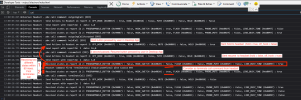
For those interested in this, here you can clearly see the difference between the two jabra models. That is why it works for Jabra 935 and not Jabra 930. We are hesitant to change anything because other models might be effected. So we are awaiting Jabra response. This is really something that a headset provider needs to test and support themselves.
 

Attachments

  • jabra935.png
    jabra935.png
    139.1 KB · Views: 33
  • jabra930.png
    jabra930.png
    421.5 KB · Views: 33
For those interested in this, here you can clearly see the difference between the two jabra models. That is why it works for Jabra 935 and not Jabra 930. We are hesitant to change anything because other models might be effected. So we are awaiting Jabra response. This is really something that a headset provider needs to test and support themselves.
How can I get these logs? I wanna try to see why my Grandstream headset doesn't work while it works on Teams. (I know the app only allows some vendors, but I believe the Webclient allows any, am I right?)
 
@Nick Galea
Thanks for your screenshots:cool:, I have also forwarded them to Jabra.

Together we are strong ;)
Thanks for the info,

I will share this with our internal team for more visibility, unfortunately i am waiting for an update from internal team
on subject issue.

I will keep you posted on further developments at our end, please let me know if you have any question. Thanks
 
@Tyler.Calhoun Thanks! :) And to be honest we had a call with them today and there is progress! They have made suggestions and have escalated it as well.
 
Hello, our team is equipped with Jabra Engage 75 and 65, Jabra Elvolve 2 65. Since this update, an incoming 3cx call cuts the Teams conversation. Is this a problem similar to the one discussed in this thread? THANKS
 
There are two problems being discussed here and yours is one of them.

3CX and Jabra are trying to find solutions. Take a look at Nick's posts.
 
  • Like
Reactions: egion
We are also experiencing the same issues and have raised with Jabra. My sennheiser EPOS impact D seems fine though.
Has anyone noticed any functionality loss with webclient\desktop app interacting with deskphones? We have clients using webclient to control snom 715 deskphone and now cannot put calls on hold from client, wondered if this was the same reasoning?
Have tried this in-house with desktop app and snom d785 and see the same issue, both instances are 18.6
 
We are also experiencing the same issues and have raised with Jabra. My sennheiser EPOS impact D seems fine though.
Has anyone noticed any functionality loss with webclient\desktop app interacting with deskphones? We have clients using webclient to control snom 715 deskphone and now cannot put calls on hold from client, wondered if this was the same reasoning?
Have tried this in-house with desktop app and snom d785 and see the same issue, both instances are 18.6
I'm afraid that will have to be done manually on the device. The hold/unhold function is not available when remote controlling a phone.
 
We've now released a newer build that also contains the Jabra SDK:
https://www.3cx.com/community/threa...ration-how-it-works.119133/page-2#post-555152
Just to let you know, we have found the call cuts when carrying out the following:

Using attended transfer, ending the call (with a colleague), and trying to resume with the caller. When pressing resume, the call is ended.

Note, the above is when using the Universal Driver, the Jabra SDK has no issues.

The original issue of placing someone on hold and resuming has been resolved.


If you require any more information please let me know.
 
As said here, Jabra Evolve 30 and Engage 65 are not impacted at all, even by above scenario given by @Matt_Alcom_IT (running Pro 930 as per this thread history).
May then depend on model, seems like Pro 930 is an older / discontinued one, perhaps it was developed without fully / properly following WebHID standard...
 
PBX delivers audio is set on all extensions.

I think I may have found the culprit...Under headset integration, it was set to 'Universal Headset Driver (WebHD - 3rd party supported). I have a Jabra PRO 930. If I set this integration option to 'none', the call does not cut off.
Yes, thanks Matt.. disabling integration did the trick.
Installing latest client did not work (on Mac)
 
I ran into this problem just now. I updated to update 7 and everything was fixed.
 
We had Jabra 930 Pro with Desktop App 18.11.1213. I can confirm it has this bug and others due to replacement of the Jabra Driver with the WebHD driver.
The beta 18.11.1217 I downloaded from the 3CX forum adds back the Jabra Integration and cures the problem as far as I can see.

JohnS_3CX said:
Hi all,

We have a new test release which now contains the Jabra SDK:

https://downloads-global.3cx.com/downloads/misc/3CXDesktopApp-18.11.1217.msi
https://downloads-global.3cx.com/downloads/misc/3CXDesktopApp-18.11.1217.dmg

Give it a spin and let us know how it goes!
 
  • Like
Reactions: JohnS_3CX
I had made a new thread without finding this one, but just going to bump to chime in that I was made aware of this problem this morning. I downloaded the MSI file above but after doing so noticed the desktop app prompted an update was available, which I installed.

Both the Universal headset driver, and the Jabra (support provided by Jabra) options are working for integration and the call is no longer dropped when I click resume. So thats promising. Now to call the customer who reported the issue!

**Updated the desktop app. Still using the universal headset driver and all working fine. Thanks to those reporting the issue and helping to get a resolution.
 
Last edited:
@TonyLoftus The app installer in this thread predates v18 update 7.
 
@Nick Galea, just one question if I may.
All headsets now have to use the WebHID integration, which works fine with almost all headsets, some exceptions for some old Jabra devices, for which you temporarily brought Jabra SDK back, but as I understand, it should finally go away anytime soon.
The other exception is Yealink, which has its own integration.
But then, why can't we select WebHID with a Yealink headset ? If it works (no reason it would not), we would be able to have a uniq configuration to give to our customers, whatever their headset is.
Would be perfect.
Thank you very much
 
Status
Not open for further replies.

Forum statistics

Threads
111,973
Messages
590,079
Members
164,897
Latest member
ferpeba83