Solved Disable the active call in Webclient when using softphone

Status
Not open for further replies.

torstensen

Free User
Joined
Jun 25, 2024
Messages
4
Reaction score
1
Hello there!

Is it possible to disable this view from the webclient:
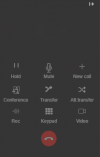
Skærmbillede 2024-06-25 112350.png

The reason we want it removed is because it's obstructing the view of the list on the webclient when in a call.
Our users are using Yealink desk phones to manage the incomming calls.
 
You cant remove it but you can close it. Upper corner right, just press this symbol.
 
You cant remove it but you can close it. Upper corner right, just press this symbol.
What symbol? The symbol on the upper right, on my screenshot, doesn't hide the call in the view. It gives these options: 1719318358857.png

Thank you for your reply though!
 
Oh yes sorry, its only avaiable whithout an call. During a call you cant hide this.
 
@torstensen
Click the "receiver" button on the toolbar, right above the dialer
 
Last edited:
@torstensen
Click the "receiver" button on the toolbar, right above the dialer
Thank you very much! This resolved the issue for our costumer service department.
Have a great day!
 
  • Like
Reactions: Vali_3CX
Can I somehow close this thread? Or should I just leave it be.

The problem was resolved by: @Vali_3CX
 
Status
Not open for further replies.

Latest Posts

Forum statistics

Threads
111,973
Messages
590,075
Members
164,895
Latest member
jasonkkrause