- Joined
- Mar 10, 2023
- Messages
- 9
- Reaction score
- 0
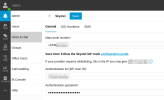
I have a single phone number via Skyetel, and right now voice is routing to 3CX Hosted Pro, and SMS to Textable.app. I would like to bring the SMS in to my 3CX Hosted Pro system, but I am unable to figure out how to route it and the guide is not helping. The goal is to send new SMS messages to a Queue so all assigned agents can see the messages and potentially take ownership.
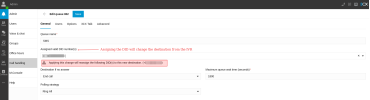
If I try to add the SMS option to the currently working Skyetel trunk I have a conflict as the General Tab » Route To is pointed at an IVR, so I can't change that option to the Queue, or all voice calls will reroute.
I started to create another Trunk for the same provider, but of course I am worried about all kinds of conflicts there and potentially stopping voice calls from working. The DID is the same number for calls and SMS.
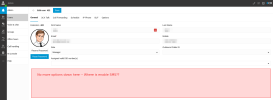
There are things in the guide that don't exist in my system. For example if I go to Users and select a user, the General tab is void of any option to enable SMS. Also going to the DIDs tab on the trunk just shows a single DID and the only thing I can edit is the number.
So while I have already the API Key setup and I have SMS configured on my existing Skyetel trunk, I see no way to route it. So I am not missing any messages, I have reverted the webhook URL at Skyetel to Textable.app until I get this figured out.
Thank you.
If I try to add the SMS option to the currently working Skyetel trunk I have a conflict as the General Tab » Route To is pointed at an IVR, so I can't change that option to the Queue, or all voice calls will reroute.
I started to create another Trunk for the same provider, but of course I am worried about all kinds of conflicts there and potentially stopping voice calls from working. The DID is the same number for calls and SMS.
There are things in the guide that don't exist in my system. For example if I go to Users and select a user, the General tab is void of any option to enable SMS. Also going to the DIDs tab on the trunk just shows a single DID and the only thing I can edit is the number.
So while I have already the API Key setup and I have SMS configured on my existing Skyetel trunk, I see no way to route it. So I am not missing any messages, I have reverted the webhook URL at Skyetel to Textable.app until I get this figured out.
Thank you.