Solved DTMF input not recognized by dialer app IVR when calling outbound

Status
Not open for further replies.

nextcx

Customer
Joined
Apr 20, 2022
Messages
33
Reaction score
3
Hello All,

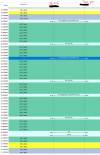
I'm trying to make an dialer app IVR (Outbound call by 3CX over SIPtrunk) that can recognize DTMF input, but as seen in screenshot it does not register the DTMF input.

When I make a call to the IVR DTMF input is registered.

Call flow apps:
Dialer CFD:
Make call from IVR (906) to Mobile extension (301)
Menu CFD:
Option 1 (Prompt playback 1)
Option 2 (Disconnect call)
Invalid (Disconnect call)
Extensions:
906 (IVR):
Prompt = Welcome
Menu options = none
Destination for invalid or no DTMF input = Send to CFD (Menu CFD)
301:
Forward to mobile number

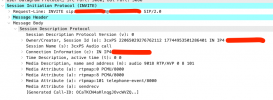
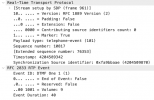
The SIPtrunk sends DTMF by RFC2833 (see also screenshot of the DTMF event and SDP of initial invite)
trace.png
trace1.png

trace2.png

Many thanks
 

Attachments

  • 2022-04-21 17_48_33-Follow Me Type Services 3CX _ 3CX.png
    2022-04-21 17_48_33-Follow Me Type Services 3CX _ 3CX.png
    33.7 KB · Views: 16
  • 2022-04-21 17_47_55-Follow Me Type Services 3CX _ 3CX.png
    2022-04-21 17_47_55-Follow Me Type Services 3CX _ 3CX.png
    42.3 KB · Views: 16
@ConceptsWeb
Source: 906 (DR)
Destination: 301 >> (mobile number)
DR setting: DTMF (we've also tried regular but this doesn't work as well).
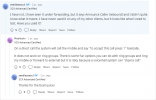
This is what I think is incorrect. Why are you calling the IVR first? The IVR will start playing the prompt before the external number picks up. This is conceptually wrong. You need to configure the Make Call component to call the external number first (Origin), and then configure the IVR as Destination. Also, why do you use an IVR there that will transfer the call to a CFD app after playing a prompt? Why don't you configure this to make the call to a CFD app directly?
 
  • Like
Reactions: Evolute IT
@ConceptsWeb @edossantos

Thank you for your reply, I have switched the source and destination. And also configured the CFD app directly.
But still no DTMF input is registered. What else could be the problem?
 
@ConceptsWeb @edossantos

Thank you for your reply, I have switched the source and destination. And also configured the CFD app directly.
But still no DTMF input is registered. What else could be the problem?
If DTMF digits are not being processed, most probably they're not being sent as RFC2833 signals. I understand that you have a Wireshark capture showing that digits are RFC2833 signals, but please check again if you're looking at the right call segment. What we need is the call connected to the CFD app, which might be different than the leg connected to the SIP Trunk...

Also, please enable verbose logs from the 3CX Console > Dashboard > Activity Log > Settings. Then make a test call where you reproduce the issue, and check the 3CXCallFlow.log file that you can download from the 3CX Console > Dashboard > Activity Log > Logs button > Instance folder. Ensure that the DTMF digits are not being logged as received. Maybe there is something in the app itself causing that digits are ignored, for example the Menu component has a property named AcceptDtmfInput, if you set this property to False, then any DTMF digit received during the menu prompt playback will be ignored.
 
@edossantos @ConceptsWeb

Thank you for your message, I have followed your instructions.

DTMF digits are visible within log file, I don't expect the issue on the sip trunk side because of this logging (DTMF on regular in/outbound calls are also working fine).
When I initiate the call using the dialer app, I don't see the message "Starting IVR session" within the logfile.
 
DTMF digits are visible within log file
Do you mean in the 3CXCallFlow.log file? Can you show this by copying a log snippet?
 
@edossantos

22/04/2022 15:36:19.873 [00000d18] RMS DTMF 1 of type 4
22/04/2022 15:36:19.873 [00000d18] RMS Locked DTMF type to RFC2833
22/04/2022 15:36:19.873 [00000d18] RMS DTMF buffer: 1
22/04/2022 15:36:20.010 [00000cfb] Updated: REGISTRATION.2
22/04/2022 15:36:21.233 [00000d18] RMS DTMF 2 of type 4
22/04/2022 15:36:21.233 [00000d18] RMS DTMF buffer: 2
22/04/2022 15:36:26.154 [00000d18] RMS DTMF 3 of type 4
22/04/2022 15:36:26.154 [00000d18] RMS DTMF buffer: 3
22/04/2022 15:36:26.154 [00000d18] RMS Invalid input: 3
22/04/2022 15:36:26.373 [00000d18] RMS DTMF # of type 4
22/04/2022 15:36:26.373 [00000d18] RMS DTMF buffer: #
22/04/2022 15:36:26.953 [00000d18] RMS DTMF * of type 4
22/04/2022 15:36:26.953 [00000d18] RMS DTMF buffer: *
 
@edossantos

22/04/2022 15:36:19.873 [00000d18] RMS DTMF 1 of type 4
22/04/2022 15:36:19.873 [00000d18] RMS Locked DTMF type to RFC2833
22/04/2022 15:36:19.873 [00000d18] RMS DTMF buffer: 1
22/04/2022 15:36:20.010 [00000cfb] Updated: REGISTRATION.2
22/04/2022 15:36:21.233 [00000d18] RMS DTMF 2 of type 4
22/04/2022 15:36:21.233 [00000d18] RMS DTMF buffer: 2
22/04/2022 15:36:26.154 [00000d18] RMS DTMF 3 of type 4
22/04/2022 15:36:26.154 [00000d18] RMS DTMF buffer: 3
22/04/2022 15:36:26.154 [00000d18] RMS Invalid input: 3
22/04/2022 15:36:26.373 [00000d18] RMS DTMF # of type 4
22/04/2022 15:36:26.373 [00000d18] RMS DTMF buffer: #
22/04/2022 15:36:26.953 [00000d18] RMS DTMF * of type 4
22/04/2022 15:36:26.953 [00000d18] RMS DTMF buffer: *
That's not from the 3CXCallFlow.log file. Where do you see that? Please check if you see those DTMF tones in the 3CXCallFlow.log file, that way you know if the CFD app is receiving it or not.
 
  • Like
Reactions: Evolute IT
Hello @ConceptsWeb @edossantos

Thank you for helping me with this problem, I have found that the issue was that I had no outbound caller ID, so the Make_Call component did not transfer the calls to outbound.

This post can be closed.
 
Status
Not open for further replies.

Forum statistics

Threads
112,190
Messages
591,172
Members
165,242
Latest member
cdebbo