Enable TLS between 3cx and SIP provider

Status
Not open for further replies.

erwan888

Free User
Joined
Jun 11, 2020
Messages
8
Reaction score
1
I have been trying to implement TLS using port 5061 between 3CX and SIP provider (Flowroute) but every time I changed the transport protocol under 3cx (SIP Trunks - Options), the registration failed right away (turned from green to red).
Here are my settings on SIP Provider based on the article posted by Flowroute:
- Go to Interconnection and add "Inbound Routes"
- Type = Host , Route = test.3cx.us:5061;transport=tls

Settings on 3cx:
- SIP Trunks - Select SIP Provider - General
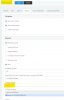
Put in Registrar information and turn off "Auto Discovery". Manually put in 5061 as port number.
- SIP Trunks - Select SIP Provider - Options
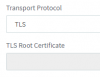
Change Transport Protocol from "Any" to "TLS"

Some troubleshooting steps that I have done:
- Turned off "Secure SIP" under Settings - Security
- Changed Registrar from hostname to IP and put it on Outbound proxy with port number 5061 ( Auto Discovery turned off)

Can someone check if I miss something?
 
Are your own phones able to use SIP TLS?
https://www.3cx.com/docs/secure-sip/#h.o0mhxbtegc1n

What did you upload for TLS Root certificate in SIP Trunk settings? Flowroute appears to be using Let's Encrypt, confirmed with OpenSSL:
Code:
openssl s_client -showcerts -connect us-west-wa.sip.flowroute.com:5061

Maybe try uploading "DST Root CA X3", which is Let's Encrypt's cross signing root:
https://letsencrypt.org/certs/trustid-x3-root.pem.txt

While I have not set this up myself I'm assuming you need to explicitly upload the root for the chain that the provider is using for it to be trusted.

Related:
https://www.3cx.com/community/threads/enabling-tls-for-sip-trunk.73465/#post-330703
 
I have not tried it yet on the phone. That will be the next step after TLS is working between 3cx and Flowroute.

I use the root cert from https://letsencrypt.org/certs/isrgrootx1.pem.txt

I tried the cert that you provided and the moment I applied, I got an email notification saying:
Registration at Flowroute has failed. Destination (sip:https://us-west-or.sip.flowroute.com%3a5061&c=E,1,_wJCXBQUfFJOw5wKzrLH1XlxjzjalJN-P6zr09t9GLI6bdPLLMH1Axy6v1_vXadEWhNOkiN5vJhGSLMbdVr2vSx9mtwoH0mfvwnjWn6lJETZ6o72PrF8EJhnqw,,&typo=1;transport=TLS;lr;maddr=x.x.x.x) is not reachable, DNS error resolving FQDN, or service is not available.

The subject on the email is DNS resolution/ Network failure.
 
Why does the SIP URI have https in it with a query string? The SIP Trunk Registrar/Server/Gateway Hostname or IP should just be "us-west-or.sip.flowroute.com" without quotes.

I suggest you try setting up an extension with Windows 3CX App using TLS without "Use 3CX Tunnel for remote connections". If it doesn't register, your own certificate or hostname configuration may be bad.

Also take a look at Dashboard -> Event Log and Dashboard -> Activity Log. Under Activity Log there is a Settings button which allows one to turn on Verbose logging.

Here is the chain they are sending. They are using the cross signed "DST Root CA X3" chain, not the self-signed "ISRG Root X1" chain https://letsencrypt.org/certificates/:
Code:
depth=2 O = Digital Signature Trust Co., CN = DST Root CA X3
verify return:1
depth=1 C = US, O = Let's Encrypt, CN = Let's Encrypt Authority X3
verify return:1
depth=0 CN = us-west-or.sip.flowroute.com
verify return:1
---
Certificate chain
 0 s:CN = us-west-or.sip.flowroute.com
   i:C = US, O = Let's Encrypt, CN = Let's Encrypt Authority X3
-----BEGIN CERTIFICATE-----
MIIFcDCCBFigAwIBAgISAxUuo9ZSJLDLKFW8izuabDF/MA0GCSqGSIb3DQEBCwUA
MEoxCzAJBgNVBAYTAlVTMRYwFAYDVQQKEw1MZXQncyBFbmNyeXB0MSMwIQYDVQQD
ExpMZXQncyBFbmNyeXB0IEF1dGhvcml0eSBYMzAeFw0yMDA2MjkyMjE0MDBaFw0y
MDA5MjcyMjE0MDBaMCcxJTAjBgNVBAMTHHVzLXdlc3Qtb3Iuc2lwLmZsb3dyb3V0
ZS5jb20wggEiMA0GCSqGSIb3DQEBAQUAA4IBDwAwggEKAoIBAQC2Vdg9FixgWGAP
il81qmTBc6t6Ipa1BUGFLkuxq+PIa/vSJ1vjuPlmFDVrh6qWb1Ng8HAZgFTB72Pj
U9aQ43MF5a0gWW3Aez2kisK/MO6O3lWSdPUsyUSTN1oPKtml9sLTWkK9QJE6FrQ/
dMbA/nv5sUnm9Pk5dI2sBsWefTQHYQkHVT3wTPW8nI57rm9jTPZsXO7VAMIU5Y24
xZN2Yv3SieASltm7I+YiNC6F/Gk2Dl3jIEv2FYXTqKm7DjcA7I9EFqlz41O8R2NS
FrzHyPaG5bAZ2STEQF/oh3+d5swHKo7L9fk/jQo1ZwaHf9di3hebnCiBtln2dPLa
ahR2QPzhAgMBAAGjggJxMIICbTAOBgNVHQ8BAf8EBAMCBaAwHQYDVR0lBBYwFAYI
KwYBBQUHAwEGCCsGAQUFBwMCMAwGA1UdEwEB/wQCMAAwHQYDVR0OBBYEFAyNDAbo
OqtLGx1dQbRv9JZ2ipDIMB8GA1UdIwQYMBaAFKhKamMEfd265tE5t6ZFZe/zqOyh
MG8GCCsGAQUFBwEBBGMwYTAuBggrBgEFBQcwAYYiaHR0cDovL29jc3AuaW50LXgz
LmxldHNlbmNyeXB0Lm9yZzAvBggrBgEFBQcwAoYjaHR0cDovL2NlcnQuaW50LXgz
LmxldHNlbmNyeXB0Lm9yZy8wJwYDVR0RBCAwHoIcdXMtd2VzdC1vci5zaXAuZmxv
d3JvdXRlLmNvbTBMBgNVHSAERTBDMAgGBmeBDAECATA3BgsrBgEEAYLfEwEBATAo
MCYGCCsGAQUFBwIBFhpodHRwOi8vY3BzLmxldHNlbmNyeXB0Lm9yZzCCAQQGCisG
AQQB1nkCBAIEgfUEgfIA8AB2AF6nc/nfVsDntTZIfdBJ4DJ6kZoMhKESEoQYdZaB
cUVYAAABcwJb2UAAAAQDAEcwRQIgEMBFAIglDo8VTOsHTmE+QVKp9X5GRo+wyweV
Qh+3KzECIQDykh99UDGUp+68NcMQfpKqSwZHpmHeHbvvdjEuoXvgjwB2AAe3XBvl
fWj/8bDGHSMVx7rmV3xXlLdq7rxhOhpp06IcAAABcwJb2WkAAAQDAEcwRQIhANRW
XQUfuBvWaFBEIR1QEHAAs2pfKzB4hlGrHRB0kYY5AiBPUjcShkgB/k1ACYZdP2b5
555fvdLVhzgtoZGEsHdMUDANBgkqhkiG9w0BAQsFAAOCAQEAbglegkI6+6VDWhVw
wOpJN8+tFxJ+2fdvgELUlv22sgFgdKuztNlVKBMLXXq6i+dxogr8uALu60gOlPn+
ClbtBIbiWhV+gg8UZXWMrLLzNP9jjzHBr1ZQBoSjVyq8vO8L0mQiyS/b6e3Bb2pQ
rE4NQxl+KNN4knJDcdxw0KXm/vJTiT00a84ocqIjsURTonYef73bCY6Ow1LM9LJa
/VzIrytGK6dvuUw9zsA62qT94lsxlELiXC4wL1Hhtl0inraTw3uBmbDME/iKwd0+
8AMYlkSrzpAgA8scVj55jxVFIaVhI7TrHJg6TiXZaaqIwY056z6GM1v+FLk3N2qN
yHjjrA==
-----END CERTIFICATE-----
 1 s:C = US, O = Let's Encrypt, CN = Let's Encrypt Authority X3
   i:O = Digital Signature Trust Co., CN = DST Root CA X3
-----BEGIN CERTIFICATE-----
MIIEkjCCA3qgAwIBAgIQCgFBQgAAAVOFc2oLheynCDANBgkqhkiG9w0BAQsFADA/
MSQwIgYDVQQKExtEaWdpdGFsIFNpZ25hdHVyZSBUcnVzdCBDby4xFzAVBgNVBAMT
DkRTVCBSb290IENBIFgzMB4XDTE2MDMxNzE2NDA0NloXDTIxMDMxNzE2NDA0Nlow
SjELMAkGA1UEBhMCVVMxFjAUBgNVBAoTDUxldCdzIEVuY3J5cHQxIzAhBgNVBAMT
GkxldCdzIEVuY3J5cHQgQXV0aG9yaXR5IFgzMIIBIjANBgkqhkiG9w0BAQEFAAOC
AQ8AMIIBCgKCAQEAnNMM8FrlLke3cl03g7NoYzDq1zUmGSXhvb418XCSL7e4S0EF
q6meNQhY7LEqxGiHC6PjdeTm86dicbp5gWAf15Gan/PQeGdxyGkOlZHP/uaZ6WA8
SMx+yk13EiSdRxta67nsHjcAHJyse6cF6s5K671B5TaYucv9bTyWaN8jKkKQDIZ0
Z8h/pZq4UmEUEz9l6YKHy9v6Dlb2honzhT+Xhq+w3Brvaw2VFn3EK6BlspkENnWA
a6xK8xuQSXgvopZPKiAlKQTGdMDQMc2PMTiVFrqoM7hD8bEfwzB/onkxEz0tNvjj
/PIzark5McWvxI0NHWQWM6r6hCm21AvA2H3DkwIDAQABo4IBfTCCAXkwEgYDVR0T
AQH/BAgwBgEB/wIBADAOBgNVHQ8BAf8EBAMCAYYwfwYIKwYBBQUHAQEEczBxMDIG
CCsGAQUFBzABhiZodHRwOi8vaXNyZy50cnVzdGlkLm9jc3AuaWRlbnRydXN0LmNv
bTA7BggrBgEFBQcwAoYvaHR0cDovL2FwcHMuaWRlbnRydXN0LmNvbS9yb290cy9k
c3Ryb290Y2F4My5wN2MwHwYDVR0jBBgwFoAUxKexpHsscfrb4UuQdf/EFWCFiRAw
VAYDVR0gBE0wSzAIBgZngQwBAgEwPwYLKwYBBAGC3xMBAQEwMDAuBggrBgEFBQcC
ARYiaHR0cDovL2Nwcy5yb290LXgxLmxldHNlbmNyeXB0Lm9yZzA8BgNVHR8ENTAz
MDGgL6AthitodHRwOi8vY3JsLmlkZW50cnVzdC5jb20vRFNUUk9PVENBWDNDUkwu
Y3JsMB0GA1UdDgQWBBSoSmpjBH3duubRObemRWXv86jsoTANBgkqhkiG9w0BAQsF
AAOCAQEA3TPXEfNjWDjdGBX7CVW+dla5cEilaUcne8IkCJLxWh9KEik3JHRRHGJo
uM2VcGfl96S8TihRzZvoroed6ti6WqEBmtzw3Wodatg+VyOeph4EYpr/1wXKtx8/
wApIvJSwtmVi4MFU5aMqrSDE6ea73Mj2tcMyo5jMd6jmeWUHK8so/joWUoHOUgwu
X4Po1QYz+3dszkDqMp4fklxBwXRsW10KXzPMTZ+sOPAveyxindmjkW8lGy+QsRlG
PfZ+G6Z6h7mjem0Y+iWlkYcV4PIWL1iwBi8saCbGS5jN2p8M+X+Q7UNKEkROb3N6
KOqkqm57TH2H3eDJAkSnh6/DNFu0Qg==
-----END CERTIFICATE-----
---
Server certificate
subject=CN = us-west-or.sip.flowroute.com

issuer=C = US, O = Let's Encrypt, CN = Let's Encrypt Authority X3
 
Ask your provider to give you the required certificate, and test again to see if it works.

As for the moment it is not considered supported.
 
Ask your provider to give you the required certificate, and test again to see if it works.

As for the moment it is not considered supported.

Hi John -

I asked the provider (Flowroute). This is what their response:
You need a certificate from a SSL cert provider not from us. We use https://letsencrypt.org/
You may obtain your public SSL cert from any cert provider you prefer.


Since you also mentioned about provider, are we talking about SSL provider (such as letsencrypt, digicert) or SIP provider (Flowroute or Telnyx)?
 

Attachments

  • 1598945346550.png
    1598945346550.png
    2.8 KB · Views: 13
Ok try this https://letsencrypt.org/certs/lets-encrypt-x3-cross-signed.pem.txt

Save it as .pem in the end, and make sure the contents are exact

Upload it in your trunk TLS settings

Change your registrar to Auto Discovery and use this registrar for testing:

sa-east-sp.sip.flowroute.com
I saved the certificate using the provided link.

The moment that I uploaded the cert and saved the settings, I got an email right away about DNS resolution/ Network failure on the subject.

Here is the content:

Registration at Flowroute has failed.

Destination (sip:sa-east-sp.sip.flowroute.com:5061;transport=TLS;lr;maddr=34.226.36.33) is not reachable, DNS error resolving FQDN, or service is not available.

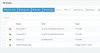
On Activity Logs, here is the screenshot about certificate validation failure/register from local.
Annotation 2020-09-01 152023.jpg
 

Attachments

  • certerror.png
    certerror.png
    35.5 KB · Views: 5
Last edited:
Start a capture on your PBX https://www.3cx.com/docs/capture-network-traffic/

While running, open a 2nd tab and goto services and restart SIP service

After about a minute or so end the capture and open it in Wireshark

We are looking for DNS requests from your PBX to your DNS server (which could be part of the problem). Also, which DNS server replied and what did it reply back to the PBX
 
I suggest you try setting up an extension with Windows 3CX App using TLS without "Use 3CX Tunnel for remote connections". If it doesn't register, your own certificate or hostname configuration may be bad.
I tried it and it failed to register.

John: I tried to subscribe to another SIP provider (Telnyx) for testing. It works right away without any issues when I turn on TLS by following this link https://www.3cx.com/docs/telnyx-voip-provider/
Annotation 2020-09-03 074235.jpg
Annotation 2020-09-03 074236.jpg


At this point, can I conclude that the issue is more on Flowroute or more specific on the certificate or DNS? I ran a package capture but not sure exactly what to look for. Can I send it to you in PM?
 
sure, upload it in some public folder and PM me the link
 
So which traffic you have issues with to encrypt:
the inbound SIP traffic from Flowroute to 3CX or the outbound from 3CX to flowroute.

The route setup in flowroute addresses the inbound SIP traffic.
requires port 5061 on 3cx has to be reachable
and yes you need a SSL cert installed on 3CX which if you use the default one that 3CX provides is sufficient (depents if you use your own domain or 3CX domain)

The outbound traffic to flowroute. That I have not setup either because I couldn't make it work. And I believe that is the part that 3CX doesn't support yet.
 
Hi Erwan,

At some point during the TLS negotiation, your PBX sends its cert to the provider (upon their request) and they appear to be rejecting you because that cert is expired, hence the 503 Certificate Validation Failure message. This is Two-Way SSL

Telnyx does not request sending your own cert, so this issue does not crop up with them.
This is One-Way SSL

You can open your TLS capture in two separate WireShark windows so you can compare them side by side ( I will PM you the filters )

If you find out the expired cert and remove it, then restart your server then you might be successful.
 
Status
Not open for further replies.

Latest Posts

Forum statistics

Threads
111,962
Messages
589,993
Members
164,867
Latest member
swegner