Enjoy a More Native Experience with the Latest iOS App

@paulc79

@gbourgeois reported, quoted
"In the notifications, when a remote person (with the phone configured in STUN / Yealink ) calls me, I see the domain name of our company, instead of the CNAME of the caller."

and you said
"I'm also having this issue and it's affecting both IOS and Android phones."

This has nothing to do with what you describe now, about TCP and UDP connections - there are two, unrelated issues.

For connection, definitely check the PBX, to have the firewall tunnel port (typically 5090) open for both TCP and UDP connection: https://www.3cx.com/docs/ports/ If this is the issue, please report it here: https://www.3cx.com/community/threads/constant-reconnecting-beeping-since-16-1-7-update.81829/
 
I haven't tested that to be honest, we work almost entirely remotely using iphone/android and windows softphone. We have noticed that the PBX is only seeing connections on TCP 5090 - we're looking at this at the minute. Seems the older client was happy to pick up on TCP only - Windows Clients are unaffected but we've noticed they are using TCP. Could the new client be fixed to UDP?
Just an FYI, we had restarted the services via the console (a few times), so presumed it was ok. After hours of trying various things, I restarted the phone server services manually and at the current time it's working ok. We still haven't got to the bottom of why UDP doesn't appear to be listening, firewall rules are open, but for the time being it seems to be ok. Weird!
 
  • Like
Reactions: Vali_3CX
@paulc79

@gbourgeois reported, quoted
"In the notifications, when a remote person (with the phone configured in STUN / Yealink ) calls me, I see the domain name of our company, instead of the CNAME of the caller."

and you said
"I'm also having this issue and it's affecting both IOS and Android phones."

This has nothing to do with what you describe now, about TCP and UDP connections - there are two, unrelated issues.

For connection, definitely check the PBX, to have the firewall tunnel port (typically 5090) open for both TCP and UDP connection: https://www.3cx.com/docs/ports/ If this is the issue, please report it here: https://www.3cx.com/community/threads/constant-reconnecting-beeping-since-16-1-7-update.81829/
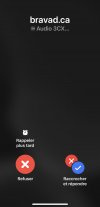
I was responding to this reference: https://www.3cx.com/community/threa...nce-with-the-latest-ios-app.81755/post-378126
 
Are you also seeing @bravad or something else?

After Valeriu have reply my post, I investigated.
My Push problem was related to a double nat problem (poorly configured).
We have solved the problem. Push works correctly.

Also, I found my problem why I was seeing my domain name.​
I am extremely embarrassed, childish mistake. Lol ! No, not a Double Nat mistake
61DD3336-A384-46F6-8F66-A3E7BB344234.jpeg


Well, I'm going to come across as being extremely, very incompetent in my area of expertise, but ridicule doesn't kill. I share.
You have the right to make fun of me but remain respectful, I share with you, I assume my error analysis.:D

Considering a « PUSH issue », I uninstalled the app believing the issue was from updating from AppStore... the TestFlight version -> AppStore Version.

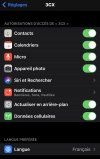
When I installed the app again, it asked for permission to access some resources. Have no fear, I accepted everything.
5A2EAAA1-CB9A-4DCC-A58E-DECF5E84440E.jpeg


I forgot that I had not accepted to access my iOS contacts on the TestFlight version.

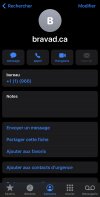
73F43FB9-61F3-4A1C-9012-6BB02C173FD7.jpeg

Yes, you got it !! I don't know why, but my extension was created in a contact in my phonebook (Maybe I created this during the full moon, I don't remember doing that).

No matter how much I tried any PBX on my same cell, I had the same problem, but I always used the same extension number. So it's the same contact that is displayed .. (really!).

In summary I had confused 2 problems and believed in a single problem.
#1 Problem with Push , caused by a new network configuration where the PBXs are installed (New DataCenter environment) and caused a bad double-nat where the pbx is located.

#2 A basic function that made me a bad joke. If it has matches in « Contacts repertory » iOS displays the contact information saved in the phone.

~ All humans have the right to make mistakes. ~

- Guillaume
 
After Valeriu have reply my post, I investigated.
My Push problem was related to a double nat problem (poorly configured).
We have solved the problem. Push works correctly.

Also, I found my problem why I was seeing my domain name.​
I am extremely embarrassed, childish mistake. Lol ! No, not a Double Nat mistake


Well, I'm going to come across as being extremely, very incompetent in my area of expertise, but ridicule doesn't kill. I share.
You have the right to make fun of me but remain respectful, I share with you, I assume my error analysis.:D

Considering a « PUSH issue », I uninstalled the app believing the issue was from updating from AppStore... the TestFlight version -> AppStore Version.

When I installed the app again, it asked for permission to access some resources. Have no fear, I accepted everything.


I forgot that I had not accepted to access my iOS contacts on the TestFlight version.

View attachment 22299

Yes, you got it !! I don't know why, but my extension was created in a contact in my phonebook (Maybe I created this during the full moon, I don't remember doing that).

No matter how much I tried any PBX on my same cell, I had the same problem, but I always used the same extension number. So it's the same contact that is displayed .. (really!).

In summary I had confused 2 problems and believed in a single problem.
#1 Problem with Push , caused by a new network configuration where the PBXs are installed (New DataCenter environment) and caused a bad double-nat where the pbx is located.

#2 A basic function that made me a bad joke. If it has matches in « Contacts repertory » iOS displays the contact information saved in the phone.

~ All humans have the right to make mistakes. ~

- Guillaume
That was a roller coaster
 
  • Like
Reactions: Evolute IT
  • Haha
Reactions: accentlogic
Just a quick note, we were doing iOS training and when you are doing an attended transfer, after you connect with the person you want to transfer the call to, to complete the transfer the button says "join" which is a bit misleading.

Technically you are just transferring the call and leaving the call. Is there any plans to change that back to transfer or something more clear?
 
Is it possible to trigger 3CX to dial directly from iOS contacts list?
 
Yes, you can.
can you please suggest how? I tried saving 4 digits 3CX's contact and when press to dial, it defaults to nativa iOS call.
 
не могли бы вы, пожалуйста, подсказать, как это сделать? Я попытался сохранить 4-значный контакт 3CX, и при нажатии для набора номера по умолчанию используется вызов nativa iOS.
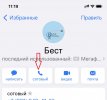
IMG_7063.jpg

press and hold the "call" button, an additional menu will appear. choose the option you need.
 
press and hold the "call" button, an additional menu will appear. choose the option you need.
Thanks, that did work.
 

Forum statistics

Threads
111,993
Messages
590,178
Members
164,933
Latest member
bunthoeun.may