Extension showing old user on phones

dbnsllc

Bronze Partner
Joined
Jun 2, 2023
Messages
17
Reaction score
0

I am experiencing same issue as this previous thread. Not sure if has been fixed or not.​

Any solution on how to fix it?​

​

Extension showing old user on phones​


I am experiencing same issue as this previous thread. Not sure if has been fixed or not.​

Any solution on how to fix it?​

​

Extension showing old user on phones​

Have you tried factory resetting the phone?
Also, what is the phone's model and firmware version?
 
Yes, i did reset phone few times already. Also deleted extension and recreated again. Phone is Fanvil X4 with firmware: 2.14.0.7387. But it is not this phone. Other phones do see old user name. This phone does show new user name. This is not with all phones. Some do show new user and some do show old user. When i pick up call from that phone on my cell phone app, new user does show. On other deskphones within site all phones do show old user except only one phone. Phones are behind SBC.
 
The fact that some devices are seeing the new name would suggest that it is being sent correctly. I suspect that some devices, that have not been reset, have simply retained (personal directory?) the old name, and continue to associate it with the extension number.
 
I am aware of it, but it is showing on something like 15 devices. Anyway we can clear that?
 
Short of a "factory reset", you could have people check the phones directory, and delete the entry with the incorrect name.
 
Is any way we can do that without going to each phone?
 
It sounds, like @leejor said, that the phones that do not work right (the ones that show the wrong info - not the actual extensions of the new users), have not been properly factory reset.
- This is the first step of troubleshooting. Always!
- Then firmware (make sure all phones have the latest 3CX firmware - not the latest vendor firmware!!!)
- I assume your PBX is running the latest and greatest

What do these users see when they use the app? I mean the users that their X4 shows the wrong info. When they use the app, what do they see?
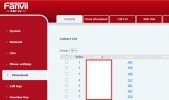
  • if they see the correct info, then the problem is 100% with your desk phones (if you have done the factory reset properly, then login to the phone web interface and check the PHONEBOOK
Check the CONTACTS that should be empty BUT!!!!! keep scrolling and look at the next screenshot about the cloud phonebook​
phonebook1.jpg​
​
​
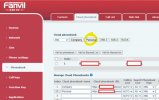
Note here (in the cloud phonebook), you have a company and a personal phonebook (you can see both in XML if you copy the URLs from the table under MANAGE CLOUD PHONEBOOKS)​
Check these and delete if you have already done a factory reset and they are still there​
phonebook2.jpg​
​
My bet is the above - stuck entries on the desk phone.

  • if they don't see the correct info in the app, I would try the following:
    • impersonate the user extension that sees the wrong info (again - not the new user!!!) - go to CONTACTS and check ALL contacts (personal and everything should show up there)
    • Also just in case, check here? https://YOUR_FQDN/#/office/system/contacts

Hope that helps
 
  • Like
Reactions: Evolute IT and N_G

Forum statistics

Threads
112,283
Messages
591,700
Members
165,406
Latest member
ARKC