Fail - Apple Push Notifications in 3CX Management Console ?

Status
Not open for further replies.

a6ela

Joined
Feb 23, 2017
Messages
3
Reaction score
0
Morning All,

I'm currently new to 3CX and having a little bit of a issue trying to work out how to setup "Apple push notifications". If I go by what is written in the manual (www.3cx.com/docs/configuring-apple-push/). I can not work out what they are saying.

We are running v15, and the layout has changed. So when I log into the Management console, I go to settings (on the left side) then click on "3CXphone".

I can see where we can setup "google push", but where is the box that allows me to tick enable apple push?

any help would be greatly appreciated.
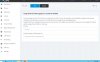
3CX fail.jpg
 
Apple push should just work... out of the box... as long as it is enabled for the particular extension.
And, your firewall has these ports open - OUTBOUND: Port 2195, 2196 (outbound, TCP) for Apple iOS Push
Notice the link you refer to clearly says on the first line: This guide applies only for 3CX Phone System 12 and 12.5.
 
Thanks for the reply Craig, I have had a look at the users extension options, what am i looking for to "enable" it?
 
Open an Extension
goto the phone provisioning tab
chaneg the dropdown from "Yealink (or other)" to 3cx Client.
Enable Push for Smartphone
 
Thanks again for the reply.
All these settings you have told me about are already setup on our server.

Maybe I have asked the wrong question before, here is my true problem.

Staff have iPhones (mostly running ios10.x) when they are OUT of the app, and doing other things on the phone or the phone screen is off, 3CX does not work. I thought that the "push" option should allow them to use 3CX with out the application be open on the screen. Am i right saying this? or 3CX ONLY works when the app is open??

cheers
 
I thought you were having issues with setup. You have done all that. So, onto diagnostics.

It should always work - and seems to work for me...
I just tested mine and it did just that.
Client: 15.2.5.138 (beta)
Verizon LTE

Perhaps a Wireshark on the server would ensure the push is actually going out... I am going to do some more tests here.

What are your clients on - WiFi or Cell? Carrier?
 
Hello @a6ela

On the update section on the top of the the update section make sure that under "other" there is no IOS certificate waiting to be installed.
If there is one there then install it and then send new welcome emails to your IOS devices.
Also make sure that in the iPhones notifications for the 3CX app are allowed.
 
Status
Not open for further replies.

Forum statistics

Threads
111,856
Messages
589,408
Members
164,694
Latest member
Xavierf