Fax ATA

SaraMarlar

Forum User
Advanced Certified
Joined
Sep 27, 2023
Messages
56
Reaction score
9
Not sure what I'm doing wrong. Two separate clients we've tried to setup a fax ATA, and it's failing.

1st scenario:
V20 PBX
Grandstream HT812 ATA provisioned with a T46U as it's SBC
Fax extension registered successfully
Xerox printer
Outbound faxes fail every time. Calling out on that extension/ATA with a analog phone works every time.

2nd scenario:
V20 PBX
Grandstream HT812 ATA provisioned with a T46U as it's SBC
Fax extension registered successfully
HP printer
Outbound faxes fail every time. Calling out on that extension/ATA with a analog phone works every time.


What am I missing? I followed this exactly: https://www.3cx.com/voip-gateways/grandstream-ht-fxs/
 
Does your SIP provider support fax?
 
Yes, we have the same setup working for another client who has a Canon printer. Plugged it in and it worked right away.
 
I am having a difficult time getting this to work. We got this to work without a problem at all for another PBX, and all we did was plug it in and it went to working.

I have followed these instructions exactly: https://www.3cx.com/voip-gateways/grandstream-ht-fxs/

  1. Created fax extension 8800
  2. Added Grandstream HT812 to the Voice & Chat menu and set to use T46U as it's SBC and added the fax extension 8800 as the user
  3. Assigned the fax DID to the fax extension 8800
  4. Downloaded the config file from the provisioning URL
  5. Updated firmware on Grandstream
  6. Uploaded config file on Grandstream
  7. Fax extension is registered
  8. Grandstream is connected to fax port on printer
Outbound fax calls do not go through or reach our provider, Bandwidth.

Bandwidth does support T.38 and faxing, it worked just fine on another client's PBX.

Please help, this client is not happy about their fax no longer working after migrating to 3CX when we assured them it would.
 
In some cases the devices (Fax Machines), have a setting, to allow them to work (slow down the data speed), when using VoIP. Have you checked to see if this, if available, is enabled?

Do you have access to the 3CX Activity Log? If so, does it provide any clues as to why the calls are not going out?
 
Last edited:
Outbound fax calls do not go through or reach our provider, Bandwidth.
- Can you plug an analog phone into the same FXS port the FAX machine was using, and dial that same FAX number to confirm the outbound rules allow the call?

- Can you check whether the FAX machine was previously programmed to dial a prefix automatically in front of whatever number the user enters?

- Can you check your 3CX logs (Activity Log / Event Log / and Call Log) to see what the machine actually dialed out?

Sounds like the Xerox machine is doing something unexpected or may need some minor adjustments.
You can also bring along a small fax machine to plug into the same cable and confirm that it works.
If it does, then it's up to the Xerox people to come troubleshoot and make any adjustments needed.

PS: Can also confirm sending faxes successfully here using HT812 (1.0.55.5) on V20 Update 3.
 
  • Like
Reactions: SaraMarlar
In some cases the devices (Fax Machines), have a setting, to allow them to work (slow down the data speed), when using VoIP. Have you checked to see if this, if available, is enabled?

Do you have access to the 3CX Activity Log? If so, does it provide any clues as to why the calls are not going out?
Currently we're testing in house with our demo PBX and an HP printer, and in this case the ATA isn't even making a call to the PBX successfully. It just shows phone line unavailable, as if the printer doesn't recognize the ATA as a sip device. The HP printer has very little in the way of fax settings.
 
- Can you plug an analog phone into the same FXS port the FAX machine was using, and dial that same FAX number to confirm the outbound rules allow the call?
The above test should clear things up with the ATA.

It would be a good idea to factory reset it and reprovision it again, just in case there were any modified settings.
 
The above test should clear things up with the ATA.

It would be a good idea to factory reset it and reprovision it again, just in case there were any modified settings.
In the client's environment, we did test calls with an analog phone on the ata and all calls went through successfully, but once plugging the ata back into the printer, all faxes out failed everytime. :(
 
Either it's not dialling, or it dials something invalid and is blocked by the rules.

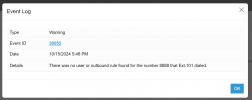
Example event log entry where I dialled an invalid destination from Ext.101
1729003734158.png
 
Either it's not dialling, or it dials something invalid and is blocked by the rules.

Example event log entry where I dialled an invalid destination from Ext.101
While testing in house, there arent even call logs or event logs when it tries to dial out. An analog handset can call out on the ATA without a problem, but the printer can't.

In the clients enviroment, it would call out, the receiving end would answer, the call log would always show talking for 46 seconds, and then the receiving end would end the call. No idea why the Xerox would call out, and still say the fax failed. But this inhouse HP just shows phone line not available.
 
- Can you plug an analog phone into the same FXS port the FAX machine was using, and dial that same FAX number to confirm the outbound rules allow the call?
Yes, plugging in an analog phone allows calls out successfully, both to the test fax number and to a cell number.
- Can you check whether the FAX machine was previously programmed to dial a prefix automatically in front of whatever number the user enters?
This HP printer does not have any settings added to prefix dial. We have an outbound rule set for the fax extension 8800, and the fax server extension 8888 to dial 10 digit numbers with a prefix of +1 since that's what's need for Bandwidth.com just like voice calls, which work when the ATA calls using analog phone.
- Can you check your 3CX logs (Activity Log / Event Log / and Call Log) to see what the machine actually dialed out?
Currently we're testing inhouse with an HP printer, and in this case, the ATA isn't even reaching the PBX when trying to fax from the fax machine, it has no logs associated with it in event log / call log
Sounds like the Xerox machine is doing something unexpected or may need some minor adjustments.
You can also bring along a small fax machine to plug into the same cable and confirm that it works.
If it does, then it's up to the Xerox people to come troubleshoot and make any adjustments needed.

PS: Can also confirm sending faxes successfully here using HT812 (1.0.55.5) on V20 Update 3.
I agree. at the problem clients location, they have a xerox. The Xerox at least dials, and we can see logs, but the faxes always fail even though analog calls succeed.

In house, we have an HP and it's not even dialing out.

At another client, they have a Canon and it had no issues at all, just plug and play, same setup.
 
It just shows phone line unavailable
Given this "message", My guess is that there is an open between the ATA and Fax device. It would seem to indicate that the machine sees no voltage on the phone line. Faulty phone cable perhaps? ...or plugged into the wrong socket on the machine (there are sometimes two phone jacks)?
 
Yes, plugging in an analog phone allows calls out successfully, both to the test fax number and to a cell number.

This HP printer does not have any settings added to prefix dial. We have an outbound rule set for the fax extension 8800, and the fax server extension 8888 to dial 10 digit numbers with a prefix of +1 since that's what's need for Bandwidth.com just like voice calls, which work when the ATA calls using analog phone.

Currently we're testing inhouse with an HP printer, and in this case, the ATA isn't even reaching the PBX when trying to fax from the fax machine, it has no logs associated with it in event log / call log

I agree. at the problem clients location, they have a xerox. The Xerox at least dials, and we can see logs, but the faxes always fail even though analog calls succeed.

In house, we have an HP and it's not even dialing out.

At another client, they have a Canon and it had no issues at all, just plug and play, same setup.
Hi, my client has a Xerox copier/fax and I've spent days trying to get it to work, without success. Exact scenario as your setup.
I had to set up the Fax Server feature and get all incoming faxes sent to reception email. Not what they want.

Did you get this resolved? As I too have a very disgruntled client, having just migrated to 3CX.
David
 
Hi, my client has a Xerox copier/fax and I've spent days trying to get it to work, without success. Exact scenario as your setup.
I had to set up the Fax Server feature and get all incoming faxes sent to reception email. Not what they want.

Did you get this resolved? As I too have a very disgruntled client, having just migrated to 3CX.
David
As mentioned above, please see these troubleshooting steps

Does your SIP provider support fax?

A fax calls is not the same as a normal voice call. some providers even break out into hives when fax is mentioned.

In some cases the devices (Fax Machines), have a setting, to allow them to work (slow down the data speed), when using VoIP. Have you checked to see if this, if available, is enabled?

sometimes newer fax machines have a higher bitrate which some lines cannot keep up with. Check this.

Yes, we have the same setup working for another client who has a Canon printer. Plugged it in and it worked right away.

This could be a specific device issue, so check if your printer has a firmware update for example.

In the client's environment, we did test calls with an analog phone on the ata and all calls went through successfully, but once plugging the ata back into the printer, all faxes out failed everytime.

This cements my point that fax calls are not the same. Put a phone on your ATA and make a few test (voice) calls. This can verify that 3CX and the ATA device are working fine and you can pinpoint where your issue is.
 
Yes, plugging in an analog phone allows calls out successfully, both to the test fax number and to a cell number.

This HP printer does not have any settings added to prefix dial. We have an outbound rule set for the fax extension 8800, and the fax server extension 8888 to dial 10 digit numbers with a prefix of +1 since that's what's need for Bandwidth.com just like voice calls, which work when the ATA calls using analog phone.

Currently we're testing inhouse with an HP printer, and in this case, the ATA isn't even reaching the PBX when trying to fax from the fax machine, it has no logs associated with it in event log / call log

I agree. at the problem clients location, they have a xerox. The Xerox at least dials, and we can see logs, but the faxes always fail even though analog calls succeed.

In house, we have an HP and it's not even dialing out.

At another client, they have a Canon and it had no issues at all, just plug and play, same setup.
Did you ever get this resolved? I support a large law firm and faxing using an HT802 ATA always worked fine until something 3CX did with v20. I've tried working with 3CX Support but they don't officially support faxing.
 

Latest Posts

Forum statistics

Threads
111,883
Messages
589,537
Members
164,741
Latest member
Carsonix