Solved Force in/ out does not work

Status
Not open for further replies.

IsaacK

SOHO User
Joined
May 31, 2023
Messages
27
Reaction score
5
What am I doing wrong? I defined a dial code for force in/out in settings to *75. When I dial *751 I hear the announcement that the system is in IN mode. Despite that the system stays in out of office mode as defined by office hours.
 
If you heard the announcement this means that the PBX is forced to IN Office Hours.
What is the destination for the Out Of Office hours and what for the In Office?
 
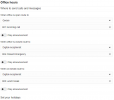
In office the system rings the extensions. Out of office it goes to digital receptionist. There is absolutely no issue with automatic office hour switch. It works as intended. When I try to switch manually it still sends to dedicated out of office digital receptionist. Something’s not right here.
 
Is there any other inbound rule that when you are In Office will route calls to the IVR?
 
The rule is there and it is not different for IN or OUT mode. See screenshots.
 

Attachments

  • 3cx inbound rules.PNG
    3cx inbound rules.PNG
    9 KB · Views: 5
  • 3cx office hours.PNG
    3cx office hours.PNG
    18 KB · Views: 4
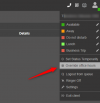
If you select to override the Office hours from the web client or desktop as per below example, the issue is the same?
1699937828264.png
 
Never tried. Does it override the system mode or extension mode? i need to override the system.
 
This is for the system.
 
I will try it in am. I may wake up couple of people trying it now. Thank you!
 
You are welcome ;)
 
This worked! I didn't know about the ability to do that. Why bother with the dial codes? The options in the menu are awesome. I don't know if they are described anywhere in the manuals, but I think they should be. Problem solved. Thank you again!
 
  • Like
Reactions: NatalyS_3CX and jed
Glad to assist ;)
 
  • Like
Reactions: NatalyS_3CX
Status
Not open for further replies.

Forum statistics

Threads
111,974
Messages
590,081
Members
164,899
Latest member
mazet