Forward call to mobile number

Status
Not open for further replies.

Larsvdh

New User
Joined
May 12, 2021
Messages
4
Reaction score
0
We are currently having some issues with forwarding calls outside of office hours, is there a specific number format that has to be used under Out of Office?

like 06 in the netherlands or +316 ?

or should the number start with a double 0 for outbound calls? because we had to use that on the VoIP network at my previous employer
 
Hi @Larsvdh,

Have you tried to forward to mobile during office hours? Does it work?
 
@VasilisV_3CX due to incomming call we are currently not able to test it during office hours. i asked the question because i we will be re-configuring and testing some setting in a few hours.
 
@Larsvdh,

Okay then, some things to check would be:

  1. Your outgoing rules. Make sure that your outbound rules allow the forward to mobile to run without blocking it.
  2. Under Settings >> General >> Automatically disable Outbound calls on all Ports outside Office hours is disabled.
  3. The format of the number would be what your provider want to receive, this you'd need to check with them, or refer to current rules already set up on the system.
 
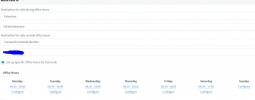
@VasilisV_3CX I was able to make some time to test the settings, the out of office settings give the message: "the number you are trying to call is currently unavaillible" the settings you suggested are set up correctly.when a call is out of office hours i will anounce the prompt aboveCall forwarding.PNG
 
Hi @Larsvdh,

If the exact wording that you're hearing is "the number you are trying to call is currently unavailable", this would mean that the call has already left the 3CX PBX.

I noticed the screenshot you provided is from the SIP Trunk configuration, do you happen to have any inbound rules that may be matching this inbound call instead?
 
Have you tried doing some testing the forwarding to a known landline number, rather than a mobile? The recording your are getting is similar to one where a mobile has no voicemail configured, and is unreachable, i.e., switched off.
 
Hi @Larsvdh,

If the exact wording that you're hearing is "the number you are trying to call is currently unavailable", this would mean that the call has already left the 3CX PBX.

I noticed the screenshot you provided is from the SIP Trunk configuration, do you happen to have any inbound rules that may be matching this inbound call instead?
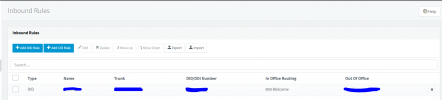
do you mean this by inbound calls (attatched a picture)? or did you mean a configured CID rule?
What leejor said was tested. Calls show up as not answered (2nd picture added is the one from the calls log).
 

Attachments

  • inbound rules.PNG
    inbound rules.PNG
    18.9 KB · Views: 15
  • inbound calls.PNG
    inbound calls.PNG
    7.2 KB · Views: 14
What log (3CX Activity Log) do you get back, from your provider, when the call is sent to them?
Perhaps compare that type of call (one that is failing), with a log of a call to the same number, dialled direct from an extension. What is different? Sent number, perhaps caller ID?
 
do you mean this by inbound calls (attached a picture)? or did you mean a configured CID rule?
He means both, regardless if it's a DID or CID Rule, there might be a rule matching that same call and therefore using different routing. Though if you see a call log entry to the mobile number you have set then it means you are probably not matching a different rule. I would first simply try and make an outbound call to this mobile number from one of the 3CX's extensions (even during office hours) to first ensure that calls to the number in question do go through. When dialing the mobile number, make sure you use the same exact number formatting you have used on the Inbound Rule/SIP Trunk routing.

If this call works, there's a good chance the issue is related to Outbound Rules restrictions. If this is the case, try creating an open Outbound Rule with a prefix value of +,0-9 and absolutely nothing else. Move this Outbound Rule to the top and then wait for out of office hours to test your scenario again.

Let us know how it goes.
 
Status
Not open for further replies.