Forwarding to different extension

tbc-tech

SOHO User
Joined
Jun 11, 2024
Messages
19
Reaction score
0
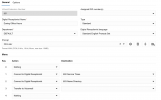
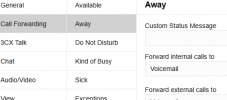
I am trying to forward our front desk phone to another phone in the office when that particular person is away or out of the office. The phone is a T46U. I have tried setting a forward on the phone itself, but incoming calls still ring at the front desk phone and not forward like it is set on the phone itself. However I can log into the web dashboard of the phone and set it manually and it will work, but performing those functions on the phone itself do not work. Now the away and available dsskeys that have been created work as they should. I did create a forwarding dsskey to always forward, but when active it does not forward to specific extension. All incoming calls come straight to the front desk phone. So I don't know if something is configured incorrectly in the 3cx software or if I'm doing something incorrectly to get calls forwarded to different extensions. Here are some screenshots of the phone in question along with a digital receptionist extension that is associated with the front desk phone.

On a side note. I assume when doing the call forwarding from the 3cx admin dashboard of any phone, that the "forward internal" calls means that any internal extension within the organization would be sent to wherever it is set to and the "forward external" calls means any incoming calls to the organization (front desk phone) would be sent to wherever it is set to. Am I correct on this understanding?
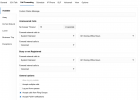
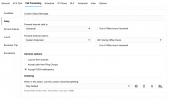
Screen Shot 2025-06-04 at 10.55.25 AM.png Screen Shot 2025-06-04 at 10.55.52 AM.png Screen Shot 2025-06-04 at 10.57.53 AM.png
 
For the call forwarding based on your description you need to change the status of the extension and not perform any manual configuration on the device.
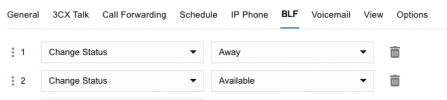
Status change can happen either with configured Office Hours, Manual Change from the 3CX Clients or with a BLF key on the device.
 
For the call forwarding based on your description you need to change the status of the extension and not perform any manual configuration on the device.
Status change can happen either with configured Office Hours, Manual Change from the 3CX Clients or with a BLF key on the device.
Thank you for the information. I have tried to use the BLF keys, one being Away and another Available. When the Away is selected the calls go to voicemail or rings till the call goes to voicemail. I assume the Away option in the dashboard would need to be programmed to an extension? How would the front desk person forward calls to a different extension on the fly by using the phone itself, if the BLF keys do not work correctly? Would I need to program that in the 3cx dashboard each time. I thought there was an option for any yealink phone to have the ability to forward to another extension on the fly if need be. If this is the case I can not get this to happen on any phone within our organization. Kind of lost with getting this feature to work. Are there any settings in the admin dashboard that you would need to see to make sure they are correct? Thanks
 
For the call forwarding based on your description you need to change the status of the extension and not perform any manual configuration on the device.
Status change can happen either with configured Office Hours, Manual Change from the 3CX Clients or with a BLF key on the device.
I tried setting the forwarding under the front desk phone on the away tab to forward on both internal and external calls, but only the internal calls works. The internal rings once and then goes to voicemail. So I know that the forwarding works to some extent, but can't figure out why it will not work on incoming calls. Is there any other setting that I would need to look at that may have this particular extension tied to the main DID number of the organization? The reason I say something like this is because I was looking and noticed in the "call handling" tab, under the "RingAll" option, then "users" tab the front desk extension is the only user in there. I am not sure if this is how it is supposed to be in order for incoming calls to point to a certain extension or what. It's just weird to me how the forwarding option will work for internal calls, but not external. Thanks for the time and help.
 
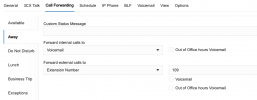
The status change BLF just changes status. The status needs to be set, like:
1749157847317.png
 
The status change BLF just changes status. The status needs to be set, like:
View attachment 48149
Thanks for the visual. I have the particular phone set just like this. Except I can't see what the "forward external calls" is set to. I assume I would need to set it to "extension number" then assign the extension. If this is the case I have tried that and still no success. I'm wondering if there could be something else going, that I've overlooked or that is configured incorrectly for this extension, since it is the one that receives all incoming calls from the outside. Here is what that particular extension looks like.
Screen Shot 2025-06-06 at 8.44.51 AM.png
Screen Shot 2025-06-06 at 8.45.20 AM.png
 
Try to factory reset the device and reprovision first.
Then set the configuration only in the extension Call Forwarding and try again.
 
  • Like
Reactions: JohnS_3CX

Members Online Now

No members online now.

Forum statistics

Threads
111,831
Messages
589,277
Members
164,660
Latest member
RJenkinsROCK