Solved forwarding yealink on hosted

Status
Not open for further replies.

goinghosted79

Silver Partner
Basic Certified
Joined
May 3, 2022
Messages
81
Reaction score
7
user has a yealink T54w and when she goes into the phone's settings and selects forward and enters the extension she wants calls forwarded to then saves the system will not follow that forwarding and i'm not sure why. they are on the pro license of hosted by 3cx. She just wants to be able to forward calls to any other user while she is away from her desk
 
NEVER tell users to use the phone's forwarding. It won't work and it is NOT supported by 3CX.

They should be using the Forwarding Rules of their status, and use statuses to change between them. All that is available within the user's Webclient.
 
is there an easy way for the end user to have a button that will allow status change that gives her the ability to define what extension she wants her calls forwarded to. in the beginning, i told her to use the app on her pc to set her status but that was to big of a change so i thought this way would be much easier since it's like her older avaya system, i didn't know it was not supported. thank you for the fast response
 
is there an easy way for the end user to have a button that will allow status change that gives her the ability to define what extension she wants her calls forwarded to. in the beginning, i told her to use the app on her pc to set her status but that was to big of a change so i thought this way would be much easier since it's like her older avaya system, i didn't know it was not supported. thank you for the fast response
First of, you should train the users to NOT think of 3CX like an Avaya system. It's not the same thing at all and shouldn't be used as if it were.

The easiest would be having her use the DesktopApp to set the forwarding of the Away or DND status, then you can setup her phone with BLFs to quickly change statuses, but honestly using the app is easiest.

@Charles_3CX Any idea if Yealink could block that feature from the phones via a provisioning parameter? We see a lot of people trying to use those phone's forwarding and it always end up creating confusion.
 
  • Like
Reactions: VoIPTools and N_G
I wholeheartedly agree with @ConceptsWeb. It can be challenging to remotely troubleshoot routing problems if users are setting up forwarding rules in the physical phone. Setting forwarding in the phone also ignores the benefit of telling others your status.

Our job, as technology providers, is to help businesses understand and fully leverage the benefits of new technologies rather than attempting to create work-arounds that replicate outdated approaches. The 3CX way is a single button push that ensures the forwarding number is entered correctly every time, and sets your presence status at the same time. This is a far better approach.
 
  • Like
Reactions: Evolute IT
what is that single-button push procedure that allows you to set the forwarding number/status? I see that I can make a button that changes the status but it looks like I'd have to create a button for away another for out of office, etc. the user sends calls to a lot of different users depending on who is there when she is about to leave; probably 4 or 5 different extensions she regularly forwards to.
 
That does complicate things. Still, being true to the 3CX design, I would suggest using presence status to control forwarding. To do so, however, is going to require two Call Flow Designer (CFD) applications.
  1. The first CFD when dialed (via BLF) asks the caller to either enter the forwarding number, or select from a list of named extensions. Based on the user's choice, a forwarding number is written to a file.

  2. The second CFD reads the file and forwards the caller to the specified number.
When the person is going to be away from their desk, they can simply set their presence to "Away". The "Away" presence status should be configured to forward calls to the 2nd CFD.

If the person needs to update the forwarding number, they press the BLF assigned to the first CFD.

Note: The example above is perhaps more complicated than it needs to be (from a user's perspective). This process could be reduced down to one CFD for both functions, but that would require the use of the 3CX Call Control API, and that would require a higher level of expertise.
 
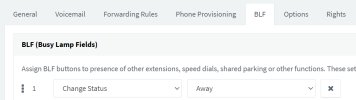
You can create a BLF to change the status to Away for example
1673352368088.png

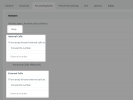
That status should have the forwarding destination set via the Webclient / Desktop App / Mobile app or MC.
1673352445332.png


Is this what you were looking for?
 
Yes this is what I ended up doing yesterday. Gave her an away button and another button to go back to available. Went over the desktop app with her again to show her how to set the forward to extension. Was just trying to find the most straightforward way since she is almost 80 years old. Thank you to everyone that helped on this post for help!
 
  • Like
Reactions: JohnS_3CX
Status
Not open for further replies.

Forum statistics

Threads
111,974
Messages
590,081
Members
164,899
Latest member
mazet