GrandStream GXP2135: BLF does not work if "Accept Multiple Calls" is set.

Status
Not open for further replies.

nextgen6

Customer
Joined
May 12, 2014
Messages
4
Reaction score
1
We have an operator extension with GrandStream GXP2135 (firmware: 1.0.9.135) for which all incoming calls are directed to. The BLF works fine if the option "Accept Multiple Calls" is not set. In this case any new incoming call will not wait for the operator and goes straight to the voicemail. When the option "Accept Multiple Calls" is set, any new incoming call waits for the operator extension becomes available. So, if "Multiple Calls" is set for that extension, BLF shows all extensions marked as available (green) even if some are busy, but BLF works properly when Multiple Calls is not set.
3CX Version: Standard 16.0.4.493
 
BLF and the "Accept Multiple Calls" are not even related...

Please provide the following:
  • 3CX Version, e.g. Standard Annual 16.0.2.910
  • Server OS, e.g. Debian 9 / Windows Server 2012 R2 / Raspberry Pi
  • Is the 3CX Server Hosted and where?
  • IP Phone Make/Model/Firmware
  • Provisioning Method: Local / VPN / STUN / SBC
  • Trunk Provider or Gateway Make/Model
  • Has the Firewall Checker passed: YES / NO
  • Are custom Phone Templates being used: YES / NO
 
  • 3CX Version: Standard Annual 16.0.4.493
  • Server OS: Debian 9.12
  • Server Hosted - AWS - sa-east. There's another server in the same network to establish VPN (strongswan) with customer local network.
  • IP Phone Make/Model/Firmware: Phone GrandStream GXP2135 / firmware 1.0.9.135
  • Provisioning Method: VPN
  • Trunk Provider: Brazil - VIVO
  • Has the Firewall Checker passed: Yes - no errors.
  • Are custom Phone Templates being used: No.
BTW, all extensions are working fine for provisioning and calls. Just BLF of this extension does not work only if I set Accept Multiple Calls. I made tests unsetting and setting this option and noticed consistent behaviour for the BLF, working and not working in this extension.

Thanks in advance
 
Have you tried a factory reset and then reprovision?

That might also be caused by your VPN. I seen this before with Strongswan. Can you try also provisioning the phone in STUN temporarily and see if that helps?
 
I will perform both suggestions. by tomorrow morning. I'm remote and the office is now closed. If stun works, the problem may be related to strongswan as you consider. Strongswan is in only in the AWS side. Mikrotik router is in local side. I can setup Mikrotik in the AWS side as well. I let you know the results asap.
Thanks.
 
  • Like
Reactions: Evolute IT
Hi. I took a while to perform those and another tests. After resetting the phone, the provisioning was not working. I did not understand why, but the provisioning could be done setting IP to static. DHCP has no funtions set for provisioning.

First I made the test through STUN and it worked perfectly. I reset the phone to factory settings again and tried provision as local lan. Again just could do it with static IP. It worked perfectly as well. I tried to do the same falling back the firmware to 1.0.9.132 but did not succeed with dynamic IP, so I return to the latest firmware again (final 135). This is the only GrandStream phone in the network. Another 11 phones are Yealink T19P. I tried reset one of those and I could provision with dynamic IP perfectly.

Thank you for your support.
 
Hi,

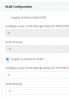
Sounds like you either have network issues that affect the phone/provisioning mechanism or perhaps you have enabled VLAN in the extension provisioning (making the phone go offline as soon as it provisions)

Delete the phone from your extension, and assign it to a brand new extension just to make sure
 
  • Like
Reactions: Evolute IT
Default should appear like so:
1581686716078.png
 
Status
Not open for further replies.

Latest Posts

Forum statistics

Threads
111,937
Messages
589,831
Members
164,819
Latest member
mechelle