Hotdesking not working after upgrade

Status
Not open for further replies.

per.eriksson_1

Premier Customer
Joined
Nov 11, 2019
Messages
42
Reaction score
1
Hi

Upgraded to 7A today after discovering that the previous stable version I upgraded to a week ago apparently crashed the login function for hotdesking and with it the provisioning when logging in.
When dialing *77*xxxx* it doesnt ask for PIN code and more and people can call without beeing logged in.
Logoff Hotdesk is also broken. No "de-provisioning" happens.

As we have 100% Hotdesking we are now in a bit of an dilemma with 180 desk phones...

BR
Per
 
Hi Per,

And was the issue resolved after upgrading to 7A or are you still facing this problem?
 
No. problem still persist
 
We are using Grandsrream 2130 phones if it now has any inpact to the fault.
 
Can you tell us a bit more about how the upgrade was instigated, and what actions you did?

For example did you take a backup and reinstall, or did you upgrade from SSH, or using the management console upgrade button?
 
System is on-premise Debian that has been running for several years under VMWare. Did backup before i upgraded but the upgrade itself was done throught the web interace without any issues as such. Same also with the A7 version.
Restarted the server once more but the issue continue.
 
Hi Per,

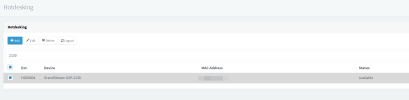
In your management console under Hot Desking, if you select a user that appears logged now in and click the Logout button on top, does it show the Status as going back to available? (even if the phones don't reprovision)

1683190046345.png
 
Hi and thanks for the reply,

My own name did not appear in the list under hotdesking but the phone was working to call with. Logout button on the phone rendered in "Service unavailible".

I reset my deskphone and it is not provisioning at all after the factory reset. The broadcast function for provisioning is then apparently not working in the SBC any more.

I have SBC's in all locations (all are v18.1.36) and they are visible/green under trunks on the server and i can ping them from the network I have the phones on. The SBCs are mixed stretch and bullseys Debian installations, all do the same.

3cx server is buster Debian and not upgraded prior to the 3cx upgrade. Have upgraded it to latest buster now and restarted but no difference. Will bring it up to bullseye later on.

At least Grandstream GXP-2130 is not working any more via SBC after the upgrades.
I see that this phone model have been put as "EOL" in the later 3cx releases but....they shall still work to provision, i assume, as they dont show up as read in the list of phones?

I have a few Yealink and GPX-2130 phones that connect without SBC. They are out of reach for today so I will test tomorrow.


BR
Per
 
Tested now and those phones outside SBC are working so the issue is related to the SBC's
 
Any ideas whats going on in my system after upgrade?
 
I'm beginning to suspect that the phones cannot reach 3CX. The SBC will only send the instruction, but the actual provisioning happens between the phone and the PBX independently of the SBC.

Try to factory reset a phone and manually enter the provisioning link into the device, then restart it. If it fails to provision you will probably be looking at access issues and would explain what you experienced so far. Can we check this to confirm that the access works?
 
  • Like
Reactions: Guillaume Bourgeois
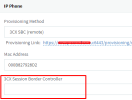
Found the problem on the settings of the Hotdesk phones

1683612109202.png


There is a new field that you apparently now MUST set. Else there is no provisioning happening. Of course this field is empty after upgrade so I now have 210 phones to reconfigure....

However....This is really a not wanted "feature".
This locks the phone to a specific SBC via the provisioning....Why on earth would that be neccessary when an unprovisioned phone shows up in the Phones section with the additional information "Connected via SBC XYZ" ?
It is know which SBC it is using anyway....

This new "feature" will create a mess for us as our desk phones are moved around between different offices/sites on regular basis due to relocation of staff (containerized temporary offices). Earlier we solved this with a local DNS record to the SBC in the firewalls to point to the local SBC LAN IP which is different LAN IP every site (due to VPN setup). This "trick" has been woking flawlessly for years.

What is the use of this new field? As it now locks the phone to a specific SBC it will cause us really unneccessary administration when our logistical department move and connect the phones on different sites. This will be a real mess for us....

BR
Per

Update: PHEW....while starting to do the changes of 210 phones....I have no clue where the phones are located so to figure that our I have to open the Hotdesk phone setting, copy the MAC and paste it in the Phone section where i can see the phone IP address. When I see the IP I know on what site it is and i can then go back to the Hotdesk settings of that phone and choose the correct SBC. This is terrible!
 
Last edited:
Hi Per,

I'm glad you found the solution. However, I'm not sure how you ended up with an empty field in the first place.
If you have an SBC, the only way it can end up empty that I'm aware of is if you delete your SBC from 3CX.

There was a transition from it being an IP field to becoming a drop down field between V18 Update 4 and Update 5. If something would have broken during the update, it would have happened last year - not when updating to 7A.
As such your hot desking would have stopped working a long time ago but you said it was working fine until recently.

Was the SBC perhaps deleted recently by mistake?
 
Hi John,

Same SBCs since 2-3 years.

We were maybe a bit behind in upgrades and I upgraded the stable and the A7 with just a few days between them and didn not notice the hotdesking login/logout issue during those days as SIP was still working through the SBC's.

As you understand I'm not happy about this "feature" as it now requires considerably more time to maintain these phones.

Why is the phone needed to be locked to a specific SBC?

BR
Per
 
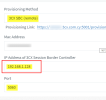
1683639382619.png

I saw this old picture now. IP address could be populated witha a FQDN like "sbc.domain.com" which i had done.....and put the DNS record in the firewall to point tothe correct SBC.
Now impossible to do with this new "feature".
 
Hi Per,

In the last couple of updates we made some improvements and introduced some new features:

1. One of them was the SBC: often its local IP would change (because not everyone uses a static IP on it) and the phones would no longer find the SBC and would fail to register as a result.

The PBX now auto-discovers the current LAN IP of the SBC, and the next time a phone tries to reprovision (ie. upon reboot or on a regular interval) the PBX will now automatically feed it the new current IP address of the SBC and it will come back online. If this was a static box like before, we would not be able to know what SBC the phone is meant to connect to, and this function would not be possible - hence the drop down option for SBC selection.

2. Another new feature is the ability of some phone models to now have an embedded SBC into their firmware so you don't necessarily need to use an standalone SBC machine - especially useful for remote workers, small offices, and people who move their phones around a lot or people who don't have the extra budget for an SBC machine.

The Router phone's built-in SBC needs to inform 3CX of its IP so 3CX can then include it in the config file upon the next reprovision event. If the IP changes, the phone is now designed to retransmit its new IP and then re-download its config, making it very robust and reliable, even when the network conditions are not ideal. This necessitates the SBC to be a drop down option.

These two features are interconnected, and this is the direction we are going in currently because it addresses some of the weak points that the SBC used to have.

The models that support this feature are listed here as Router phones: https://www.3cx.com/sip-phones/


The SBC field was never meant to be used as an FQDN - it was not the intended purpose, and we never tested it to be used that way. Some people used to it as a neat "trick" but unfortunately is not something we ever supported or promoted. Our guides always made it clear that you should type the SBC IP there.
 
Thanks for the explanation. Sounds like a major rework of the SBC functions has been made.

But I'm a bit cunfused here anyway.
If I have a new phone (or reset a phone that has Hotdesk configured but blank specific SBC as in my case) the phone shows up with the IP and "via" SBC IP nicely in the Phone table. The server knows which SBC the phone is using using when it connects. Why does it then need to know exactly which SBC it MUST connect to on the Hotdesk configuration? Its already presented itself when it hooked up to the server where it came from.

Seems like the auto function was only focused to make the SBC detected automatically while the Hotdesk was never thought that they would move round on different SBC's. In my case its not only the staff that moves. Also the phones moves...

As I see it there is no return. I have to locate all my 210 phones and configure each and every on of them to a specific SBC and do manual updates as soon as phones stops provisioning. Back to stone age :)

BR
Per
 
The server knows which SBC the phone is using using when it connects.
..but that's for a phone that is already provisioned and connects via a known SBC.

Why does it then need to know exactly which SBC it MUST connect to on the Hotdesk configuration?
Because before a phone is provisioned for the first time, the initial provisioning needs to tell the phone which SBC to use. You could have multiple SBCs at different sites for example and you want to make sure it uses the correct one.

Seems like the auto function was only focused to make the SBC detected automatically while the Hotdesk was never thought that they would move round on different SBC's. In my case its not only the staff that moves. Also the phones moves...
Whether a normal phone or hot desking phone, we still need to tell it which SBC to go register to via our provisioning.
If you move a phone to a new office, we expect that you will change its SBC from the drop down menu to point it to the new SBC.

If staff moves their devices often, we could recommend some other solutions, like using the 3CX apps instead of a hardware phone, or to give different phone models to those employees that move often. If they use a router phone model for example, and they take it with them when they move to another office, it will automatically work without needing to re-configure anything. The only limitation is that it cannot be a hotdesking phone though.

Sorry if this caused some trouble, I hope those solutions can be somewhat useful in the future.
 
  • Like
Reactions: N_G
Hi

Apparently I'm the only one who runs a bit larger setup with 99% hotdesking on 6 SBC's where staff and phones moves around faster than I change underwear :)

A for me fully automted setup, that saved me monthly hours of administration, has been put to the grave....

BR
Per
 
Smartphone Apps are the correct and modern choice for your network / usage....
 
Status
Not open for further replies.

Forum statistics

Threads
111,974
Messages
590,081
Members
164,899
Latest member
mazet