Hi Per,
In the last couple of updates we made some improvements and introduced some new features:
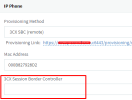
1. One of them was the SBC: often its local IP would change (because not everyone uses a static IP on it) and the phones would no longer find the SBC and would fail to register as a result.
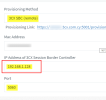
The PBX now auto-discovers the current LAN IP of the SBC, and the next time a phone tries to reprovision (ie. upon reboot or on a regular interval) the PBX will now automatically feed it the new current IP address of the SBC and it will come back online. If this was a static box like before, we would not be able to know what SBC the phone is meant to connect to, and this function would not be possible - hence the drop down option for SBC selection.
2. Another new feature is the ability of some phone models to now have an embedded SBC into their firmware so you don't necessarily need to use an standalone SBC machine - especially useful for remote workers, small offices, and people who move their phones around a lot or people who don't have the extra budget for an SBC machine.
The Router phone's built-in SBC needs to inform 3CX of its IP so 3CX can then include it in the config file upon the next reprovision event. If the IP changes, the phone is now designed to retransmit its new IP and then re-download its config, making it very robust and reliable, even when the network conditions are not ideal. This necessitates the SBC to be a drop down option.
These two features are interconnected, and this is the direction we are going in currently because it addresses some of the weak points that the SBC used to have.
The models that support this feature are listed here as Router phones:
https://www.3cx.com/sip-phones/
The SBC field was never meant to be used as an FQDN - it was not the intended purpose, and we never tested it to be used that way. Some people used to it as a neat "trick" but unfortunately is not something we ever supported or promoted. Our guides always made it clear that you should type the SBC IP there.