- Joined
- Apr 28, 2023
- Messages
- 64
- Reaction score
- 20
We are running V20 Hosted with Snom D785 phones and need to customize templates to add proprietary features supported by SNOM that are not available in the 3CX admin console.
I am trying to follow the documentation: https://www.3cx.com/docs/custom-ip-phone-templates/, but it appears those instructions are outdated. For example, documentation instructs Go to “Management Console → Settings → Templates”, but that path is not applicable to V20. The nearest I can find is Admin Console → Settings → Templates and I am assuming that is equivalent to the documentation.
Further, the documentation instructs: Press the “Copy” button (3) and give it a new name, then press “OK”. There is no "Copy" button that I can find:
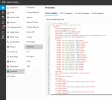
What is the CURRENT procedure for copying/customizing phone templates? It does not appear to be obvious...
Thanks in advance!
I am trying to follow the documentation: https://www.3cx.com/docs/custom-ip-phone-templates/, but it appears those instructions are outdated. For example, documentation instructs Go to “Management Console → Settings → Templates”, but that path is not applicable to V20. The nearest I can find is Admin Console → Settings → Templates and I am assuming that is equivalent to the documentation.
Further, the documentation instructs: Press the “Copy” button (3) and give it a new name, then press “OK”. There is no "Copy" button that I can find:
What is the CURRENT procedure for copying/customizing phone templates? It does not appear to be obvious...
Thanks in advance!