How to disable email notifications in STARTUP PRO hosted ?

Status
Not open for further replies.

Rsztd

Customer
Joined
Dec 20, 2022
Messages
10
Reaction score
2
Hello, I would like to disable the email notification that every user belonging to a ring group (ring all) receives when a call is not answered. I'm on 3CX STARTUP PRO hosted version.
 
Hello!

StartUP does not provide the option to disable the emails.

However, you could use a queue instead of a ring group where only the manager gets calls for unanswered (Abandoned) calls.
 
Hi JohnS_3CX, but I need the function ring all phones. Is that possible ?

 
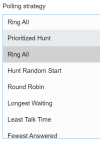
Yes, you will find that you can use multiple Polling strategies under the Queue General options.

1671797993707.png
 
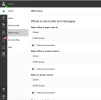
In Admin > Office Hours > Where to send calls and messages
I set send to Queue but I still get the email notification message: There was a lost Call in Queue Queue (32360) from Caller ID XXXXXXXXXX

Schermata 2022-12-23 alle 13.31.41.png
 
As mentioned before, the manager will always get the notification, but not the users.
 
As mentioned before, the manager will always get the notification, but not the users.
But: As far as I know, in StartUp Pro you *can not* set if an extension is a simple Q-User or a Q-Manager.
So in our tests you always get an e-mail for lost calls. It there a solution or workaround to set that?
If not please implement an option to opt that out (like available for dedicated installations).
If you get a lot of lost Q Calls, this drives our customers crazy.
 
Status
Not open for further replies.

Members Online Now

Forum statistics

Threads
111,831
Messages
589,277
Members
164,660
Latest member
RJenkinsROCK