
UCMUserAZ
Customer
- Joined
- Dec 19, 2023
- Messages
- 131
- Reaction score
- 232
Looks good. Does not show now. Thanks!Its should be fixed - let the system redownload again automatically or force the update


Looks good. Does not show now. Thanks!Its should be fixed - let the system redownload again automatically or force the update


Hi,Hi @tripo
To clarify, there is no change on when the reports are generated from Update 2 to Update 3.
How this works is the following:
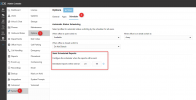
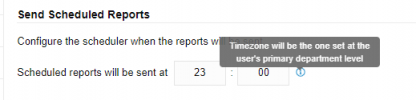
You set a specific time under System>>Options>>Scheduler and this time will be used in combination with your main Department timezone.
So for example, you set the Report schedule time to be 23:00 and your department timezone is set to +8:00 Australia (Perth).
The report will be generated at 23:00 Perth time.
However if you schedule the report from an extension whose main department timezone is -5:00 US Eastern time, that report will be generated at 23:00 US Eastern time.
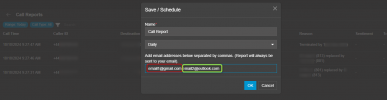
Now in regards to adding multiple emails in the reports, what is added is the ability to add additional emails to receive a specific report when scheduling the report. This looks like the screenshot below.
So whenever this report is generated, an email will be sent to the extension who scheduled it and to the emails specified in the field shown in the screenshot.
View attachment 44419
I hope this clarifies it.
So…if one creates extensions in various other time zones, and creates a report in each of those, the report will use the time of that extension?if you schedule the report from an extension whose main department timezone is -5:00 US Eastern time, that report will be generated at 23:00 US Eastern time.
So…if one creates extensions in various other time zones, and creates a report in each of those, the report will use the time of that extension?
Please tells me that it's in the roadmap and it's not the definitive way to do that...It will use the timezone of the Department that the extension has its "Main department membership" set to.

OK thank you. So while we cannot control the minute, we can essentially control what hour a report is sent.
I think you will be happy with the Grafana integration which is planned. You will be able to schedule your reports at any time, as many times per day as you want, till your SMTP server throws the towel in!Hi,
I have customers that have reports schedule 4 times in a day to compare and be able to recall client easily, how can I will be able to do that when I will upgrade to V20 ?
Hi Nicholas, I meant, we can control the time zone used for that time choice, hence the hour (or I think a few are a half hour off, because why make time zones simple). So if the server is set to run reports at 23:59 then reports can be run at 23:59 in any time zone, but not xx:45 or xx:01.You can control the specific time it is set to send
Each user will have the reports sent at the time stated in their timezone.Hi Nicholas, I meant, we can control the time zone used for that time choice, hence the hour (or I think a few are a half hour off, because why make time zones simple). So if the server is set to run reports at 23:59 then reports can be run at 23:59 in any time zone, but not xx:45 or xx:01.
Grafana sounds interesting of course. And I do see they have a free hosted option; hopefully that will work.
Thank you for your response. I hope this will fit the customers needs.I think you will be happy with the Grafana integration which is planned. You will be able to schedule your reports at any time, as many times per day as you want, till your SMTP server throws the towel in!
Watch this space. This is a highly anticipated feature and I promise you the forum and our blog posts will light up like a christmas tree when this is released!Thank you for your response. I hope this will fit the customers needs.
Do you have any ETA ? Update 4 maybe ?

Yes it works - can you check the Event Log if its failing for you - it must report and tell you why its failing.Hi, could anyone with update 3CX V20, U3, confirm if the push notifications for IOS devices are being received?
This is what I received on V18 U9;Yes it works - can you check the Event Log if its failing for you - it must report and tell you why its failing.


Founded in 2005, when VoIP was an emerging technology, 3CX has gone on to establish itself as a global leader in business communications.


