Initial Integration Error

Status
Not open for further replies.

MSteele25

Bronze Partner
Advanced Certified
Joined
Jun 26, 2023
Messages
17
Reaction score
0
We are trying to integrate M365 with our on-prem hosted 3CX. We run through the connector as in the document here (https://www.3cx.com/docs/manual/microsoft-365/), but its at #5 in Step 1 we get the following error.

59fb3a03-a4b1-484d-a52e-87cd178ebffa.jpg

We have tried this several times and after going in Azure we see this...
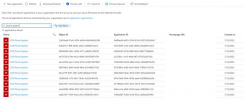

9bc18470-8070-476b-b3c8-4f4528a67f5e.png
Is this an issue with communicating with Azure or coming back to our local 3CX system. I suspect this is 3CX telling me it cant connect to the newly created 3CX Phone System item in Azure.

Matt
 
Can the system's management console be reached from any external source, or have you locked down access or even not opened the HTTPS port the system is using so that access is available to the management console externally?
 
We can access the management console externally from the public IP and the FQDN
 
This issue indicates that the Azure side cannot access the Phone system to complete the configuration. Therefore, I suggest checking the logging within Azure to check where the issue is.
 
Charles,

We have looked into our firewall and Azure and neither are showing errors. Since the site this error came from is integrations.3cx.com could it be this is 3CX stating its not able to connect to our "3CX Phone System" that it created in Azure, meaning we have an inbound issue to Azure AD?
 
did you get to the bottom of this issue? I have had the same thing on a site.
 
I posted a question in O365 forum similar to this error recently, perhaps this is related to your issue:

Regarding your question, the 365 integration requires logging in with an Azure global admin account.
 
Status
Not open for further replies.

Latest Posts

Forum statistics

Threads
111,973
Messages
590,074
Members
164,895
Latest member
jasonkkrause