Invalid timezone when provisioning Yealink phones

Status
Not open for further replies.

Severin Meyer

Free User
Joined
Jul 29, 2017
Messages
135
Reaction score
18
Since 18U6 the value resolved for provisioning Yealink phones is incorrect when the system wide time zone is set to 'Swiss (Bern)'.
The resulting time zone provisioned to the phones will be Namibia, which is currently one hour ahead.

I have solved it by specifying the time zone directly in the provisioning tab on every phone and reprovising the phones, instead of 'Use global Timezone'.
 
Hi @Severin Meyer

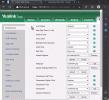
Despite the fact that you see Namibia in the phone, was the time actually wrong?

If it was wrong, please tell us the model and firmware version
 
For Namibia, the time was correct, for Switzerland the time was wrong.
As I wrote, one hour ahead.

The model and firmware is not relevant, as the error is present already in the provisioning file itself created by 3CX.
It happend on all customers with Yealink phones after the update.
 
- OS: Debian (3CX-ISO)
- Yealink T46S
- Default Template
- System Time Zone: +1:00 Swiss (Bern)

Resulting provisioning file with "Use global Timezone":
####################################################################################### ## Time Settings ## ####################################################################################### #Configure the time zone and time zone name. The time zone ranges from -11 to +12, the default value is +8. #The default time zone name is China(Beijing). #Refer to Yealink IP Phones User Guide for more available time zones and time zone names. #local_time.time_zone = +8 #local_time.time_zone_name = China(Beijing) local_time.time_zone =+1 local_time.time_zone_name = Namibia(Windhoek)

Resulting provisioning file with "GMT+1 Germany(Berlin)":
####################################################################################### ## Time Settings ## ####################################################################################### #Configure the time zone and time zone name. The time zone ranges from -11 to +12, the default value is +8. #The default time zone name is China(Beijing). #Refer to Yealink IP Phones User Guide for more available time zones and time zone names. #local_time.time_zone = +8 #local_time.time_zone_name = China(Beijing) local_time.time_zone =+1 local_time.time_zone_name = Germany(Berlin)

Template:
####################################################################################### ## Time Settings ## ####################################################################################### #Configure the time zone and time zone name. The time zone ranges from -11 to +12, the default value is +8. #The default time zone name is China(Beijing). #Refer to Yealink IP Phones User Guide for more available time zones and time zone names. #local_time.time_zone = +8 #local_time.time_zone_name = China(Beijing) local_time.time_zone =%%param::time_timezone_yealink%% local_time.time_zone_name = %%TimeZoneName%%
 
Can I also have the firmware version of the phone please?
 
Is the creation of the provisioning file dependent on the firmware version?
66.86.0.5
 
Hi Severin,

Is the creation of the provisioning file dependent on the firmware version?
No, but I still want to find out why you are getting the wrong time.
I can confirm that the system does indeed give this in update 6 just like you said:
local_time.time_zone =+1
local_time.time_zone_name = Namibia(Windhoek)

But my time is not 1 hour ahead like you said:

- T46S v66.86.0.5
- System Set to Swiss (Bern) +1
- Phone provisioned with global timezone
- Resulting time was the same on phone LCD as Switzerland

So even though I see Namibia in the settings, I still get the correct time (both T46S and website showed 10:46 when I checked). What time do you see for example when it is 11:00 in Bern, what does your LCD show, 12:00?
 

Attachments

  • 2023-02-06_11h57_42.gif
    2023-02-06_11h57_42.gif
    1.3 MB · Views: 6
Last edited:
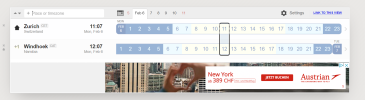
Namibia i really one hour ahead, so your phone is wrong:

1675678092531.png
 
In this case I'm not able to replicate your issue and do not see any problem here.
 
So you are confirming, that 3CX is provisioning the phone with a wrong time zone.
But you don't see a problem?
It doesn't matter, if the the time for Namibia is the same as in switzerland or not. (Perhaps based on wrong daylight saving times on your site.)
Namibia is geographically not a neighbor of switzerland, just if don't know that.
So if Yealink is not providing a correct time zone for Switzerland, there should be a fallback to germany and never to Namibia.
 
Hi @Severin Meyer

As we already mentioned here, the time shown on the phone is correct and it's a primary goal that we have here.
Don't be so concentrated on "geographical" locations because Yealink phones can use different settings combinations to provide a correct LCD time to the customer.
At the same time, you correctly mentioned that the "Swiss (Bern)" timezone is not added to the provisioning templates by the Yealink team. We will forward your request to them to add the "Swiss (Bern)" timezone to all provisioning templates.
 
If the time displayed for Switzerland and Namibia is the same, as in your case, it is just wrong.
Namibia has really to be one hour ahead.

You cannot add the timezone "Swiss (Bern)" to the template, because Yealink does not have this out of the box.
The value in the template needs to be set to a fallback, as long as Yealink doesn't know anything about "Swiss (Bern").

So you can ask Yealink to add the time zone in there firmware, or set the correctly fallback.
Namibia is just the last one with +1, and I assume this is why it is chosen.
But if they had different daylight saving times, it is not working correctly.
 
@Aram : Where are you taking your timezones from @ 3CX?

You seem to be mixing the ISO 3 letters code SWZ, which stands for Eswatini aka Swaziland, with the ISO 3 letters code CHE, which stands for Confédération Helvetique aka SWITZERLAND.
Swaziland, Switzerland... not quite the same but guess what, Swaziland is a neighboor of Namibia... Does it click now?

Yes, you read that right. Please update and push as all my phones are ahead 1h since the last automatic update!

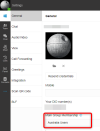
Also, I cannot find the general timezone setting in V18, it drove me crazy going through all the pages... I guess this is coming straight from the OS...
In 3CX admin, I can only change it phone by phone which does not make sense at all especially when this was working fine before.

Pierre
 
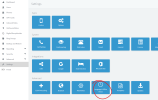
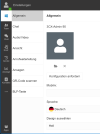
The global time zone settings are here:
1675693613782.png
 
Hello,
Same problem here.
If time zone on Bern there is 1h difference.
If time zone is Paris or Berlin, it's OK.

The problem seems to concern only the T4xx and not the T5xx from yealink.

Thanks
 
Hello,
Same problem here.
If time zone on Bern there is 1h difference.
If time zone is Paris or Berlin, it's OK.

The problem seems to concern only the T4xx and not the T5xx from yealink.

Thanks
The German locale exists in the Yealinks, and that works the same in Update 5 and Update 6.

But note that user Groups in Update 6 can have a different timezone from the main PBX global timezone.

So if you have a group of users with IP phones and their group now has a different timezone, it will also affect their IP phones.

Can you kindly check this from your new Webclient Admin Panel?
But make sure your user is not in two groups at the same time!
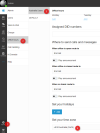
Here is my example on a German PBX but with a user group configured for Australia
Code:
local_time.time_zone =+8
local_time.time_zone_name = Australia(Perth)


1675700595324.png

Note: if you are part of multiple groups, it will generate the timezone of the one you select here in Update 6 ;)
1675701849230.png
 
Last edited:
There is no "Admin"
1675701890629.png
 
@ Severin Meyer

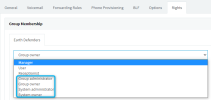
To see the Admin view your user (extension) needs to have, at least, "Group administrator" rights.
So, the Admin view is available for the following group rights:
* Group administrator
* Group owner
* System administrator
* System owner
1675702768966.png
 
If you think the group could have different locale settings, this is not the case.
Every group uses the global settings.
Changing global settings will result in a corrected provisioning file.
So there is no intermediate settings like groups affecting this
 
Status
Not open for further replies.

Latest Posts

Forum statistics

Threads
111,945
Messages
589,867
Members
164,835
Latest member
Firefox Technologies