- Joined
- Oct 22, 2021
- Messages
- 62
- Reaction score
- 16
I have just migrated a customer's telephone system from on-premises (v16 running on Windows 10) to Azure (v18 running on Debian).
We have a Yealink W52P Base Station and one cordless phone; both were working OK when locally provisioned to v16 running on-prem. After the migration we cannot get the extension to register on the base station.
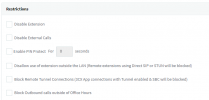
We have factory reset the base station and phone. Set up the base station under FXS/DECT in 3CX Admin Console. Logged into the base station and entered the provisioning link provided in the FXS/DECT section, selected to Auto Provision. This is all OK, the password of the base station changes to the one set in 3CX and I can log in, we can see the extension under 'Account 1' with all the correct settings for that extension (i.e. register name, password, label, and display name) but the status is Register Fail.
We are provisioning using Direct SIP, firmware of the base station has been updated to the latest provided by Yealink for 3cx.
Nothing I have tried seems to work and I cannot register the extension. Could anyone offer any advice?
Thanks
We have a Yealink W52P Base Station and one cordless phone; both were working OK when locally provisioned to v16 running on-prem. After the migration we cannot get the extension to register on the base station.
We have factory reset the base station and phone. Set up the base station under FXS/DECT in 3CX Admin Console. Logged into the base station and entered the provisioning link provided in the FXS/DECT section, selected to Auto Provision. This is all OK, the password of the base station changes to the one set in 3CX and I can log in, we can see the extension under 'Account 1' with all the correct settings for that extension (i.e. register name, password, label, and display name) but the status is Register Fail.
We are provisioning using Direct SIP, firmware of the base station has been updated to the latest provided by Yealink for 3cx.
Nothing I have tried seems to work and I cannot register the extension. Could anyone offer any advice?
Thanks