M365 Integration Not Fully Working Version 20.0 Update 2 (Build 688 Alpha)

Status
Not open for further replies.

themotes

SOHO User
Joined
Dec 7, 2020
Messages
6
Reaction score
1
I have deployed a net new HA cluster to test the multi-company settings. I have setup the M365 integration and get good results on the setup, any reconfiguration attempts, and can use SharePoint for backup. However, user sync is not working.

I'm happy to walk the logs/troubleshoot but am unable to see anything failed in logs with verbose enabled. I have manually created a user and matched the email addresses, etc. but it never syncs up.

I have this working properly in my production V20.0 Update 2 (Build 688 Alpha) system but it was an upgrade and is not configured in HA or setup for multi-company.

I'm probably just tired, but I cannot find the fist level of logging showing any errors. Can someone get me started in the right place?
 
Have you checked the System Service log file?
 
I've looked through the log and can only find mention of the M365 configuration when I turn sync off and on again:

[Graph.Access.Configuration.Microsoft365ConfigurationRepository] Microsoft 365 configuration event happened OFFICE365_CONFIG

I don't see any errors otherwise about the user sync process/etc. Are there other log locations I should look?

Alternatively, I have used "reconfigure" multiple times but is there a method to completely remove the integration and start new? I know I can delete the app in Entra, but what about the 3CX system configurations?

Thank you for the help!
 
Just set the PBX in verbose and restart the 3CX services.
This will also force the sync, then check the log for any error.
 
  • Like
Reactions: midwest1
It has been in verbose since I originally set it up and I have restarted all services multiple times - but there is never any other mention of M365 other than what was shared above. I have completed the same again just before posting this message just to be certain. I can still use SharePoint backups, and M365 email.
 
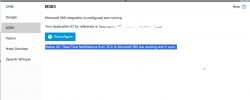
Also not working for me. integration says :
"Status OK. Real Time Notifications from 3CX to Microsoft 365 are working and in sync."
But does not appear any other config options:

1720402187533.png
 
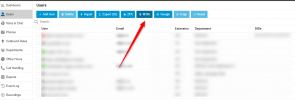
In V20 you need to configure O365 under the integration and then go to users and press the M365 option to configure the integration options:
1720412224778.png
 
  • Like
Reactions: Juan Marriott
Hi @themotes

You mentioned that you deployed the machine "to test the multi-company settings".
If by that you mean that you are using the MULTICOMPANYMODE parameter as mentioned here (https://www.3cx.com/docs/multi-tenant-configuration/) please keep in mind that O365 Sync gets disabled when MULTICOMPANYMODE is enabled.

Also, in your System service log you will see the following entry when you restart the service:
[Integration.Microsoft365.Microsoft365IntegrationService] General MS 365 sync is not available in Startup mode

Can you confirm that this is the case?
 
Its working now, thanks @TheodorosG_3CX
Its missing, or I was xpecting that when a extention is on a call (yellow status), it appears red on teams...
 
Glad to know this is resolved
 
Its working now, thanks @TheodorosG_3CX
Its missing, or I was xpecting that when a extention is on a call (yellow status), it appears red on teams...
Wil teams status change when the user is on a call on our end when it was working it will change to DND if the 3cx side is on dnd but no change when we are on the phone. Is there a setting for that?

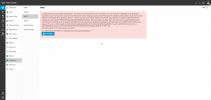
When I try to reconfigure.
Error: Permission entry already exists.

Any ideas on how to delete from 365 side and start over? I do not see this new app under enterprise apps

1720804097284.png
 
Status
Not open for further replies.

Forum statistics

Threads
111,954
Messages
589,919
Members
164,851
Latest member
DrunkeMeister