- Joined
- Mar 21, 2021
- Messages
- 27
- Reaction score
- 4
I've tested this with two recent model iPhones, an Adroid phone, and the 3CX web client. This problem exists only on the 3CX app for iPhones.
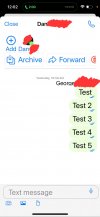
Extension messaging and SMS messages are not separated by date inside the 3CX iPhone app. Example:
However, when logging into the same extension on Android, the messages are properly separated. Example:
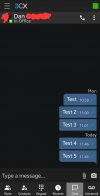
Messages are also properly separated in the web client.
Is this a bug or am I missing something in settings?
Extension messaging and SMS messages are not separated by date inside the 3CX iPhone app. Example:
However, when logging into the same extension on Android, the messages are properly separated. Example:
Messages are also properly separated in the web client.
Is this a bug or am I missing something in settings?