


- Joined
- Apr 6, 2017
- Messages
- 105
- Reaction score
- 43
This stopped working on V18 to V20 upgrade.
After v20 upgrade, I went into Entra and removed all App Registrations and Enterprise Applications related to 3CX. I then went to the server and reconfigured the application from the 3CX side.
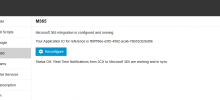
I now see this notification:
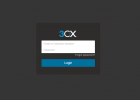
When browsing to the sign-in page however, the Microsoft sign-in button is not present:
All users on the system have the Microsoft SSO enabled under Extension Options.
After v20 upgrade, I went into Entra and removed all App Registrations and Enterprise Applications related to 3CX. I then went to the server and reconfigured the application from the 3CX side.
I now see this notification:
When browsing to the sign-in page however, the Microsoft sign-in button is not present:
All users on the system have the Microsoft SSO enabled under Extension Options.


