Solved Missing keypair option on install for Self hosting AWS EC2

Status
Not open for further replies.

augment-tech

New User
Joined
Sep 26, 2021
Messages
5
Reaction score
1
Hi all,

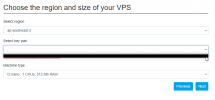
Having an issue at the moment where on installation of the 3CX system using PBXEXPRESS, you get to the point where you have to choose the keypair to match to the instance to be installed. Unfortunately, the keypair doesn't appear as an option in the dropdown.

This is after following the guide. The keystore was generated multiple times in the correct region, tried multiple user accounts, new and existing, different browsers and in private mode on each and even multiple computers. The credentials are correct with AWS and it is accessed via a root user so no permission issues.

Are there any know issues with installation on AWS and keystores?

Thanks!
 

Attachments

  • opera_AIfEKGLTXM.png
    opera_AIfEKGLTXM.png
    15.1 KB · Views: 12
Hi all,

Having an issue at the moment where on installation of the 3CX system using PBXEXPRESS, you get to the point where you have to choose the keypair to match to the instance to be installed. Unfortunately, the keypair doesn't appear as an option in the dropdown.

This is after following the guide. The keystore was generated multiple times in the correct region, tried multiple user accounts, new and existing, different browsers and in private mode on each and even multiple computers. The credentials are correct with AWS and it is accessed via a root user so no permission issues.

Are there any know issues with installation on AWS and keystores?

Thanks!
Do you at least have a keypair created in AWS?
 
As stated, multiple keystores were generated, added and removed multiple times.

To be clear, there are keystores and they are active. They are in the correct region. They do not appear on the installation using pbxexpress (refer to the screenshot).
 
As stated, multiple keystores were generated, added and removed multiple times.

To be clear, there are keystores and they are active. They are in the correct region. They do not appear on the installation using pbxexpress (refer to the screenshot).
What permissions did you give to the credentials you created? (Created in IAM normally.)
 
Okay, in this case it is indeed weird that it doesn't show up. That's the role we use when doing that.

Let me run some tests today using my account and I'll let you know if I get the same result.
Thanks kindly. I was going to attempt to create a dummy 3cx account to test with as well but always good to hear from someone that deals with it more than myself. Much appreciated!
 
@augment-tech the account you have created in AWS has Full access as you mentioned above.
Now the Access Key ID and the Secret Access Key you setup on the 3CX Deployment Wizard, have authorization to full resources of your account yes?
One more question, what browser are you using?
 
@augment-tech the account you have created in AWS has Full access as you mentioned above.
Now the Access Key ID and the Secret Access Key you setup on the 3CX Deployment Wizard, have authorization to full resources of your account yes?
One more question, what browser are you using?
Yep, full access as listed above. As originally stated, multiple browsers were used, this included Chrome, Firefox, Opera and Edge.
I have since redeployed the pbxexpress to an Azure service and the system is up and working. So I'm going to put it down to an issue with my AWS account somewhere (first thought is permissions to keystore access but not sure why since each user attempted had full access in the correct region).
Before getting to this issue, I was able to get to the point of deployment but was presented with the 'Your PBX has been delayed' error which also seemed to suggest a permissions issue.
I suppose it doesn't matter now but I would have preferred to keep it with AWS. It's basically apples for apples compared to Azure, just means I have another service I have to manage.
 
  • Like
Reactions: NikosT_3CX
Status
Not open for further replies.

Forum statistics

Threads
111,974
Messages
590,081
Members
164,899
Latest member
mazet