Missing LAN IP when choosing Interface in IP Phone Local LAN Provisioning

Status
Not open for further replies.

lancetech01

Joined
May 15, 2023
Messages
3
Reaction score
0
We recently found out this issue and I am not sure when it happened.
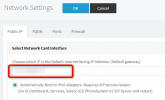
Whenever we are going to provision a phone (We have Fanvil X3SG and Grandstream GRP-2616). We are choosing the IP as the local interface in Local Lan Provisioning.
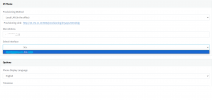
But now it is not appearing. Only the FQDN shows in the interface selection.
We recently updated the system to the latest update (18.0 (Build 912)

I already tried to restore our backup from 2 weeks ago but the issue still persists.
Apart from reinstalling the system (Debian OS), is there another way I can make it show up again?
 

Attachments

  • Untitled.png
    Untitled.png
    20.5 KB · Views: 44
3CX have moved away from having 2 interfaces for in/out of office and are insisting the use of SplitDNS. You will only be able to use FQDN going forward unless using custom templates.

https://www.3cx.com/docs/creating-fqdn-split-dns/

you will need to get yourself a DNS server.
 
Hi @lancetech01

- Can you tell us whether you setup your machine for split DNS?

- Can you also tell us whether you have a public IP listed in your Network settings?
1691572782285.png

- If you do have a public IP there, was this selected during the installation phase of 3CX setup Wizard?
 
Hi @lancetech01

- Can you tell us whether you setup your machine for split DNS?

- Can you also tell us whether you have a public IP listed in your Network settings?
View attachment 36717

- If you do have a public IP there, was this selected during the installation phase of 3CX setup Wizard?
1. I don't think we have set up the system for a split DNS, we are using FortiGate firewall and there are no DNS databases configured.

2. The default gateway was setup as shown below. We have a Dynamic Public IP configured in external IP.

1691575380716.png

3. I am not sure about the setup done before the system was handed-over to me. But I am sure that we used to have this option before as I was used to selecting it when I am provisioning new IP Phones. I did the system update this week and I think this started after that.
 
A fast workaround is to set SIPDOMAIN2 (Settings -> Paramaters) to something that is not FQDN.
 
A fast workaround is to set SIPDOMAIN2 (Settings -> Paramaters) to something that is not FQDN.
Doing this will break communication with the 3cx mobile apps!

Suggest using Split DNS if the system was installed using a single external FQDN.

Or if you chose the public IP during the installation instead of the private IP to re-deploy the system, take a backup and test it during the redeployment, then use the private IP instead, but note that in the future release of 3CX Split DNS will be enforced.
 
Doing this will break communication with the 3cx mobile apps!

That is not true, this doesn't affect mobile apps at all, neither previously nor currently provisioned mobile apps.
 
Are you referring to changing the the section below

1691595870090.png
 
No, I'm referring to the exact parameter I mentioned in my post.

Settings -> Parameters -> variable SIPDOMAIN2
 
Thank you guys for your input, just had a remote session with support.
They pushed an update to resolve the issue.

Have a good day everyone!
 
Not sure what you mean. this hasn't fixed anything for me. I still can't change to the IP.
Is there a reason 3cx made this change?
 
  • Like
Reactions: Nico!
Status
Not open for further replies.

Forum statistics

Threads
111,974
Messages
590,081
Members
164,899
Latest member
mazet