





The Update 8 issue affecting installations where the Public IP interface is selected as the default interface during installation has been resolved. A hotfix has been rolled out. During the investigations Update 8 was temporarily paused.
It’s important to note the following installations were NOT affected:
- 3CX Hosted - PRO /ENT
- 3CX FREE & 3CX SMB - Small Business
- 3CX Self Hosted / On Premise: where the local interface was selected during installation as the default network interface.
How do I check if I am affected or not?
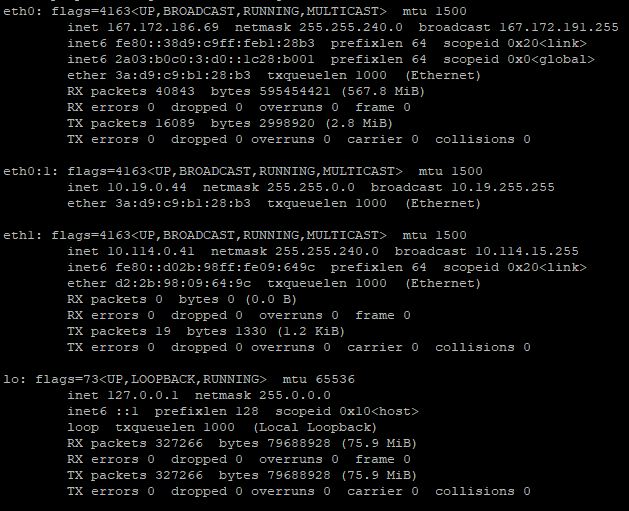
If you’re a current U8 user you can check if your system is affected as follows:
Log into your Debian machine and run ifconfig, as per the example shown above. Following the example in the screenshot provided you will see the eth0 public interface and 2 local interfaces. During installation the public interface was selected.
If your setup is similar to the above then it’s likely your system will run into the issue below. Read on for more details.
Phone reprovisioning / provisioning link issue
If you update the system and provision phones as local to your system - using IP interface addresses instead of the FQDN interface - the phones will still be functional. If however you made changes to the users extension after the system update, then the provisioning url has been changed to the FQDN interface only. This means the phones will have stopped communicating with the PBX.
Provisioning of Local Phones
Provisioning of local phones in this installation mode was also affected after the update. To clarify: If you provisioned a phone as local - using your FQDN as the interface - the provisioning link in Extension settings >> Phone provisioning would have been generated using the Public IP http:://PUBLICIP and not the FQDN of the system.
In this scenario, following the hotfix the provisioning link will be correctly generated using the FQDN of the system - and not the Public IP - which can be used to provision your local phones successfully.
To recap: if you’re affected by this issue, you can update to the Hotfix, then you can take the correctly generated FQDN link from the provisioning tab and provision your phones.
If you made changes to users extensions after the system update and your phones have stopped communicating with the PBX we recommend the following:
Updating to U8 A Hotfix
Current V18 Update 8 users running Build 912 who need to update to the U8 A Hotfix can follow these steps:
- Login and select the update “U8 A Hotfix - Build 917”
- After the update is completed re-login back again
- Find the affected user’s extension
- Edit the extension by going to the phone provisioning tab
- Select from the Interface dropdown an interface your phone can use to reach the PBX
- Factory reset the phone and provision it again.
View the complete changelog here.
Best practice guidelines & recommendations
Please note that whilst investigating customer setups we’ve also found a number of issues. We’re listing here our best practice guidelines and recommendations to help you avoid further issues going forward:
- On-premise installations without a Firewall in front are not recommended. This is particularly important to address as we’ll be moving to Split DNS in the near future.
- Some users have attempted to configure their installations as Split DNS but have not completed all associated network requirements. As mentioned, Split DNS will soon be a requirement so to function it must be done correctly. For users that will be updating their systems, we’ve reinstated the option to have all interfaces shown in the dropdown for provisioning a Phone. This is to provide you with extra time to configure your system for Split DNS properly. Follow these guidelines on creating FQDN with split DNS.
- Custom Templates and modifications to Custom Parameters are not recommended.
- If you are out of disk space you should enable the quota for recording and vmails. Users should start using archiving methods for backups and recordings to remote locations.
- Machines should be appropriately spec’d and in compliance with our hardware and spec recommendations.
- Stun Provisioning: we’ve seen multiple phones being provisioned in this way. For communication with the 3CX Phone System you MUST use either SBC or router phones. In v20 provisioning ip-phones with method stun will be removed.
Join Us at U8 Webinars
Our free 3CX webinars scheduled from tomorrow have been postponed. New dates will be announced shortly.
Stay Informed
Let’s discuss further in the Forum. Hit the follow button on Twitter and LinkedIn for blog updates.









 Copyright © 2026