Missing the SMS tab in my SIP Trunk settings

Status
Not open for further replies.

MARLEY JAFFE

Customer
Joined
Oct 20, 2018
Messages
44
Reaction score
3
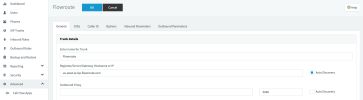
I am attempting to enable SMS on existing DID's as described here. We have enterprise license on v18.0 (Build 965). When navigating to the existing SIP Trunk or creating a new SIP Trunk, I dont see the SMS tab to enable SMS and create/view webhook details. Screen Shot 2022-09-07 at 11.13.15 PM.png
 
Last edited:
The above linked documentation doesn't mention what version I need to be running for the SMS tab to be there. I think im still on a prior version. Once logged in with an admin account I found the Messaging tab on the left navigation bar.
 
If you are going to use SMS you need to use a preferred vendor and be on v18 update 5
 
Hi!

Related to this topic, I had SMS configured for multiple DIDs since long. When I added a new DID yesterday, there was no SMS tab and thus I cannot configure anything. It appears something changed as this used to work.

I'm on v18 update 4 (build 965). When I try to update it says my system is up2date, and when I look at update details, I see this, which doesn't seem like a recommended option :

Screen Shot 2022-09-09 at 12.47.54 PM.png

Any recommendations ?
 
Update 5 is a Beta release (beta 2) for testing purposes and is not recommended for production use. The update you see is for the Beta version; if updated to it, there will be another update to beta 2.
 
  • Like
Reactions: IrinaP_3CX
Update 5 is a Beta release (beta 2) for testing purposes and is not recommended for production use. The update you see is for the Beta version; if updated to it, there will be another update to beta 2.
OK. So how do I get SMS functionality back ?. Can I downgrade back to a version where it worked ?. This was all OK before and now it suddenly doesn't work anymore. Also the Twilio "Send SMS via" drop down list doesn't show any of the new numbers, but only old ones generated in the past.
 
Hi @dataradical

If you on update 4 SMS should still be available under the "Messaging" tab on the left side. We did not remove any functionality.
What license type are you using however? You need to be on PRO or ENT for the options to be available.
Try to refresh your license details to see if that helps.
 
  • Like
Reactions: Evolute IT
Hi @dataradical

If you on update 4 SMS should still be available under the "Messaging" tab on the left side. We did not remove any functionality.
What license type are you using however? You need to be on PRO or ENT for the options to be available.
Try to refresh your license details to see if that helps.
Hi!

I'm on PRO, but do not see any messaging tab on the left. I did try to refresh the license details, but it did not resolve the issue.
The license says it's active and SMS still works for existing numbers I created in the past.
 
With update 4, ensure you have logged in to the management console with the System admin account and not a user (extension) with admin rights.
 
That was it. I was logged in with an extension. Thanks
 
Hello,
I have the same problem with my 3CX system 18.0 Update 5 (Build 418), PRO license: I cannot see the options for SMS in the SIP trunk configuration. I login to the management console with the admin account.
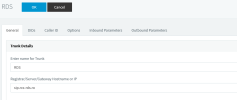
Can somebody clarify if this option is present only for the SIP trunks supporting SMS communication (selecting one of the providers available for SMS), or for any SIP trunk configuration? Curently, I have a SIP trunk defined for a provider from Romania, that is not in the list of SIP providers presented by 3CX and is possible to not provide SMS service.SIP RDS.png
 
Hello,
I have the same problem with my 3CX system 18.0 Update 5 (Build 418), PRO license: I cannot see the options for SMS in the SIP trunk configuration. I login to the management console with the admin account.
Can somebody clarify if this option is present only for the SIP trunks supporting SMS communication (selecting one of the providers available for SMS), or for any SIP trunk configuration? Curently, I have a SIP trunk defined for a provider from Romania, that is not in the list of SIP providers presented by 3CX and is possible to not provide SMS service.View attachment 33410
The SMS tab only appears for trunks with SMS support from 3CX. Those include Twilio, Telnyx, VoxTelesys, and Flowroute.
 
Very clear and helpfull! Thank you!
I dare another question: can I find documentation/support to configure a SIP trunk for SMS messages to integrate in 3CX (with technical help from a SMS service provider in Romania - smslink.ro)?
 
Very clear and helpfull! Thank you!
I dare another question: can I find documentation/support to configure a SIP trunk for SMS messages to integrate in 3CX (with technical help from a SMS service provider in Romania - smslink.ro)?
You provider can contact 3CX Interop team and see if they can get it certified for it. I am unsure if there is any public documentation for this.
 
Thank you again!
Can I have an email address to contact them?
 
Another question, please:
The SMS provider smslink.ro is interested in being certified by 3CX to offer only SMS service (no voice service). The approach we are considering is to build a dummy SIP trunk (no voice channel) for two-way SMS communication only.
Is the 3CX Interop Team interested in integrating SMS providers into the platform via any kind of API, without voice capability?
Thanks!
 
  • Like
Reactions: IrinaP_3CX
Thank you!
 
  • Like
Reactions: Charles_3CX
Ok. Thank you!
 
Status
Not open for further replies.

Latest Posts

Forum statistics

Threads
111,973
Messages
590,074
Members
164,895
Latest member
jasonkkrause