


- Joined
- Jul 3, 2017
- Messages
- 8
- Reaction score
- 0
I'm trying to integrate with a 3CX system from within our .NET Windows based software application.
I have installed and configured the TAPI drivers as per the instructions here https://www.3cx.com/docs/installing-multi-line-tapi/
In control panel, phone and modem section I can see the drivers are installed.
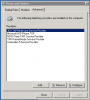
As per the instructions in link above, I've ensured the user 1 in the configuration file is the extension (235) configured in the 3CX client.
To confirm the configuration is correct, I've tried to use the Windows built-in dialer program to make a call. The dialer can see the different lines I've configured in the config file, as shown below.
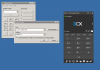
However, when I try to make a call I receive the error below;
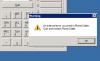
A posting on this forum indicates this could be a result of a missing configuration attribute https://www.3cx.com/community/threads/error-with-3cx-tapi-driver-windows-dialer-exe.44948/
I've added in the missing attribute but no joy.
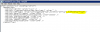
Any ideas to what this could be ?
I don't think my client is using a Pro license, but will check. Could that make a difference?
Thanks for any help.
I have installed and configured the TAPI drivers as per the instructions here https://www.3cx.com/docs/installing-multi-line-tapi/
In control panel, phone and modem section I can see the drivers are installed.
As per the instructions in link above, I've ensured the user 1 in the configuration file is the extension (235) configured in the 3CX client.
To confirm the configuration is correct, I've tried to use the Windows built-in dialer program to make a call. The dialer can see the different lines I've configured in the config file, as shown below.
However, when I try to make a call I receive the error below;
A posting on this forum indicates this could be a result of a missing configuration attribute https://www.3cx.com/community/threads/error-with-3cx-tapi-driver-windows-dialer-exe.44948/
I've added in the missing attribute but no joy.
Any ideas to what this could be ?
I don't think my client is using a Pro license, but will check. Could that make a difference?
Thanks for any help.


