No RTP - DECT W60B

Status
Not open for further replies.

james_tech

Silver Partner
Joined
Jun 7, 2022
Messages
37
Reaction score
2
Hi there,

I have had reports of no speech/dial tone for a list of extensions that are all registered against all DECT devices, Initially there were some Firewall issues and the Firewall checker was failing. I have now got the checker passing all the rules, as well as all DECT Base 1 and Base 3 working (Base 3 is behind an SBC), and also had DECT base 2 working until today (was working for around a day).

However, Base 2 (Far Office) now has no speech and when I dial any of those extensions I cannot hear the ring noise and when they try and call out they get the same. I can see no RTP passing through the Firewall when I do a call to the phone, but when they do a call to the remote end I can see RTP packets.


Firewall - WatchGuard

Host - HyperV VM hosted (remote)

Local Firewall Logs: - only shows base 2 log when making a call from DECT, not showing when calling DECT from Remote Source

Outgoing-Call-Firewall-Log.png
PBX Firewall Rule:
Firewall-Config-Remote.png
Local Firewall Rules:
Firewall-Config-Local.png

Phones provision via STUN

Latest updates applied

Hope this helps! If anyone could help that would be great thanks
 
FYI I am ringing a test DID just to one of the extensions on the DECT
 
Ok then your call flow should be fine. I guess this leaves the firewall (and possibly your ISP modem) messing about with the SIP traffic.

Would it be possible to temporarily install an SBC, then reset and reprovision the base as SBC, and see if the problem stops?

You could compare the base+SBC capture to your current base+STUN capture afterwards and that should shed some light
 
Ok then your call flow should be fine. I guess this leaves the firewall (and possibly your ISP modem) messing about with the SIP traffic.

Would it be possible to temporarily install an SBC, then reset and reprovision the base as SBC, and see if the problem stops?

You could compare the base+SBC capture to your current base+STUN capture afterwards and that should shed some light
If it was the Firewall/Modem would it not affect both DECTs, and not just the one?

I'll see if that is possible but the customer is quite a distance, so would rather get this working :/

Have you spotted anything in the logs I sent on the support ticket? - 833353
 
If it was the Firewall/Modem would it not affect both DECTs, and not just the one?
Nope, it's typical to see cases where you can have multiple STUN phones and some work while others don't so it's still quite possible that it could be the root of the issue.

Have you spotted anything in the logs I sent on the support ticket? - 833353
I don't have access to that department's tickets, but best to let them handle it since you already raised the case with them. They will be able to look through what you sent in and inform you of their findings.


If you do get the chance to test SBC (even if installed temporarily on a Windows PC at the customer's site) give it a go so you can get a comparison. If the firewall/modem combo is messing with the traffic somehow, you can be practically assured that the SBC will be able to bypass it and deliver the calls successfully.
 
Nope, it's typical to see cases where you can have multiple STUN phones and some work while others don't so it's still quite possible that it could be the root of the issue.


I don't have access to that department's tickets, but best to let them handle it since you already raised the case with them. They will be able to look through what you sent in and inform you of their findings.


If you do get the chance to test SBC (even if installed temporarily on a Windows PC at the customer's site) give it a go so you can get a comparison. If the firewall/modem combo is messing with the traffic somehow, you can be practically assured that the SBC will be able to bypass it and deliver the calls successfully.
Thanks - I am going to test using SBC, just flashing one now.

I've just been informed that internal calls are not working via STUN either, from this DECT to any device on the PBX. Would this still be going over the Firewall, etc?
 
Yes, everything needs to pass via the firewall and ISP modem whether internal or external calls because the base needs to contact the PBX to initiate or receive the call.
 
Thanks for confirming. I'm still awaiting to hear back from support
 
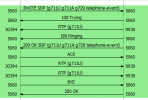
I have done another test call and have noticed that under the Active Calls is shows the from number, but the to number is the same as the from number?? but after 20 seconds it goes to the correct extension (but the VM). I did a PCAP and saw that the destination number (same as caller ID - my mobile) was ringing:
1655735927565.png
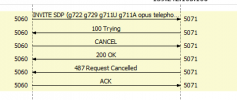
but the extension showed this:

1655735957333.png

this is very odd, any ideas?
 
Status
Not open for further replies.

Forum statistics

Threads
111,973
Messages
590,078
Members
164,896
Latest member
sameage