Solved No terminal in 3CX dashboard

Status
Not open for further replies.

Mr. Blue

Customer
Joined
Apr 22, 2021
Messages
5
Reaction score
1
Hello,

I have a pretty specific problem, I hope somebody would be able to help me out.

I have two almost identical 3CX installations.
  • Both are 3CX version 16.0.8.9
  • Both are running on Debian 9.9 Stretch
One installation shows the terminal button in the 3CX dashboard, the other doesn't.
The button used to be there on both installation. But on one of the installation it disappeared.
How can i get this button back?

Any tips about possible settings i should check would be very helpful!
Thanks in advance!

For clarification, the is the terminal button I'm talking about:
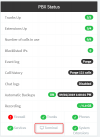
1567684918473.png
 
Where are you hosted?
 
The fact is that, the option will not be there if:

a) This is a 3CX Hosted Instance (Linux)
b) It is a Windows machine

That said, if this is a Linux machine that is not Hosted with 3CX, you should have the "Terminal" option.
 
  • Like
Reactions: Evolute IT
The fact is that, the option will not be there if:

a) This is a 3CX Hosted Instance (Linux)
b) It is a Windows machine

That said, if this is a Linux machine that is not Hosted with 3CX, you should have the "Terminal" option.
Thanks for your answer.
What exactly do you mean with a 3CX Hosted Instance?

I have installed 3CX using the 3cx debian ISO installation (the same for both installation).
They are both hosted in proxmox.
 
By 3CX Hosted I mean using 3CX as the Hosting provider.

Please try, accessing the Management Console of the PBX that does not have the "Terminal" option. Navigate to "Dashboard >> Activity Log >> Logs", what folders can you see here?
 
By 3CX Hosted I mean using 3CX as the Hosting provider.

Please try, accessing the Management Console of the PBX that does not have the "Terminal" option. Navigate to "Dashboard >> Activity Log >> Logs", what folders can you see here?
I have the folders Global, Instance and Linux Syslog.

On the other PBX (with the "Terminal" option) there are the same folders.
 
Is there any chance you are not logging in with the main administrator account and are instead logging in with an extension with administrator rights?
 
  • Like
Reactions: Mr. Blue
Is there any chance you are not logging in with the main administrator account and are instead logging in with an extension with administrator rights?
Thanks a lot!
That was indeed the problem. I logged in with the true admin account and now the button is there.
 
  • Like
Reactions: ChrisC_3CX
Glad to hear this is now resolved! Feel free to post a new thread should you require additional assistance or information.
 
  • Like
Reactions: Mr. Blue
Status
Not open for further replies.

Forum statistics

Threads
111,974
Messages
590,081
Members
164,899
Latest member
mazet