Outside of Office Hours - Call Routing to User's Mobile / Cell

Status
Not open for further replies.

lthibx

SOHO User
Basic Certified
Joined
May 18, 2023
Messages
19
Reaction score
6
Recently deployed 3CX system in client's office. Had discussion on how they want to handle call routing for outside of Office Hours. With old phone system they forward all lines to a user's mobile / cell Info from my client is provided below:
Office hours Monday thru Friday 7:00 AM to 5:00PM
Saturday 7:00 AM to 11:30AM
Sunday Closed
Person on call starts shift on Friday evening @ 5:00PM
Stays on call till the next Thursday morning. @ 7:00AM
We do forward the calls to man on call every weekday @ 5:00 PM

User1 week one
User2 week two
User3 week three
User1 week four
Repeat

We are always mixing up this schedule if someone has an issue with the date.

We would probably prefer to call forward on a manual regular basis as we have been doing rather than automatic.
Emphasis on the last two statements...they would rather do the forwarding manually at the end of the day and disable at beginning of next day. And though they have a schedule, it can change based on personal situation. So they really are not going to use Office Hours...they will handle it and the forwarding manually, and to a different number each week (on-call persons cell number).

The current setup is Office Hours (3 DIDs)...Queue...All phones ring, with most out of box default settings as to what happens in and out of Office Hours.
Doing some research and looking into Call Flow Designer.
What is best way to handle routing to the person that is on-call for that week?

Much appreciated
Lonnie
 
You have a number of options:

  • Route calls to a dummy extension and then have that extension forward calls to the appropriate person based on the presence set on the dummy extension

  • Give the user access to the 3CX console and have them manually change the routing

  • Create a Call Flow Designer that routes based on a configuration file / database lookup

  • Take a look at our 3CX On Call Manager tool.
 
Recently deployed 3CX system in client's office. Had discussion on how they want to handle call routing for outside of Office Hours. With old phone system they forward all lines to a user's mobile / cell Info from my client is provided below:
Another option is to set up an extension on everyone's mobile app, and each week have only the on call person select/activate it. Easier to use if they don't use the mobile app for their own extension. (people not on call "un-check" the extension so have no extension active on their app). Then after hours the call is routed to that extension. IOW they change who is using that extension not where it is forwarding.
 
  • Like
Reactions: EmmettsIT
There are various approaches to fulfill your requirements effectively.
One simple way would be to:
  1. Forward the queue calls to the receptionist extension
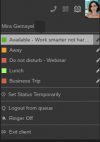
  2. Choose a specific status to be used when out of office hours (buisness trip - shift)
  3. Create the forwarding rules for the receptionist extension for that particular status
  4. When out of office hour, the receptionist must switch their extension to that status and just amend the phone number the calls should be routed to
In your queue settings ensure that the calls are routed to that specific extension if no answer
1686640557105.png
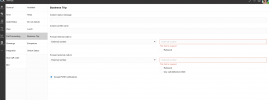
Then create your forwarding rule for the status you have choosen for when out of office hours
1686640704290.png
and then the receptionist just needs to set change their status and the phone number in the forwarding rules
1686640890629.png
 
Hi Everyone,
Been sporadically working this off and on with some attention to other non-related tasks. Thanks for your feedback. It provided me with some info to come up with the solution below.

This is what I have done to this point:
  • Created a dummy extension (921), set that extension to always forward calls to its own mobile number.
  • Created a CFD (coded to extension 920).
  • MainMenu prompting (Specified actual user names for Userx below)
    • 1 = "On Call User1"
    • 2 = "On Call User2"
    • 3 = "On Call User3"
  • Using the SetDNProperty component, based on the user selected, I set the "MobileNumber" property of extension 921 to the cell number of the user selected from the prompt. (specified as 10 digit number).
  • Set up a BLF DSS key named "Set On-Call" for the primary users phone (Custom Dial)
  • User can press that key which calls extension 920 (CFD). Extension 921 is then set to the selected user's cell number (I can see that change for 921 in the MC as it happens).

    The above process works flawlessly. That is part one of the On-Call scenario.

Part 2:
I have set the Office Hours (related to the Group, which is not DEFAULT, BTW) to dial extension 921 when Out of Office Hours. For testing I set the system to Out of Office by clearing the time for today.

Problem...
When I was at the clients office and I tried it, the mobile would get dialed, but I would get a Verizon message stating the number dialed was invalid or could not be reached. Dialing from outside of my clients network (my own office), I get two short dial beeps, and then it immediately hangs up. I even set their 921 ext to dial my mobile number (of course I am not making the call from my mobile at that point). Same result

I did a similar set up on my own instance, setting 921 to my mobile number (also on Verizon), and dial in from another number and it works flawlessly. My mobile always rings.

Additional problem...
Also on my client's instance there is one other issue not related to this On-Call thing. When in Office Hours, for an incoming call, the caller hears one short ring and then silence until someone in the office answers the call. I have yet to find the cause of this issue. Wondering it is also having an affect on the On-call forwarding (two short beeps). For my 3CX instance, the caller hears normal ringing until answered.

If I can get these two issues resolved...the system will be ready to go for my client.

Thanks
Lonnie
 
Additional feedback.
I resolved the On-Call issue where it was failing when ringing the mobile.
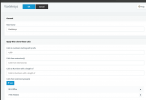
Determined that the Outbound rule for Voxtelesys had the main group specified (BLS-Office). That group does not have extension 921 as a member (and should not). 921 is in the DEFAULT and iTNS-Hidden groups. I added iTNS-Hidden to the Outbound Rule and now during Out of Office Hours, the specified mobile will ring. RESOLVED :)
1686943029316.png
Working with Voxtelesys now on the issue where a normal in-hours incoming call, the caller only hears two short rings, then slience, but the phones are ringing in the office. Will reply back when that is resolved.

I will have only one additional issue remaining. The client wants the ability to control Office Hours. For example normal Office Hours is 7AM to 5PM, but he might be in the office during Out of Office time. Want to be able to turn off Out of Office manually. I know there is some dial codes that can do this...I believe that support has to enable them? Also docs refer to controlling DEFAULT Office Hours with those codes. Will the groups Office Hours (BLS-Office) not be controlled?

Lonnie
 
  • Like
Reactions: Nathan@Voxtelesys
Status
Not open for further replies.

Forum statistics

Threads
111,974
Messages
590,081
Members
164,899
Latest member
mazet