Phone server and phones wrong time

Status
Not open for further replies.

jason-manning

Customer
Joined
Jan 9, 2023
Messages
6
Reaction score
0
Hello,
My Hosted server is set to -6 US Central Time. But, our phones ring outside of our allotted times for the week. For example, 8:00 AM is when we start and the schedule is set to go to our main digital receptionist. Though if someone calls at say 7:00 AM the call goes through and not to our after-hours recording that is set.

It is currently 8:47 AM and the phones show the time is: 17:26. This is very confusing. We have restarted all the phones with no update. The phones we are using are:
Fanvil X4
Fanvil XU

At one point when we started our system, the phones all said the correct time, and the Call windows were correct. Since this is a hosted system we do not seem to have control over the servers time.
@3CX support. How can we correct this?

-Jason
 
Also, the phones show that the date is Aug 11 and not JULY 7.
 
Hi there, kindly note that the phone times are taken from the 3CX System time as defined under the management console > Language & Office Hours Settings > Timezone setting or from under the individual extensions settings phone provisioning tab that the Ip phones are provisioned to.

Additionally, the IP phones will request the time from a time server pool.ntp.org by default, as configured under each phone UI, and this you need to ensure that the network the phones are located can receive the reply from the time source using UDP port 123 and that this communication is allowed through your firewall.
 
Hi there, kindly note that the phone times are taken from the 3CX System time as defined under the management console > Language & Office Hours Settings > Timezone setting or from under the individual extensions settings phone provisioning tab that the Ip phones are provisioned to.

Additionally, the IP phones will request the time from a time server pool.ntp.org by default, as configured under each phone UI, and this you need to ensure that the network the phones are located can receive the reply from the time source using UDP port 123 and that this communication is allowed through your firewall.
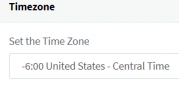
Charles, Thank you for your reply. The server is set to: management console > Language & Office Hours Settings > Timezone> 1688740016063.png
So I assume the server time in the Management Console is set correctly. With the correct time we still receive calls outside our Office Hours Rules.

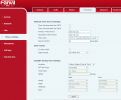
The IP Phones are using the 3cx provisioned firmware and configuration that the 3cx server created and pushed to the phones. I logged into my phone and saw this:
1688740155678.png

Though I see that the time server pool.ntp.org is set. But The checkboxes above are not checked. Do I need to go into each phone's web GUI and check one of the two boxes? Or should this be done by the 3cx server. And IF I make this change, will the revert back to this state then next time the phones get an update from 3CX?

Thank you again.
 
The option to sync time with DHCP or SNTP is not set by 3CX, as these options are specific to individual network options and configurations and are only used if you have the option to assign network time via your internal DHCP server or SNTP. Still, these have to be enabled manually on each IP phone. Generally, though these are not used by default, time settings are received from the time source pool.ntp.org.

As mentioned, please ensure the phones have a good DNS server to resolve the FQDN pool.ntp.org and that communication for UDP port 123 is available through your local firewall/router and replies can reach the IP phones.

With the above configuration, the phones will try to resolve the NTP server address via their configured DNS server. If a reply to the query is received, they will send a request to the returned IP address for pool.ntp.org, and a reply will be received with the time settings. This process does not involve the 3CX system to ensure this communication is possible. We only assign the time source and the time zone.
 
Last edited:
  • Like
Reactions: JohnS_3CX
Status
Not open for further replies.

Forum statistics

Threads
111,974
Messages
590,081
Members
164,899
Latest member
mazet