- Joined
- Mar 27, 2019
- Messages
- 50
- Reaction score
- 7
Hi,
I would like to find out how to go about creating a custom XML containing the Contacts entered in the 3CX Company phonebook.
The Reason for this is that a few of our customers would like to access Contacts on the Gigaset handsets which are connected to the N670 DECT Base Station. 3CX newly supports this. An XML is generated which the Gigaset Basestation accesses after an auto-provisioning setup. However we have multiple problems with this XML:
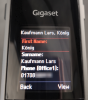
1. A few of our customers have contacts saved with special characters (ä, ü, ö, ß, ...) The Gigaset Handsets cannot display them. My solution would be to change these characters into standard characters which the Handset can display. Currently the name is simply cut off at a special character.
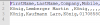
2. The more criticalproblem is that the XML stores the contacts incorrectly. As an example, a Contact that has a mobile number and a business number in the 3CX Phonebook shows up with the mobile number as the "office1" number in the XML. The business number isn't even stored in the XML. Even though the XML formatting allows for up to two mobile, home and office numbers.
The fact that all numbers except the mobile number are lost in the creation of the XML is a big problem for most our customers.
If anyone has a suggestion for better managing contacts across devices, then i would be interested in hearing those suggestions also.
I hope everyone is pulling through the current global situation. Thanks for your help and stay healthy
I would like to find out how to go about creating a custom XML containing the Contacts entered in the 3CX Company phonebook.
The Reason for this is that a few of our customers would like to access Contacts on the Gigaset handsets which are connected to the N670 DECT Base Station. 3CX newly supports this. An XML is generated which the Gigaset Basestation accesses after an auto-provisioning setup. However we have multiple problems with this XML:
1. A few of our customers have contacts saved with special characters (ä, ü, ö, ß, ...) The Gigaset Handsets cannot display them. My solution would be to change these characters into standard characters which the Handset can display. Currently the name is simply cut off at a special character.
2. The more criticalproblem is that the XML stores the contacts incorrectly. As an example, a Contact that has a mobile number and a business number in the 3CX Phonebook shows up with the mobile number as the "office1" number in the XML. The business number isn't even stored in the XML. Even though the XML formatting allows for up to two mobile, home and office numbers.
The fact that all numbers except the mobile number are lost in the creation of the XML is a big problem for most our customers.
If anyone has a suggestion for better managing contacts across devices, then i would be interested in hearing those suggestions also.
I hope everyone is pulling through the current global situation. Thanks for your help and stay healthy