Solved Presence info on bridged sites not working after update to 18.0 (Build 906)

Status
Not open for further replies.

NeoConsultants

Silver Partner
Advanced Certified
Joined
Jan 13, 2022
Messages
7
Reaction score
2
This afternoon I updated 5 bridged sites for a client from Update 6 FINAL, Build 18.0.6.908 February 2023 to Update 8 RC, Build 18.0.8.906 July 2023.

After the update none of the sites are showing presence info for remote extensions in any of the 3CX apps. (Local extensions can see each other correctly).

All bridged sites are active (showing the green light) and I can manually dial extensions between sites. Each Group has Publish group information to all extensions ticked under Group Rights.

I tried removing and re-configuring the bridge between one of the sites, but presence info still didn't show for either site.

Any suggestions? Perhaps there is a new setting I may have missed?

Thanks for your help.
 
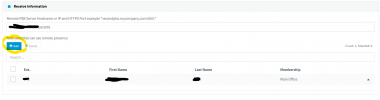
When using a bridge, add users, otherwise none will show.

Screenshot 2023-07-30 062628.png
 
This afternoon I updated 5 bridged sites for a client from Update 6 FINAL, Build 18.0.6.908 February 2023 to Update 8 RC, Build 18.0.8.906 July 2023.

After the update none of the sites are showing presence info for remote extensions in any of the 3CX apps. (Local extensions can see each other correctly).

All bridged sites are active (showing the green light) and I can manually dial extensions between sites. Each Group has Publish group information to all extensions ticked under Group Rights.

I tried removing and re-configuring the bridge between one of the sites, but presence info still didn't show for either site.

Any suggestions? Perhaps there is a new setting I may have missed?

Thanks for your help.
Just an update...

We have a 6th site still on Update 6 FINAL, Build 18.0.6.908 and they can still see presence status of the other remote sites.

Perhaps this is an issue with Update 8 RC, Build 18.0.8.906 July 2023...
 
@NeoConsultants Use just 2 machines in your test to keep things simple.

For those two machines to be tested, please tell us:

- Do they have an IPv6 address showing in the management console?
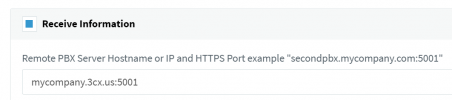
- When setting the bridge presence URL, is it FQDN+port? ie. "mypbx.3cx.com:5001"
- Are those machines using our 3CX FQDN + certs or are they custom?
 
@NeoConsultants Use just 2 machines in your test to keep things simple.

For those two machines to be tested, please tell us:

- Do they have an IPv6 address showing in the management console?
- When setting the bridge presence URL, is it FQDN+port? ie. "mypbx.3cx.com:5001"
- Are those machines using our 3CX FQDN + certs or are they custom?

- The IPv6 address is None in the management console.
- The bridge presence URL is IP address+port (5001) for one location only. The rest are IP address only, as they use port 443, so not explicity entered.
- All machines use 3CX FQDN + certs. All machines are on a private WAN network and were working correctly prior to updates.
 
I tried changing to mycompany.3cx.com.au:443 and it reverted back to mycompany.3cx.com.au. Unfortunately, I still can't see presence.
 
@NeoConsultants presence information is sent via https, it is important that the HTTPS port is open publicly on the firewall in front of each pbx, also check that no proxy https or ssl inspection is being used.

Both pbx must be running the same version and validate that both bridges have enabled the parameter Remote PBX uses Tunnel Connection.

Validate on the blacklist that the IPs are not blocked and that both systems have a valid SSL certificate, you can check that using this link

I would also suggest disabling the parameter Automatically Bind to IPv6 Adapters and give it a try.

Also you can try for example on site A provisioning an extension from system B and vice versa so you can check with the mobile app if you have the presence information of each system or not.
 
@NeoConsultants presence information is sent via https, it is important that the HTTPS port is open publicly on the firewall in front of each pbx, also check that no proxy https or ssl inspection is being used.

Both pbx must be running the same version and validate that both bridges have enabled the parameter Remote PBX uses Tunnel Connection.

Validate on the blacklist that the IPs are not blocked and that both systems have a valid SSL certificate, you can check that using this link

I would also suggest disabling the parameter Automatically Bind to IPv6 Adapters and give it a try.

Also you can try for example on site A provisioning an extension from system B and vice versa so you can check with the mobile app if you have the presence information of each system or not.

All 3CX machines are on the same private WAN and can see each other. I.e. we can still transfer calls between each site. The HTTPS port is also open on the firewall, but none of the machines communicate with each other through our main firewall.

All of the 3CX machines are running exactly the same version/update, etc and have Remote PBX uses Tunnel Connection enabled.

The 3CX machines are on 192.168.x.x network and white listed. All systems are using 3CX certificates.

Automatically Bind to IPv6 Adapters is currently ticked. I'll try changing it later.

Presence information hasn't worked on the mobile apps since we updated.

Please note, everything was working prior to the update and no configuration changes have been made.
 
Can you run firewall tests on both sites?
 
As directed by @JohnS_3CX, we added FQDNs / IP addresses in the hosts file on each device.

In the SIP Trunks -> Presence tab, we changed the Remote PBX Server from IP to FQDN on each device / SIP trunk.

Presence / Status info is working again now.
 
  • Like
Reactions: jed and JohnS_3CX
This came down to the fact that presence was shared over IP instead of FQDN.

As part of out security upgrades this is something that has changed, and when using an IP the TLS check won't pass.

This is why older versions will accept an IP in the field but Update 8 requires the FQDN.

In V20 we will also update the wording on the config page to reflect this.
 
Status
Not open for further replies.

Forum statistics

Threads
111,974
Messages
590,081
Members
164,899
Latest member
mazet