


- Joined
- Jan 10, 2017
- Messages
- 19
- Reaction score
- 1
Hello,
How can I get some of the phones to load a custom template we have? Whenever we attempt to add new Yealink phones, and select the custom template we have created, it continues to load the default and won't pull the custom one we have created.
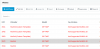
Shown in the screenshot, are a few of the older phones that were provisioned a while ago hold the custom template and they work as intended, but the two new phones wont.
Our 3CX version is 15.5.3849.1
Suggestions?
Thanks,
How can I get some of the phones to load a custom template we have? Whenever we attempt to add new Yealink phones, and select the custom template we have created, it continues to load the default and won't pull the custom one we have created.
Shown in the screenshot, are a few of the older phones that were provisioned a while ago hold the custom template and they work as intended, but the two new phones wont.
Our 3CX version is 15.5.3849.1
Suggestions?
Thanks,
Attachments
Last edited:


