Recordings: Disabled Max quote exceeded

Status
Not open for further replies.

Alldayrr

Customer
Joined
Nov 22, 2017
Messages
32
Reaction score
2
Hi all,
Is there a bug on new release? I got a recordings disabled max quota warning so I increased our storage, rebooted server and services and it’s still stuck at disabled. The 3CX system recognizes the increased storage. I even deleted all recordings and still see it disabled. Am I missing something?
 
Hi,

It takes a bit of time for the system to recheck after quota was reached, how long was it since you cleared space?

I think if you recheck now the issue must have cleared. Can you please confirm?
 
What I would do is, up the max quota and wait a short while.
 
I agree with all of the above, I just want to point one more thing out, if you have installed 3CX in the cloud in some hosting provider and you expand the Disk Size from the Hosting Provider's portal, a lot of the time you must also expand the partition from within the VM itself.

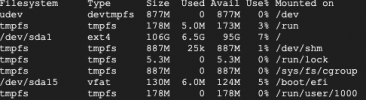
To double-check that your partition has in fact increased in size, log into your 3CX machine via SSH and run "df -h" and check that you partition has the expected size.
 
It's been 3 days and still did not update. I even checked that the partition did increase. I went from 10g to 100gb storage on google cloud. I even deleted all recordings so that alone should remove the disabled warning right? Is there a way to force check to update?
 
Restarting the 3CX services should also do the trick.
Could you do that and check again?
Also on the off chance that you have multiple partitions, the recording folder is set to the right partition, right?
 
You increased the storage, did you remember to increase the quota (you don't mention that in your post)?
 
Yes. I tried to restart services and rebooted server. My quota was set to 50gb and have zero recordings currently. I only have one partition.
Screen Shot 2021-10-07 at 9.32.16 AM.png

The only thing i could think of is we recently created a new instance and restored from backup. The original instance was 100gb but the new instance was at 10gb when we restored. The orginal had quota set at 50gb. So i increased the new instance to 100gb after we got the warning. Do you think 3CX got confused?
 
Since this is running on Linux, it would also be good to confirm that the Recordings folder has the correct rights.
1633676454757.png
 
Status
Not open for further replies.

Forum statistics

Threads
111,976
Messages
590,089
Members
164,904
Latest member
gdstratton