- Joined
- Jul 30, 2024
- Messages
- 4
- Reaction score
- 0
Hi everyone,
With the removal of Inbound Routing control in v20, I seem to be missing a step with how to reset the default call handling on DIDs after I delete an extension. After an extension is deleted, it appears that the DID goes into some middle-state between unused and assigned. The DID tab on the SIP trunk just shows blank. The problem is that when calls come in to DIDs in this state, they get a "call cannot be completed" error and then get dropped. I would expect that deleting an extension would return the DID to the pool and make it unused. With our unused DIDs, they default to the main IVR as we expect. I can't seem to figure out how to put a DID back into unassigned except for deleting it from the trunk and re-adding it, which is a stupid work around IMO. Removing the DID before deleting will probably work, but that's also one thing I would prefer not to need to remember. Have I stumbled upon a glitch? Any advice?
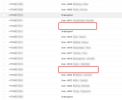
The screenshot shows the DID tab on my trunk, where some are "unassigned" because they've never been assigned (these go to the main IVR). The red boxes show DIDs that were attached to deleted extensions and have some sort of undefined state. We want these numbers to route to the default place (an IVR) without having to specifically attach them to it. This works for the unassigned ones. Thanks in advance for any thoughts.
Thanks,
Tim
With the removal of Inbound Routing control in v20, I seem to be missing a step with how to reset the default call handling on DIDs after I delete an extension. After an extension is deleted, it appears that the DID goes into some middle-state between unused and assigned. The DID tab on the SIP trunk just shows blank. The problem is that when calls come in to DIDs in this state, they get a "call cannot be completed" error and then get dropped. I would expect that deleting an extension would return the DID to the pool and make it unused. With our unused DIDs, they default to the main IVR as we expect. I can't seem to figure out how to put a DID back into unassigned except for deleting it from the trunk and re-adding it, which is a stupid work around IMO. Removing the DID before deleting will probably work, but that's also one thing I would prefer not to need to remember. Have I stumbled upon a glitch? Any advice?
The screenshot shows the DID tab on my trunk, where some are "unassigned" because they've never been assigned (these go to the main IVR). The red boxes show DIDs that were attached to deleted extensions and have some sort of undefined state. We want these numbers to route to the default place (an IVR) without having to specifically attach them to it. This works for the unassigned ones. Thanks in advance for any thoughts.
Thanks,
Tim